Participant
December 15, 2013
Answered

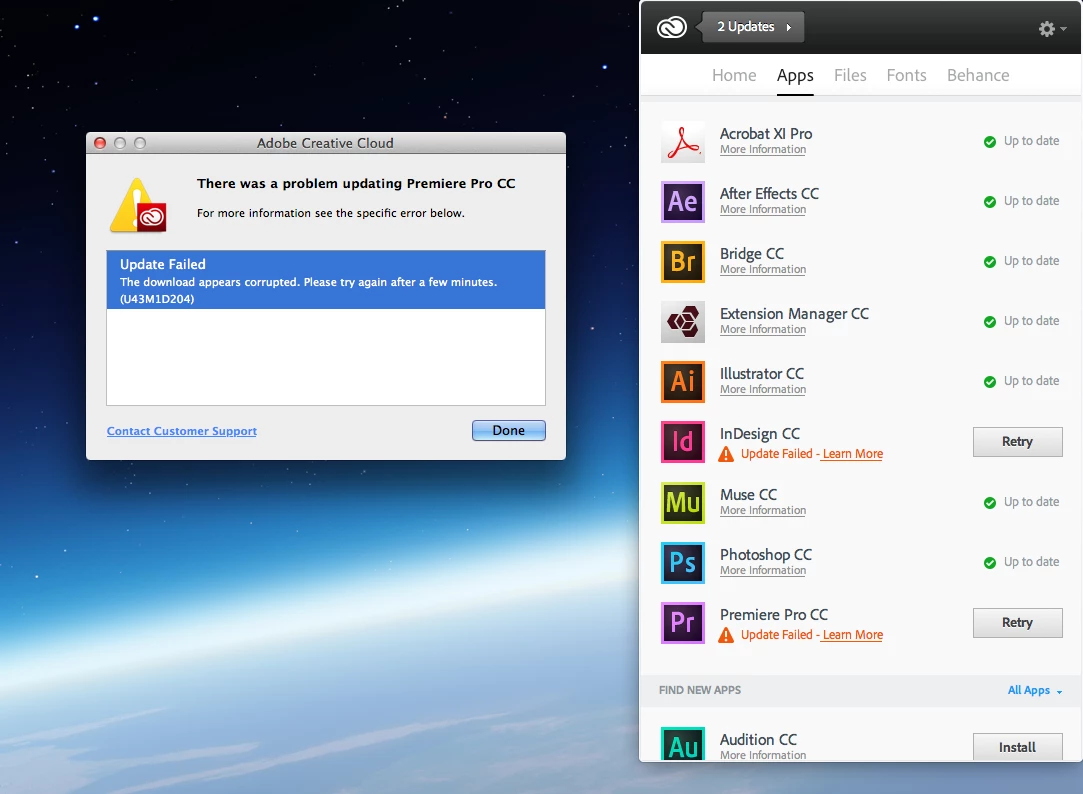
error code U43M1D207

  • December 15, 2013
  • 10 replies
  • 38739 views

I get a error code when trying to update ID & Premiere Pro cc corrupt file. When will this be fixed?

This topic has been closed for replies.
Correct answer ProDesignTools

Ezebediah67 wrote:

I've found a solution!!!

...

The file to be downloaded is http://swupdl.adobe.com/blahblahblah etc etc.

Copy the link and paste in Safari, download and manually install it.

Now close the AAC.

Relaunch it and redo the same thing for all the errors.

It worked for me!

...

Well, this may help make your life a little easier instead of going through all that...  We received many requests for these standalone patches – folks wanting to download the individual CC updates without the AAM or Creative Cloud Desktop app... 

So we put together two complete sets of downloads with all the current updates for all CC tools (and will be keeping it up-to-date going forward).  Here they are and hope they help someone:

All Adobe CC Updates: Direct Links for Windows

All Adobe CC Updates: Direct Links for Mac OS

10 replies

Participating Frequently
May 13, 2014

where exactey can i get this logs

Jeffrey_A_Wright
Community Manager
Community Manager
May 13, 2014

For Mac OS it is located at /Library/Logs/Adobe/Installers/.  Please see Troubleshoot with install logs | CS5, CS5.5, CS6 - http://helpx.adobe.com/creative-suite/kb/troubleshoot-install-logs-cs5-cs5.html for additional details on how to review the log files.

Participating Frequently
May 12, 2014

i ve tried all updates and it gives nothing

http://www.adobe.com/support/downloads/product.jsp?product=31&platform=Macintosh

btw i m using middle eastern 7.0 that wont update at all pls help

Jeffrey_A_Wright
Community Manager
Community Manager
May 12, 2014

Vaoussama when you get nothing does that mean you are unable to locate the installation log files for the update?  Or you found the logs and searched on the words ERROR and FATAL and got 0 results?

Participating Frequently
May 12, 2014

i ve done all and i have got this for now

Jeffrey_A_Wright
Community Manager
Community Manager
May 12, 2014

Excellent Vaoussama it appears progress is being made.  I would recommend reviewing the installation log for the InDesign 7.0.3 update to determine the remaining failure.  Please see Troubleshoot with install logs | CS5, CS5.5, CS6 - http://helpx.adobe.com/creative-suite/kb/troubleshoot-install-logs-cs5-cs5.html for information on how to locate and interpret your installation log files.  You are welcome to post any specific errors you discover to this discussion.

Participating Frequently
May 12, 2014

here you can find my other topic:

Re: INDESIGN CS5 craches

i have installed CS 5.5 and it s working, but only with evaluation.
now i m realy stuck with this problem.

Jeffrey_A_Wright
Community Manager
Community Manager
May 12, 2014

Vaoussama after reading the other topic I would still recommend and uninstall and reinstall.  If you receive any errors then you may also want to use the CC Cleaner Tool.  You can find more details at Use the CC Cleaner Tool to solve installation problems | CC, CS3-CS6 - http://helpx.adobe.com/creative-suite/kb/cs5-cleaner-tool-installation-problems.html.

Participating Frequently
May 12, 2014

Jeffrey_A_Wright
Community Manager
Community Manager
May 12, 2014

Thank you Vaoussama.  I am curious do you have any newer Adobe Creative software titles installed as well?

Please download the update directly from Adobe - InDesign : For Macintosh.  If you continue to experience difficulties then please run the available uninstallers located in the Applications/Utilities/Adobe Installers folder.  Once the uninstall is complete you should then be able to reinstall and apply the directly downloaded updates successfully.

Participating Frequently
May 9, 2014

I can post a screen later i m using cs5 indesign with ios 10.6.8

Participating Frequently
May 9, 2014

hi all i have the same probleme with Indesign CS5 but i can t find the appropriate patch file pls help

Jeffrey_A_Wright
Community Manager
Community Manager
May 9, 2014

Vaoussama can you please confirm you are receiving a U43M1D207 error with Creative Suite 5?  Can you please post a screen shot of the error as well?  Also which operating system are you using?

Participant
March 28, 2014

Had the same error with Flash CS6. Used the Ezebediah67 and worked perfectly... Thanks a lot!

On Windows I found the 'AdobeDownload' folder in the Temp directory (Start > Run > %temp%)

Participating Frequently
December 16, 2013

Same problem here... Please help us...

Participating Frequently
December 16, 2013

I've found a solution!!!

If you have an error U43M1D207 try to download an update from ACC (take note of hour and minutes).

In Mac OS, go to Username/library/Logs/AdobeDownload/DLM.log

You'll find at the end of the file (corresponding hour and minutes) a string like so:

The file to be downloaded is http://swupdl.adobe.com/blahblahblah etc etc.

Copy the link and paste in Safari, download and manually install it.

Now close the AAC.

Relaunch it and redo the same thing for all the errors.

It worked for me!

It's incredible Adobe don't find a solution and a simple user find a workaround... and post the solution instead of a link to the same useless discussions!

Sorry for my bad english!

Participant
January 15, 2014

Worked fine! Thanx Ezebediah67! InDesign CC is fixed!

Rajashree Bhattacharya
Community Manager
Community Manager
December 15, 2013

Hi Jazzeve69,

please refer to the following threads.

Please refer the threads:

http://forums.adobe.com/thread/1136626

http://forums.adobe.com/thread/1071473

http://forums.adobe.com/thread/912168

Regards,

Rajshree