

limakid2015
Inspiring
June 10, 2018
Answered

Fireworks CS5 and Adobe CC 2018

  • June 10, 2018
  • 4 replies
  • 5468 views

Hi,

I know that this sounds silly but I need install Fireworks CS5 (because CS6 is not available anymore at the Adobe site and because I have an original DVD of the CS5 Design Premium which includes the FW). I didn't import the respective projects to Photoshop for example, which could have been the solution at this time.

I read in the Adobe site how to install the CS5 from a DVD, is a page in spanish:

https://helpx.adobe.com/la/creative-suite/kb/install-creative-suite-5-cs5.html#main_Install_Adobe_Creative_Suite_5_or_CS5_5_from_a_desktop_installation_point

However, I wonder if... Is Adobe Fireworks able to live together with all the CC 2018 environment? Exist the danger to get a conflict between FW and CC2018? I scare if I delete something damage the system? Or is there any third party software or adobe plug in which allows me just to import original FW files (with layers, masks, fonts, paths, effects, and so on...) and export to the updated applications like photoshop, Illustrator, etc.?

Otherwise I have to redesign again everything. I want to emphasize that It's Not my intention to use Fireworks again (just because Adobe doesn't not support it anymore). I am using bootstrap and photoshop. I just want to rescue those old projects and save them with current valid applications.

I use Mac OS High Sierra 10.13.4 and Creative Cloud v. 4.5.0.331.

Thanks again for your patience.
This topic has been closed for replies.
Correct answer Nancy OShea

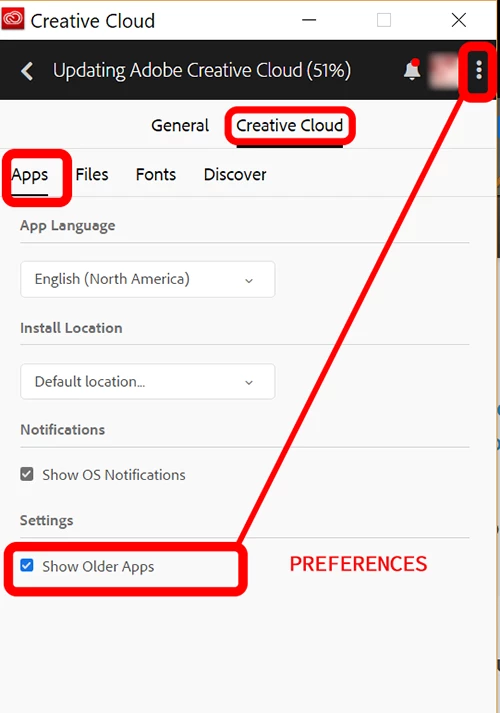
If you have a full Creative Cloud Plan, go into your CC Desktop App, change your preferences to Show Older Apps which will allow you to install Fireworks CS6 (the last version Adobe made).   See screenshot.

Fireworks is legacy software so you will need a supporting OS.

Fireworks Help | System requirements | Fireworks

4 replies

diegol119900
Participant
August 8, 2018

Thank you sooooo much! I was sick of reading long discussions in forums but none of them offered this simple, straightforward instruction!!

Nancy OShea
Community Expert
Nancy OSheaCommunity ExpertCorrect answer
Community Expert
June 10, 2018

If you have a full Creative Cloud Plan, go into your CC Desktop App, change your preferences to Show Older Apps which will allow you to install Fireworks CS6 (the last version Adobe made).   See screenshot.

Fireworks is legacy software so you will need a supporting OS.

Fireworks Help | System requirements | Fireworks

Nancy O'Shea— Product User & Community Expert
limakid2015
Inspiring
June 10, 2018

Thank U!!! I already did it. How I couldn't imagine that the options were available just right there! Now, I need just save them again within the fashion programs of today. Thanks Again!

Legend
June 10, 2018

I'd recommend an old Mac or VM to run such old software.

Mylenium
Legend
June 10, 2018

The programs should work just fine side by side. The more interesting question will be if you actually can get it installed on your version of OS X...

Mylenium