I tried to mre-install Flash Builder 4.6 on it's own from the original disk. This isntallation also failed. I found the error report this time. Here it is:
"Exit Code: 6
Please see specific errors and warnings below for troubleshooting. For example, ERROR: DF016, DW063 ... WARNING: DS013, DW066 ...
-------------------------------------- Summary --------------------------------------
- 0 fatal error(s), 19 error(s), 16 warning(s)
WARNING: DS013: Payload {7EABC54B-02C3-4DA1-9EB4-974CE7414066} AdobeHelp 3.4.0.0 is already installed and the session payload {D38116C8-C472-4BB0-AD6F-0C1DD1320D1D} AdobeHelp 4.0.0.0 has no upgrade/conflict relationship with it.
WARNING: DS013: Checking payloads upgrade/conflict relationships : Failed with code 1
WARNING: DW066: OS requirements not met for {9AB0EFC0-AC6B-11E0-9E61-00215AEA26C9} Microsoft Visual C++ 2005 Redistributable Package (x86) 6.0.2900.2180
WARNING: DW066: OS requirements not met for {08D2E121-7F6A-43EB-97FD-629B44903403} Microsoft_VC90_CRT_x86 1.0.0.0
WARNING: DW066: OS requirements not met for {9E0AF030-AC6B-11E0-8837-00215AEA26C9} Microsoft Visual C++ 2010 Redistributable Package (x86) 10.0.40219.1
WARNING: DW066: OS requirements not met for {9C4AA28F-AC6B-11E0-8997-00215AEA26C9} Microsoft Visual C++ 2008 Redistributable Package (x86) 9.0.30729.4148
WARNING: DW066: OS requirements not met for {8706963D-5F48-47CC-998B-DAB70B089DB8} Suite Shared Configuration CS6 3.0.0.0
WARNING: DW066: OS requirements not met for {B6D38690-755E-4F40-A35A-23F8BC2B86AC} Microsoft_VC90_MFCLOC_x86 1.0.0.0
WARNING: DW066: OS requirements not met for {635FED5B-2C6D-49BE-87E6-7A6FCD22BC5A} Microsoft_VC90_MFC_x86 1.0.0.0
WARNING: DW066: OS requirements not met for {152B1DA7-A342-4EAA-BD28-25DD7B74AB3C} Suite Shared Configuration CS5.5 2.5.0.0
WARNING: DW066: OS requirements not met for {D38116C8-C472-4BB0-AD6F-0C1DD1320D1D} AdobeHelp 4.0.0.0
WARNING: DW066: OS requirements not met for {046C2E05-C3C0-45AC-A6A3-D319F751E5CC} Adobe Player for Embedding 3.201 3.201.0.0
WARNING: DW066: OS requirements not met for {BD0D6363-E961-410F-8BF4-ECD8795F3923} AdobeCMaps CS5 3.0.0.0
WARNING: DW066: OS requirements not met for {6F3A624B-1B72-4081-96E8-23261F389C5C} AdobeTypeSupport CS5 10.0.0.0
WARNING: DW066: OS requirements not met for {E8AD3069-9EB7-4BA8-8BFE-83F4E69355C0} CS6 Master Collection 6.0.0.0
WARNING: DW066: OS requirements not met for {1BF6648E-DFC9-4371-98B6-F6AD9358DF4F} Adobe Flash Builder 4.6 4.6.1.0
----------- Payload: {1BF6648E-DFC9-4371-98B6-F6AD9358DF4F} Adobe Flash Builder 4.6 4.6.1.0 -----------
ERROR: DF016: Unable to create directory "C:\Users\Jon Mitchell\Adobe Flash Builder 4.6\.metadata". Error 3 The system cannot find the path specified.(Seq 14072)
ERROR: DW063: Command ARKCreateDirectoryV2Command failed.(Seq 14072)
ERROR: DF023: Unable to delete file copy at "C:\Program Files (x86)\Adobe\Adobe Flash Builder 4.6\eclipse\configuration\config.ini" Error 3 The system cannot find the path specified.(Seq 14069)
ERROR: DW063: Error rolling back command ARKMoveFileCommand(Seq 14069)
ERROR: DF037: Unable to delete directory "C:\Program Files (x86)\Adobe\Adobe Flash Builder 4.6\eclipse\configuration". Error 2 The system cannot find the file specified.(Seq 14069)
ERROR: DW063: Error rolling back command ARKCreateDirectoryCommand(Seq 14069)
ERROR: DF023: Unable to delete file copy at "C:\Program Files (x86)\Adobe\Adobe Flash Builder 4.6\AMT\application.xml" Error 3 The system cannot find the path specified.(Seq 14036)
ERROR: DW063: Error rolling back command ARKMoveFileCommand(Seq 14036)
ERROR: DF023: Unable to delete file copy at "C:\Program Files (x86)\Adobe\Adobe Flash Builder 4.6\AMT\application.sif" Error 3 The system cannot find the path specified.(Seq 14035)
ERROR: DW063: Error rolling back command ARKMoveFileCommand(Seq 14035)
ERROR: DF037: Unable to delete directory "C:\Program Files (x86)\Adobe\Adobe Flash Builder 4.6\AMT". Error 2 The system cannot find the file specified.(Seq 14035)
ERROR: DW063: Error rolling back command ARKCreateDirectoryCommand(Seq 14035)
ERROR: DF023: Unable to delete file copy at "C:\Program Files (x86)\Adobe\Adobe Flash Builder 4.6\FlashBuilder.exe" Error 3 The system cannot find the path specified.(Seq 2)
ERROR: DW063: Error rolling back command ARKMoveFileCommand(Seq 2)
ERROR: DF023: Unable to delete file copy at "C:\Program Files (x86)\Adobe\Adobe Flash Builder 4.6\.eclipseproduct" Error 3 The system cannot find the path specified.(Seq 1)
ERROR: DW063: Error rolling back command ARKMoveFileCommand(Seq 1)
ERROR: DF037: Unable to delete directory "C:\Program Files (x86)\Adobe\Adobe Flash Builder 4.6". Error 2 The system cannot find the file specified.(Seq 1)
ERROR: DW063: Error rolling back command ARKCreateDirectoryCommand(Seq 1)
ERROR: DW050: The following payload errors were found during install:
ERROR: DW050: - Adobe Flash Builder 4.6: Install failed"
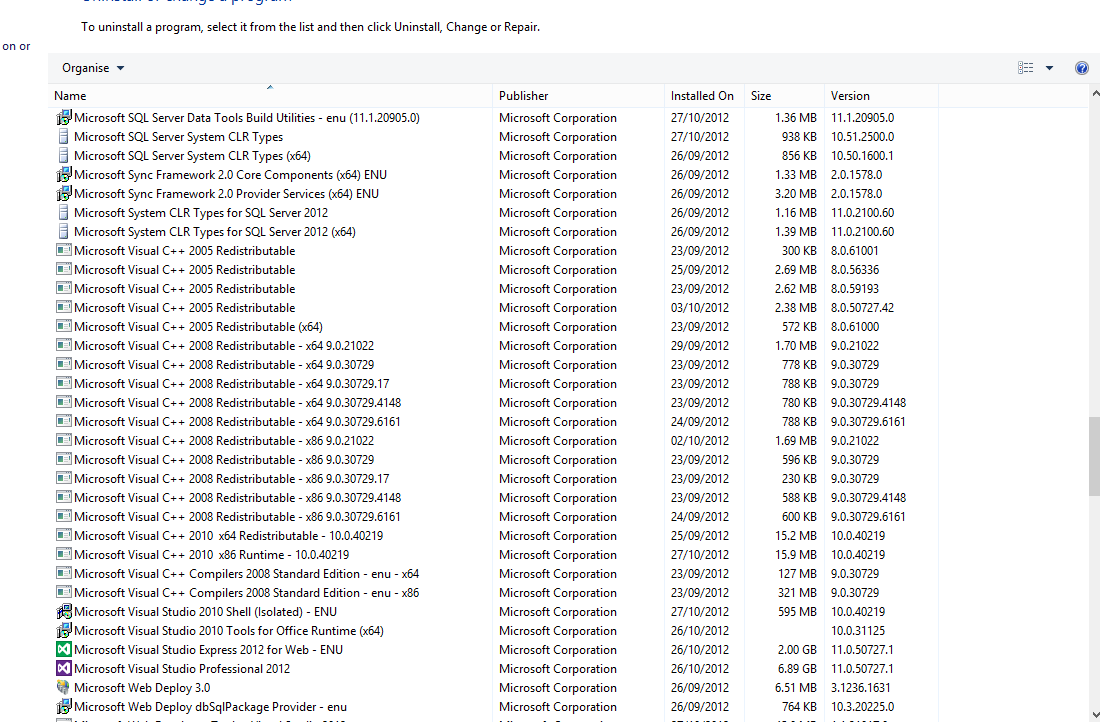
I checked the applications I have installed, and all of the items that the error report state as bmissing are present on my system. The only one I query is Microsoft VC90. What is this? Can I downlaod it manually from the microsoft website? I've searched for it there and can't find it.
Everything was working fine until I tried to update 'Flash Builder 4.6' to Flash Builder with 'Mobile Device Pack'
Any idea how I can get round this issue?
Thanks.




 4
Replies
4
Replies




 AdChoices