
Copy link to clipboard
Copied
After installing AEM, patching it, uninstalling Flash CS6 and reinstalling it, etc. You'd think one approach would work. Seriously, why on earth is this so hard for a simple update from the cloud?
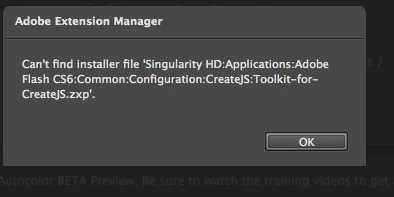
Update: New Application Manager needed:
http://download.adobe.com/pub/adobe/creativesuite/cs/mac/ApplicationManager6.2_all.dmg
Copy link to clipboard
Copied
Download and install the updates manually.
Go to http://www.adobe.com/downloads/updates and download the update that you are trying to install.
Copy link to clipboard
Copied
The update 2 for Flash Pro CS6 isn't there... it's here http://www.adobe.com/support/flash/downloads.html. Which doesn't work. I'll just wait until they post the latest Full build on the Creative Cloud download for Flash. Eventually it will get there. I just wish they tossed out the update process, it cleary failed from a rollout perspective this time around. I really don't mind installing a full download from the cloud download page, BUT I can't afford another day of poking around in the forums trying to fix patch and reinstall three separate pieces of software Flash CS6, App Man, and Ext Manager with so many homebrewed remedies. It would be very beneficial if Adobe actually posted version numbers of updates or latest builds of full software downloads ( ie. Flash CS6 12.0.0.481) and Labeled it IN the forums or ON the download page. There really is no way to know what you are installing until you actually attempt an install. If there is by some chance a page that cross tracks product version numbers with updates, please post it here.
Question what version number will Flash CS6 have after the update?
Copy link to clipboard
Copied
Update: New Application Manager needed:
http://download.adobe.com/pub/adobe/creativesuite/cs/mac/ApplicationManager6.2_all.dmg
Get ready! An upgraded Adobe Community experience is coming in January.
Learn more