
Participating Frequently
August 11, 2021
Question

Fresh install of CS6 Serial number validation issue Sierra and Yosemite

  • August 11, 2021
  • 5 replies
  • 19739 views

Has anyone else had trouble validating serial numbers during the install process of CS6 in the last week or so?

I cant get it to validate a legit serial number that is registered to my adobe account. When I try to validate the serial number it comes up with a “Please connect to the Internet and retry” error, saying it isn’t connected to the internet. If I hit retry it will come up with the same screen again and if I hit connect it will let me install and even run updates of the programs but won’t validate, which will only leave the software useable for 7days.
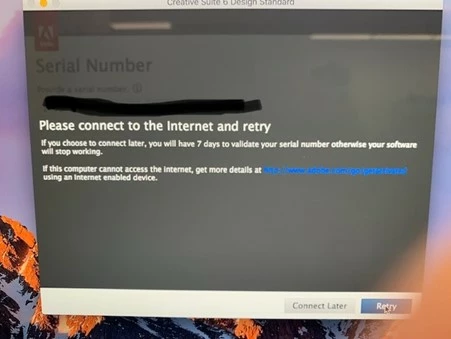
I have tried this on both a Sierra and Yosemite Mac, both freshly reformatted and I get the same problem. I also tried from home and through my phone just incase our work router, internet, virus protection software was casuing issues.  The strange thing is that I reformatted a machine last month and its all OK.


I spent time on adobe chat last night and they even issued me a new serial number, but that didnt work either and now they wont talk to me in chat saying the product is no longer supported.

This topic has been closed for replies.

5 replies

Participant
January 1, 2022

I have manged this. I went to /Applications and clicked on Adobe Application Manager. It said that it needed to be updated. I did it. After and update it changed its name into Adobe Creative Cloud - logged into my account and suddenly I was able to register my LR6 on fresh installation of macOS High Sierra.

Participating Frequently
September 11, 2021

I am having the EXACT same problem as you - trying to install CS6 Master Collection on a Sierra Mac and I keep getting this message. I have run through every single one of their activation issue tips (even downloaded their little checker program), and my computer checks out for all of them. I installed this same software on a different Sierra Mac last spring and it worked fine, so something is obviously different now. The information in this post and the comments is illuminating - but I wish there would be a solution! 

Nancy OShea
Community Expert
Community Expert
September 11, 2021

My understanding is that Mavericks 10.9.1 or higher have TLS 1.2 connection support. But you may need to update your browsers to the latest versions and enable TLS 1.2 in browser config settings.

https://www.charleyharperartstudio.com/LatestBrowser.html


Legacy CS6 installers don't work on Sierra, High Sierra or Mojave without terminal workarounds.  See link below for details.

https://helpx.adobe.com/creative-cloud/kb/install-creative-suite-mac-os-sierra.html


Nancy O'Shea— Product User & Community Expert
Participating Frequently
September 12, 2021

Thank you, Nancy. I'll take a look at those links.

I was able to install CS6 Master Collection on a Sierra Mac last March without any terminal workarounds. I didn't encounter any issues whatsoever in regards to connecting to Adobe and activating/authoring. What's going on is new. But I will see if anything on that page might help.

My Chrome is the latest version (I checked) but I'll look at that page too.

Thanks again. It's maddening to have a program that's compatible, and that I paid for, and not be able to install it. This thread is my first real lead.

Participant
August 26, 2021

I'm having the same problem connecting to the activaiton server. In my case, it's a fresh install of Mavericks (10.9) on a machine I was going to use solely for CS6 apps and screen share to my M1 mini running Big Sur. But it sure seems like Adobe may have cut access to the activation servers from the CS6 version of Adobe Application Manager (6.2.112.0 on my machine) with the deprecation of the TLS 1.0 and 1.1 protocols.

alan.kirkAuthor
Participating Frequently
September 12, 2021

Could be, but nobody at Adobe seems to know that. But i have tried the above work arounds and still cant get it to work.


Legend
August 11, 2021

It might be because Adobe have closed down support for an older less secure way of connecting to the web, "TLS 1.0 and TLS 1.1". Unfortuinately I can't find out whether this would block yosemite and sierra. https://helpx.adobe.com/x-productkb/multi/eol-tls-support.html

alan.kirkAuthor
Participating Frequently
August 11, 2021

Thanks so much for your reply.

This is actually a really intresting read and the timing of being able to validated the serial number before and adobe turning inforcing TLS1.2 on July 24 2021 does fit as I am only now experiencing this problem.

https://helpx.adobe.com/x-productkb/multi/eol-tls-support.html

When I read into the info on the link you supplied, it says if affects OS 10.8 and before as well as differnt older web browsers. On the two differnt machines I am running Yosemite10.10 (test machine) on one and Sierra10.12 on the other and I am running Google Chrome 92.0 and Safari 12.12 on both of these machines.


I did notice that it requires Java 8 or later for TLS1.2 and I know CS6 requires Java 6. So I downloaded and installed Java8 to see if that was the issue thinking if I could get it to validate I will uninstall Java8 after validation and then install Java6, but unfortunatley with Java 8 installed it still did not validate.


So I dont think it is this, but it is the most likely reason so far, so I am going to investigate further.

Thanks

Community Expert
August 11, 2021
alan.kirkAuthor
Participating Frequently
August 11, 2021

Hi Manan

Thanks so much for replying.

I actually found that the otherday and tried those options.

The strange thing is a month ago I did a refomat and reinstall and didnt experience this issue.