
Inspiring
September 25, 2022
解決済み

Getting Error 304 and large number of requests to give the installer permission - Installing PS & CC

  • September 25, 2022
  • 返信数 3.
  • 3059 ビュー

I've tried everything, even reinstalling the OS mulitple times.

Creative cloud simply will not install properly, saying the sync component did not install.

This is so infuriating. It's a fresh install of Windows 10 Pro, and I've used the inunstaller to uninstall, then reinstall the creative cloud installer over and over. It's been 10 times now.


Things I've tried:

1. Changing permissions on running the installer

2. Uninstalling and reinstalling Creative Cloud (10 times)

3. Restarting the comptuer between uninstall/reinstalls.

4. Reinstalling the OS (three times, tried using Windows home too, but same results)

5. Updating everything.

6. Making a new user, setting thier permissions to administrator, and trying again.


This has taken pretty much all day, and I'm tired and frustrated. What can I do that will solve this issue?


Here's a video of the problem: https://www.dropbox.com/s/lpf1t4io5a5t21t/20220925_143225.mp4?dl=0


Please help!

Thanks!
このトピックへの返信は締め切られました。
解決に役立った回答 cr80170577

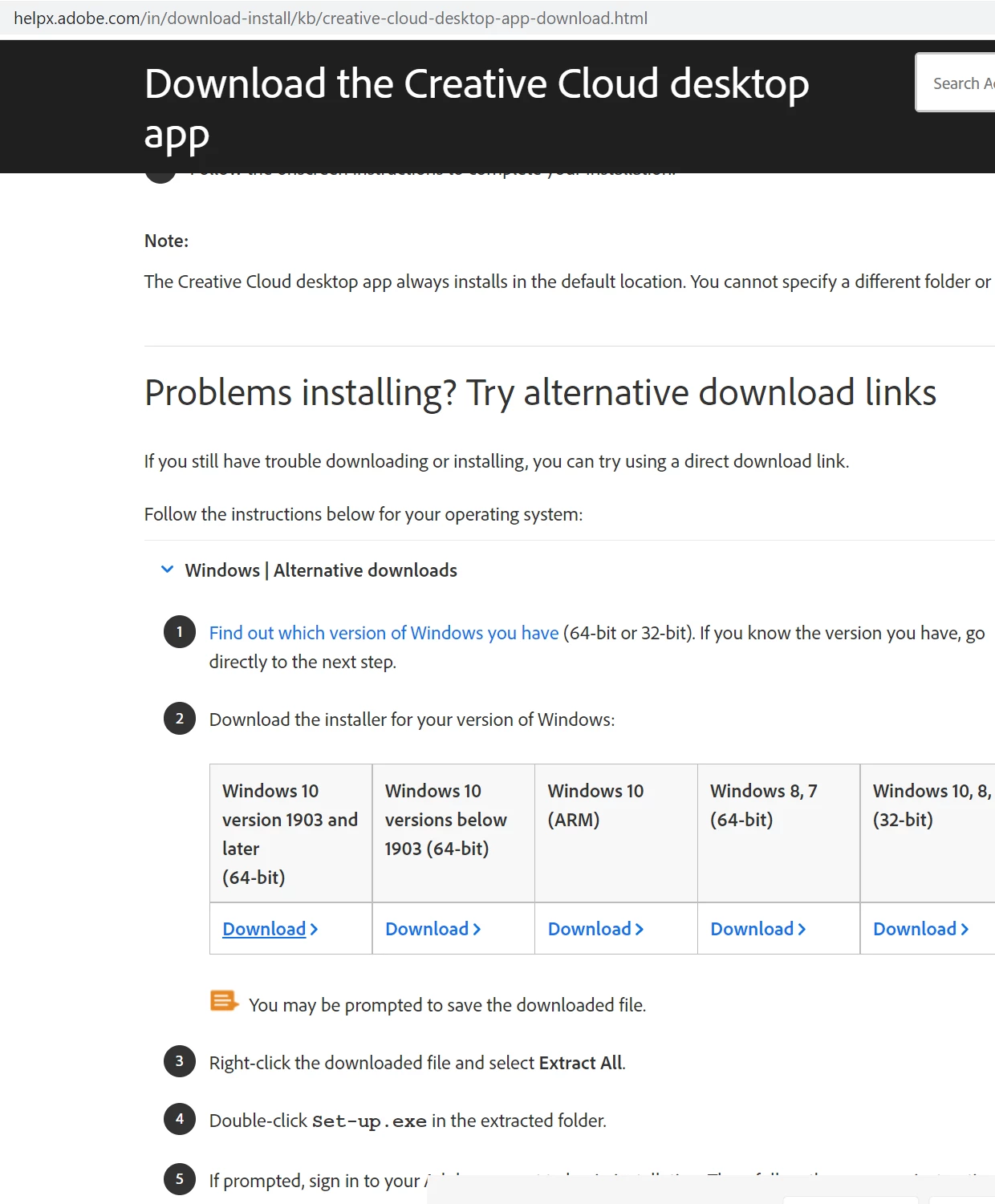
Okay, so I was able to get farther (different error, yay!) by following the links to the alternative downloads, hidden in an expander at the bottom of this page: 

This downloaded a file called ACCCx5_8_0_592 which was about 328 MB, I followed the instructions to unzip it and ran the installer giving it administrator permissions. Then it gave me some error about not being able to access a folder and to dissable antivirus, etc, and try again. It also gave me a chat link, which I pushed rather than continue, because who knows if I'd ever get another opportunity to get help. Connected me up to a help rep who took over my computer and manually installed some certificates, apparently according to this page: Error code 42 or 72 when installing Adobe Creative Cloud

I assume they just skipped to solution two and downloaded and installed the certificates (that appears to be what they were doing). After that, it "just worked"...


Now, call me crazy, but I've installed just about every kind of sortware and OS out there, and this has been *by far* the worst out-of-the-box software experience I've ever had. The rep seems to think it's MS's fault, but giving me a 304 error code all friggin day long, and no indication that it's the certificate that's the issue is, in a word, ridicoulous. I mean, I come from Linux, and we seriously don't have to deal with anything at all this complicated with any software packages. It would be deemed completely unnaceptable by most users. Adobe + MS need to get together and figure this out, because the only thing in the world that keeps me putting up Windows for any length of time is that CC isn't written for Linux. Frankly, I'm very upset with this experience and I truly hope this series of unfortunate events helps someone else stuck with this absolute catastrophe of an install process. 


Thanks @kglad for the help. 

返信数 3

Shivangi_Gupta
Community Manager
Community Manager
September 28, 2022

Hi all,

Our engineering team has identified that Error code 304 indicates that the installation is no longer functional.

Could you test the suggestions listed in this article and let us know they work for you?

https://helpx.adobe.com/creative-cloud/kb/troubleshoot-download-install-logs.html#error304


Thanks,

Shivangi

cr80170577作成者解決!
Inspiring
September 25, 2022

Okay, so I was able to get farther (different error, yay!) by following the links to the alternative downloads, hidden in an expander at the bottom of this page: 

This downloaded a file called ACCCx5_8_0_592 which was about 328 MB, I followed the instructions to unzip it and ran the installer giving it administrator permissions. Then it gave me some error about not being able to access a folder and to dissable antivirus, etc, and try again. It also gave me a chat link, which I pushed rather than continue, because who knows if I'd ever get another opportunity to get help. Connected me up to a help rep who took over my computer and manually installed some certificates, apparently according to this page: Error code 42 or 72 when installing Adobe Creative Cloud

I assume they just skipped to solution two and downloaded and installed the certificates (that appears to be what they were doing). After that, it "just worked"...


Now, call me crazy, but I've installed just about every kind of sortware and OS out there, and this has been *by far* the worst out-of-the-box software experience I've ever had. The rep seems to think it's MS's fault, but giving me a 304 error code all friggin day long, and no indication that it's the certificate that's the issue is, in a word, ridicoulous. I mean, I come from Linux, and we seriously don't have to deal with anything at all this complicated with any software packages. It would be deemed completely unnaceptable by most users. Adobe + MS need to get together and figure this out, because the only thing in the world that keeps me putting up Windows for any length of time is that CC isn't written for Linux. Frankly, I'm very upset with this experience and I truly hope this series of unfortunate events helps someone else stuck with this absolute catastrophe of an install process. 


Thanks @kglad for the help. 

Participant
September 25, 2022

Hi,same problem!

Do you have solved?

Participating Frequently
September 27, 2022

Glad it helped. 🙂


So glad I found this thread, I've been tearing my hair out the last couple of days after getting a brand new Windows 11 laptop and having the exact same install issues. I followed all the original steps but as the others above used the "Windows 10 versions below 1903 (64-bit)" alternative download and it worked absolutely fine. Adobe definitely need to sort this, I've never experienced so much hassle trying to install some software before!

kglad
Community Expert
Community Expert
September 25, 2022

the first problem i see in your video is you're using an out-of-date installer.


so, first make sure your win 10 os is up-to-date


then, if the target computer is one where you have already had botched (or successful) installs:


1. uninstall the cc desktop app,  use the correct uninstaller from https://helpx.adobe.com/creative-cloud/help/uninstall-creative-cloud-desktop-app.html#sa_src=web-messaging


2. clean your computer per http://www.adobe.com/support/contact/cscleanertool.html


3. restart your computer (if you ignore subtlies like this, you'll probably cause more problems)


4.  use the correct, Windows 10 version 1903 and later (64-bit), i hope, link at page bottom here, https://helpx.adobe.com/in/download-install/kb/creative-cloud-desktop-app-download.html to download the current cc desktop app installer


5. follow the direction at the link in 4 to install you cc desktop app, but before of double clicking set-up.exe, right click it and click run as administrator


6. if you see a problem after installing, restart your computer.


7. if you see a problem after installing (especially the sync issue error shown in your video), reset the cc desktop app: make sure it's in the foreground, then press:

Win: Ctrl + Alt + R
Mac: Cmd + Opt + R

cr80170577作成者
Inspiring
September 25, 2022

Hi. I followed these steps exactly, making sure Windows was up to date (it's now OS Build 19044.2075, as you can ses here:)

I also used the links provided, installed and ran the log collector as described in the preperation to install the cleaner, and then ran the cleaner, choosing the option 1 to clean "All" as described in the instructions specifically for sync errors. I then restarted. Then did the right-click and run as admin to the installer, which got rid of the prompts to let the installer do what it wanted to the computer, but didn't solve the problem when it reached the end of the install, as you can see in this video, ther results are the same:

https://www.dropbox.com/s/rddmmdgpb57qplw/20220925_200607.mp4?dl=0 


I tried then to restart once more, and try again. That failed in the same way upon restart as you can see from this video: 

https://www.dropbox.com/s/pw7gev8gl8oyh0h/20220925_201523.mp4?dl=0


cr80170577作成者
Inspiring
September 25, 2022

Forgot to mention, also tried this, with the same result:

7. if you see a problem after installing (especially the sync issue error shown in your video), reset the cc desktop app: make sure it's in the foreground, then press:

Win: Ctrl + Alt + R