
Exit
  • Global community
    • Language:
      • Deutsch
      • English
      • Español
      • Français
      • Português
  • 日本語コミュニティ
  • 한국 커뮤니티
0

How can I stop Lightroom CC from uploading to the Adobe Cloud when my Cloud account is full?

New Here ,
Jan 13, 2018 Jan 13, 2018

I don't want to upload my photos, as I'm using a RAID locally. How do I stop automatic uploads from Adobe Lightroom CC and clear my Adobe Cloud storage, which is now overfilled? I want to stay with the basic free Adobe Cloud size. Or do I have to use only Adobe Lightroom Classic to avoid uploads?


17.9K
Translate
Report
Community guidelines
Be kind and respectful, give credit to the original source of content, and search for duplicates before posting. Learn more
community guidelines

correct answers 1 Correct answer

Community Expert , Jan 13, 2018 Jan 13, 2018

disable file sync'g in your cc app preferences
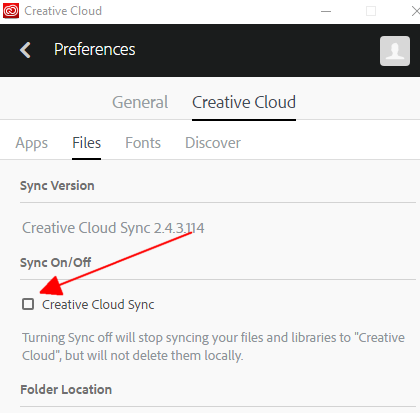
Screenshot - 1_13_2018 , 10_27_11 PM.png

Translate
Community Expert ,
Jan 13, 2018 Jan 13, 2018

disable file sync'g in your cc app preferences

Screenshot - 1_13_2018 , 10_27_11 PM.png

Translate
Report
Community guidelines
Be kind and respectful, give credit to the original source of content, and search for duplicates before posting. Learn more
community guidelines
New Here ,
Jan 14, 2018 Jan 14, 2018

Thanks very much. I wasn't aware of that setting. The other part of my problem is clearing the uploads from CC. I didn't see any way to do that.

Translate
Report
Community guidelines
Be kind and respectful, give credit to the original source of content, and search for duplicates before posting. Learn more
community guidelines
Community Expert ,
Jan 15, 2018 Jan 15, 2018

you're welcome.

if you have other questions about adobe file sync'g, post here File Hosting, Syncing, and Collaboration

p.s. you marked the wrong message correct.  i unmarked message2 so you can mark message 1, if it was helpful.

Translate
Report
Community guidelines
Be kind and respectful, give credit to the original source of content, and search for duplicates before posting. Learn more
community guidelines
New Here ,
Dec 12, 2018 Dec 12, 2018

I disabled it as per your picture but when I import a picture in my album it stills syncing it and uploading it online.

I've restarted both Lightroom CC and the computer and stills doing so...


Why is this happening? How can I turn syncing off?

Translate
Report
Community guidelines
Be kind and respectful, give credit to the original source of content, and search for duplicates before posting. Learn more
community guidelines
Community Expert ,
Dec 12, 2018 Dec 12, 2018

post in the sync forum.

Translate
Report
Community guidelines
Be kind and respectful, give credit to the original source of content, and search for duplicates before posting. Learn more
community guidelines
New Here ,
Apr 04, 2019 Apr 04, 2019

You should mark this as not answered as the answer is incorrect. Lightroom CC will continue to sync to the cloud regardless if you turn the sync off in the Adobe Creative Cloud app. This really should be redesigned as users may not want to sync work performed in Lightroom CC to the cloud.

Translate
Report
Community guidelines
Be kind and respectful, give credit to the original source of content, and search for duplicates before posting. Learn more
community guidelines
New Here ,
Jun 06, 2019 Jun 06, 2019

good

Translate
Report
Community guidelines
Be kind and respectful, give credit to the original source of content, and search for duplicates before posting. Learn more
community guidelines
New Here ,
Sep 16, 2019 Sep 16, 2019
just to confirm: disabling the upload via "Creative Cloud Sync" checkbox does not work - now spending hours to find a valid solution - thanks for nothing Adobe!
Translate
Report
Community guidelines
Be kind and respectful, give credit to the original source of content, and search for duplicates before posting. Learn more
community guidelines
New Here ,
Apr 03, 2020 Apr 03, 2020
LATEST

My menus look nothing like this. No black bar, no Files option... running Catalina with whatever the latest cloud version is. This help is not helpful at all.

Translate
Report
Community guidelines
Be kind and respectful, give credit to the original source of content, and search for duplicates before posting. Learn more
community guidelines
