
Participant
January 19, 2020
Answered

How do I contact Adobe Support? Lightroom keeps not responding

  • January 19, 2020
  • 2 replies
  • 1135 views

I'm on Windows 10, 64 Bit machine.   Got Lightroom 9.1 Desktop version.   When trying to start Lightroom, it opens but as soon as I click anywhere in Lightroom it goes into 'Not Responding' mode.


I've uninstalled and re-installed umpteen times and getting nowhere.


How do I contact Adobe Support and raise a support ticket?
This topic has been closed for replies.
Correct answer essaytee

I have resolved my issue of Lightroom not responding, taking too slow to open. 


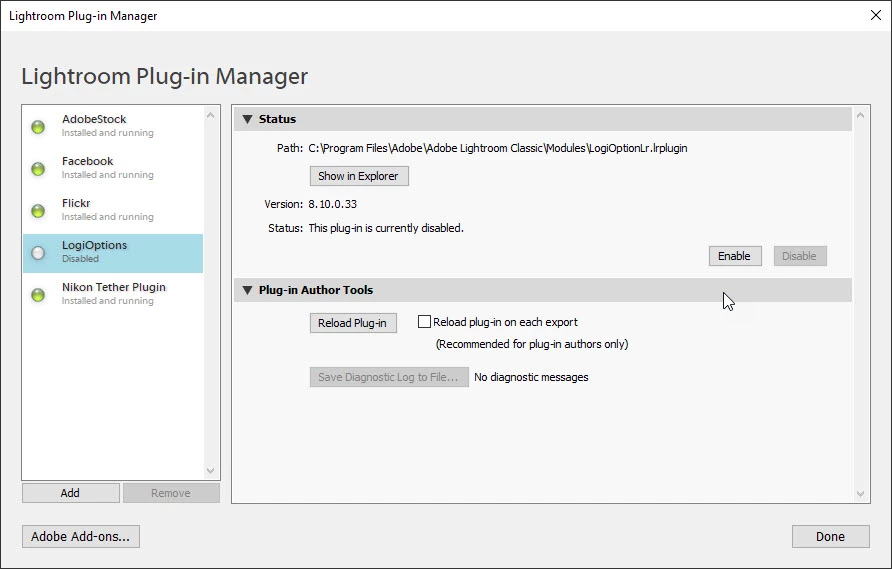
The issue is related to the fact that I use a Logitech wireless keyboard and mouse and during the installation of Lightroom a Logitech plugin was installed, unbeknown to me at the time.   By disabling the LogiOptions plugin, Lightroom now opens quicker and there is no 'not responding' episodes.

Hope this helps.


Steve.

2 replies

AxelMatt
Community Expert
Community Expert
January 19, 2020

Please try switch off the GPU support from the Lightroom preferences and check if that helps to fix the issue

Go to Lightroom > Preferences > Performance tab > Uncheck "Use Graphics Processor" > Restart Lightroom.

Adobe Lightroom GPU Troubleshooting and FAQ 

https://helpx.adobe.com/lightroom-classic/kb/troubleshoot-gpu.html


My System: Intel i7-8700K - 64GB RAM - NVidia Geforce RTX 3060 - Windows 11 Pro 25H2 -- LR-Classic 15 - Photoshop 27 - Nik Collection 8 - PureRAW 5 - Topaz Photo
essayteeAuthorCorrect answer
Participant
January 24, 2020

I have resolved my issue of Lightroom not responding, taking too slow to open. 


The issue is related to the fact that I use a Logitech wireless keyboard and mouse and during the installation of Lightroom a Logitech plugin was installed, unbeknown to me at the time.   By disabling the LogiOptions plugin, Lightroom now opens quicker and there is no 'not responding' episodes.

Hope this helps.


Steve.

January 19, 2020

Have you tried resetting the Lightroom preferences

https://helpx.adobe.com/ie/lightroom-classic/help/setting-preferences-lightroom.html

Adobe Customer Care

Just click on the chat icon, buttom right hand corner

essayteeAuthor
Participant
January 21, 2020

I don't see any 'Chat' button at the bottom right-hand corner.


Anyway, was able to get to the preferences dialogue when opening (Shift, Alt and open).   Reset to default entries.


Something is not quite right.   Now opening Lightroom, it takes forever to load.   I see the program window; nothing happens, I click in the program, then the Splash Screen appears and then it seems to be in pause mode, takes about 45 seconds to properly kick-in and be a usable program.


Turning off and on the GPU thing in preferences appears not to do anything as it's the same behaviour every time I start Lightroom, the program opens, nothing seems to be happening, I click anywhere in Lightroom, then the splash screen appears, along with 'Not Responding' against the title in the top menu bar of the program.   Further waiting then the program kicks in and works.   


I'm at a loss at the moment, what is Lightroom expecting and why does it take so long to load?


EDIT: And now, on some re-loads when clicking in Lightroom, it goes into Not Responding mode, then clicking a second time a dialog message box appears asking to 'End the Process'.    Something is not quite right.