
faizan34
Participant
September 11, 2015
Answered

How do I install the Adobe CC 2014 apps?

  • September 11, 2015
  • 1 reply
  • 430 views

The apps I'm trying to install are:

  • Premiere Pro
  • After Effects
  • Photoshop
  • Media Encoder

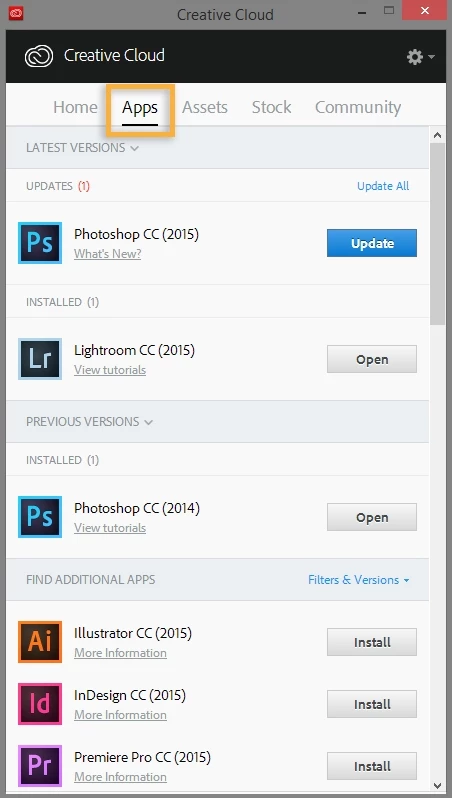
However I can't find these apps in the Creative Cloud desktop app, and the standalone installers, after showing a window that says "Initializing Installer" the window closes and nothing happens
    This topic has been closed for replies.
    Correct answer Bani Verma

    Hi,

    This could be because of multiple reasons:

    Let us know if this helps.

    Regards,

    Bani

    1 reply

    Bani Verma
    Community Manager
    Community Manager
    September 11, 2015

    Hi,

    Please check the Install previous versions of apps section here, Download and install Adobe Creative Cloud apps

    Hope this helps answer the query.

    Regards,

    Bani

    faizan34
    faizan34Author
    Participant
    September 11, 2015

    This is what I see when I try to install previous versions of apps on the Creative Cloud Desktop App

    Bani Verma
    Community Manager
    Bani VermaCommunity ManagerCorrect answer
    Community Manager
    September 14, 2015

    Hi,

    This could be because of multiple reasons:

    Let us know if this helps.

    Regards,

    Bani