daniellem38141551
Participant
June 22, 2017
Answered

How do I locate my payment plan?

  • June 22, 2017
  • 1 reply
  • 687 views

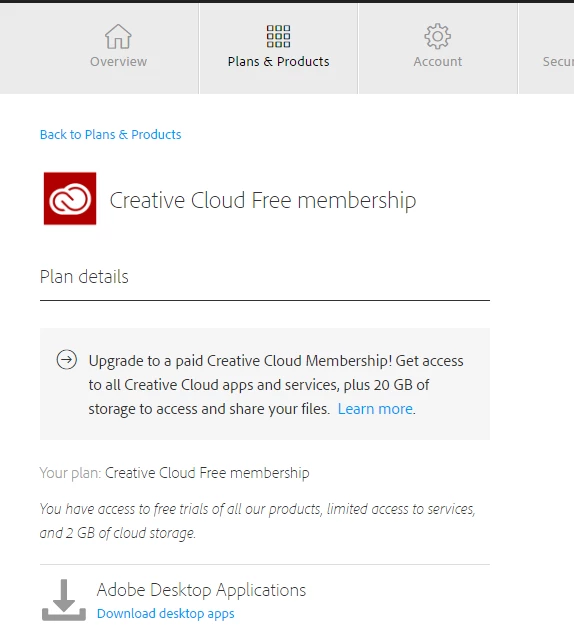
I want to see my monthly payment plan for my Photoshop CC. However, all I can find is that I have a free Creative Cloud membership. On my Creative Cloud desktop app, my Photoshop is evident, but on my Adobe ID, there is no way to find payment plans. The reason I want to see the payment plan is to find out how much more I will have to pay before I fulfill my installments. PLEASE HELP!
This topic has been closed for replies.
Correct answer Just Shoot Me

If all it is showing it the Free Membership then you are not signed in with the correct Adobe ID you used to purchase the plan.

Sign Out on that page and then Sign back in making sure you use the correct email address and password. The same one that is Sign In in the CC DTA and in PS.

Please note that the subscription will Auto Renew unless you cancel it before it runs out. Also note that if you cancel just after it renews you will be charged 50% of the remaining subscription fee for the time left on it. So you need to cancel just before it runs out. If that is your intention.

1 reply

Just Shoot Me
Just Shoot MeCorrect answer
Legend
June 22, 2017

If all it is showing it the Free Membership then you are not signed in with the correct Adobe ID you used to purchase the plan.

Sign Out on that page and then Sign back in making sure you use the correct email address and password. The same one that is Sign In in the CC DTA and in PS.

Please note that the subscription will Auto Renew unless you cancel it before it runs out. Also note that if you cancel just after it renews you will be charged 50% of the remaining subscription fee for the time left on it. So you need to cancel just before it runs out. If that is your intention.