
Participant
November 27, 2013
Question

How do I reinstall CS6 Apps under CC

  • November 27, 2013
  • 2 replies
  • 351 views

I'm unable to update my CS6 apps (Firworks, Dreamweaver, Photoshop and Illustrator within CC. They were all downloaded and installed from CC when I subscribed.

This is what the failure looks like:
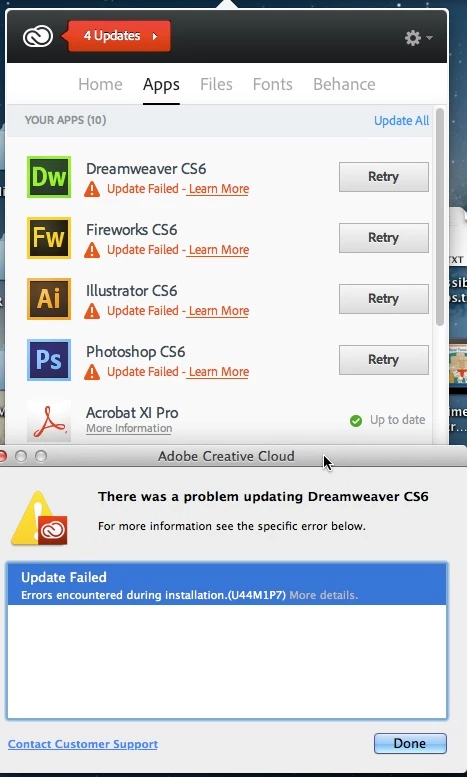
One of the proposed troubleshooting solutions is to uninstall and reinstall these apps. I have no problem with this, but where can I get the CS6 apps from to reinstall? They no longer appear as available for installaion in CC. Thanks in advance for help.

This topic has been closed for replies.

2 replies

Participant
November 27, 2013

Thanks Jeff, my problem is solved. Part of the confusion is related to the download page(s) all of which default to displaying only CC versions... until you find the very little dropdown that allows you to select the CS6 version instead.

Jeffrey_A_Wright
Legend
November 27, 2013

Moving this discussion to the Creative Cloud Download & Install forum.

Mmannh for information on the U44M1P7 error please see Installation failed. Error U44M1P7 | Updates - http://helpx.adobe.com/creative-suite/kb/error-u44m1p7-installing-updates-ccm.html.

You can also find information on how to install the CS6 applications included with your Creative Cloud Membership at Install both CC and CS6 apps - http://helpx.adobe.com/creative-cloud/help/install-cc-and-cs6-apps.html.