
Inspiring
October 17, 2012
Answered

How Do I Set the Application Manager To Install Apps In A Location?

  • October 17, 2012
  • 4 replies
  • 17862 views

I subscribed to Adobe Creative Cloud. I downloaded the Adobe Application Manager. I have a laptop with a 80GB SSD (C:) and a 1TB data drive (D:). I would like to install all the applications on my D drive, since I do not have the space on my C drive and I would like to keep that OS only.

I found the Adobe instructions on how to change the installation path for the Adobe Application Manager. I changed the path settings to install in the directory "D:\program files (x86)\adobe\" Of course that only works sometimes.
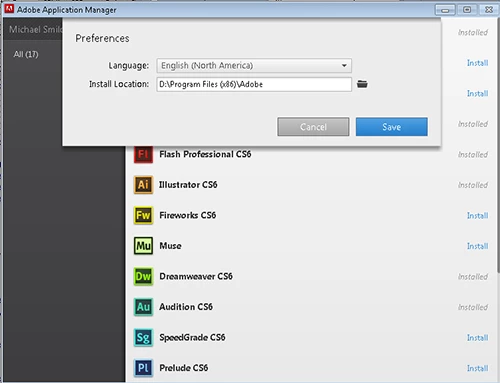
Some application were installed in the directory I specified. Some where installed in the right directory, but on the C drive. Then, I used the Adobe update in the system tray a few days ago and now Adobe is installing applications in the wrong directory on the wrong drive.  "Program Files (x86)(x86)"???
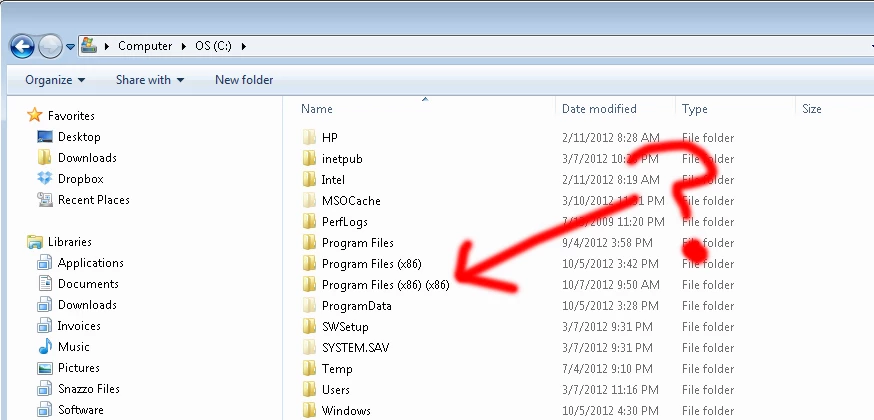
Then, it is virtually impossible to get someone from Adobe to respond. Incredibly frustrating. I really don't understand how a basic function like installation can be so screwed up.

Does anyone have any recommendations?

This topic has been closed for replies.
Correct answer saxonbigdog

WHen you log into Creative Cloud, up in the top right corner there's a cog wheel > Preferences, you have 2 menu items, General and Creative Cloud, select Creative Cloud, then select Install Location.

Good luck!

4 replies

saxonbigdogCorrect answer
Participant
December 23, 2015

WHen you log into Creative Cloud, up in the top right corner there's a cog wheel > Preferences, you have 2 menu items, General and Creative Cloud, select Creative Cloud, then select Install Location.

Good luck!

Participating Frequently
March 15, 2016

And sometimes, sometimes, it works.  But my system is proof it doesn't work all the time.

And don't get me off on Customer "Support".  Yesterday I got through to the gate keepers for tech and was promised someone would call back.  26 hours later I'm still waiting.

Participant
March 18, 2016

Have to say LinusF I have found the exact same thing - I have set the default location and it did move Photoshop to that location. The next day I installed Illustrator and it went to where Adobe wanted it - on my C drive which is not where I need it to be. Personally I am coming to hate Creative Cloud and Adobe - its like dealing with another Microsoft...

Participant
August 19, 2013

Same problem here ...

What a shame ..

May 17, 2013

I had this problem too!!!!!!!!!!!!!!!!!How to solve it?????

Participant
May 20, 2013

After I'd downloaded the installer update a few months back everything changed. Suddenly I could choose whichever path I wanted and the install worked perfectly.

Perhaps all here still experiencing this problem should check that they're using the latest installer.

Kind regards,

Peter Spence

Electric Putty Studios

<Removed by Moderator>

May 22, 2013

Thank you for your response.I have solved this problem.I change the installation path again and then it worked.

Though I still don't know how comes this problem,maybe just try a few times more to change the installation path.haha~

Kind regards,

Rezon Lei

David__B
Adobe Employee
Adobe Employee
October 30, 2012

Hi Snazzo,

I'm not sure I have a fix but if I can recreate it, I can report it to the appropriate group.

Questions:

- What applications did you install to D:\Program Files (x86)?

- What applications are appearing in the C:\Program Files (x86)(x86)?

- Dave

SnazzoAuthor
Inspiring
October 31, 2012

I ended up buying a new ssd drive because I couldn't get anything to work properly. Then I uninstalled everything and had to reinstall, leaving all the applications on the c drive (ssd). 

I think I installed Dreamweaver and photoshop on the d drive, then illustrator and indesign were installed on the c drive (automatically, I still had the d drive specified). Then, I received a notice that there were updates from adobe and I installed the updates, then I ended up with yet another folder with the (x86)(x86) on the c drive.

At that point, it was like multiple installations and the pc was confused on which application was the right one. File associations were not correct with coldfusion, dreamweaver and photoshop no longer open files when using the open with dialogue, and the extension manager only recognized illustrator and indesign as being installed, preventing installation of any of the dreamweaver extensions.

The applications ran fine, just components didn't work.