
dbashayl
Participating Frequently
January 6, 2012
Question

how to change serial number

  • January 6, 2012
  • 2 replies
  • 103767 views

Hi,

I had used the trial version and i registered through my email while my boss was away. On his return we tried to activate it. but we haven't been successful. Even online support team was unable to help after spending hours different things and finally they told it was beyond their expertise.

Please see the screenshot. i used so many uninstallers, registry cleaners, used adobe's cleaners nothing helps.

When i try to re-install it just doesn't ask me new serial number. See its faded and it jumps to next step ignoring serial number.

Any help would be appreciated.

I am trying to install Adobe creative suite 5, Design premium subscription edition on windows machine.

Thanks.
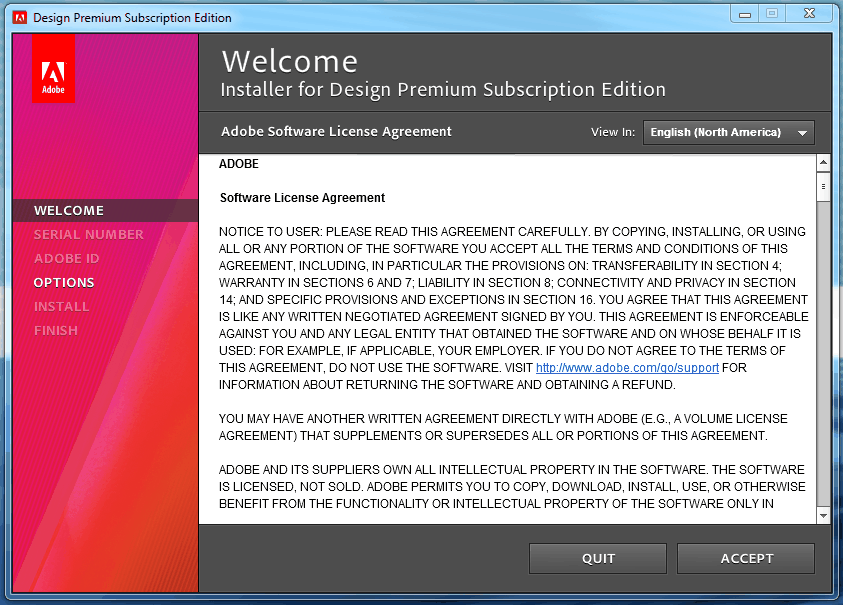
This topic has been closed for replies.

2 replies

John Hawkinson
Inspiring
January 9, 2012

I seem to recall a bug where setting your clock back to January 1, 2006 was necessary to deal with an invalid serial number: http://kb2.adobe.com/cps/494/cpsid_49485.html.

Gautham_K
Participating Frequently
January 6, 2012

Hi,

Apart from the trial version, did you have any previous versions of Adobe applications or suites installed?

dbashayl
dbashaylAuthor
Participating Frequently
January 6, 2012

No. It's a brand new machine. After trial was over, i used cs4 and it worked for few days then i couldn't use any adobe product as it crashed as soon as you click. Anyway, i want to use CS5, as my boss has already so many paid subscriptions and is way better to use as well.

I would be very happy if this issue is resolved.

FYI: I have unistalled all adobe products, deleted all folders that i can find, deleted registry entries, rebooted computer quite a few times.

Jeffrey_A_Wright
Community Manager
Community Manager
January 6, 2012

Thanks Jeff, I am not getting any error when installing. But I'll give it a go when I'll be back to office on Monday.

My problem was unable to change serial number and change adobe id.

See the screenshot above after i click "Accept" on welcome screen it goes directly to "options" skipping two steps "serial number and adobe id" because i had trial version installed and i had used my email to register trial version.

I had continued installing once without any error and searched for option to change serial number after install but i was unable to do so.

FYI. one forum said to change computer date to just after software expiry date, so it expires and can use new serial number but it expired my trial straight away but wasn't able to change serial number.


Yea the PDapp.log file should contain any errors which are happening prior to clicking the install button.  So it should report an error or give some indication as to why your installer is not allowing the input of your serial number and Adobe ID.