Exit
  • Global community
    • Language:
      • Deutsch
      • English
      • Español
      • Français
      • Português
  • 日本語コミュニティ
  • 한국 커뮤니티
0

How to deactivate a computer

Community Beginner ,
Mar 15, 2021 Mar 15, 2021

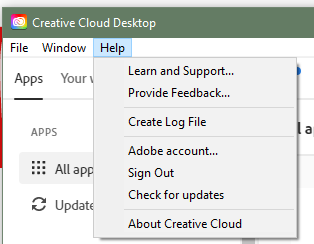
Help says when you go to the Help dropdown, you'll find the deactivate computer.  I've tried both in Creative Cloud and an app (PS), and there isn't an option to deactivate.  The instructions were from 2019 -- are there updated instructions?

TOPICS
Activation
425
Translate
Report
Community guidelines
Be kind and respectful, give credit to the original source of content, and search for duplicates before posting. Learn more
community guidelines
Enthusiast ,
Mar 15, 2021 Mar 15, 2021

Hi, 


Thank you for posting your query.


The Option to deactivate the Subscription is by Clicking on the "Sign out" button. 

Once you click on "Sign out" from the list , the Creative Cloud license will be deactivated from that computer.


Hope this helps. 


Thank you. 

Translate
Report
Community guidelines
Be kind and respectful, give credit to the original source of content, and search for duplicates before posting. Learn more
community guidelines
LEGEND ,
Mar 16, 2021 Mar 16, 2021
LATEST

I think you're looking at help for an ancient version, perhaps Creative Suite. Deactivate isn't even a term used any more. 

Translate
Report
Community guidelines
Be kind and respectful, give credit to the original source of content, and search for duplicates before posting. Learn more
community guidelines