juanfordroad
Known Participant
April 9, 2018
Answered

How to reinstall Photoshop CS3 [dead program, locked]

  • April 9, 2018
  • 2 replies
  • 12041 views

Having the same trouble.  Only my copy is photoshop cs3 and I'm using snow leopard, the last year for that softwares' use.  Followed all the instructions, got all the new serial numbers and all it does is a never-ending circle of "install after effects cs4 disc", then, "install photoshop cs3 disc".  It never completes the installation.


So frustrating after years of using the software I Purchased and then being denied its use because Adobe wants to put me on its monthly paid account.  Thanks a lot Adobe!
This topic has been closed for replies.
Correct answer Jeffrey_A_Wright

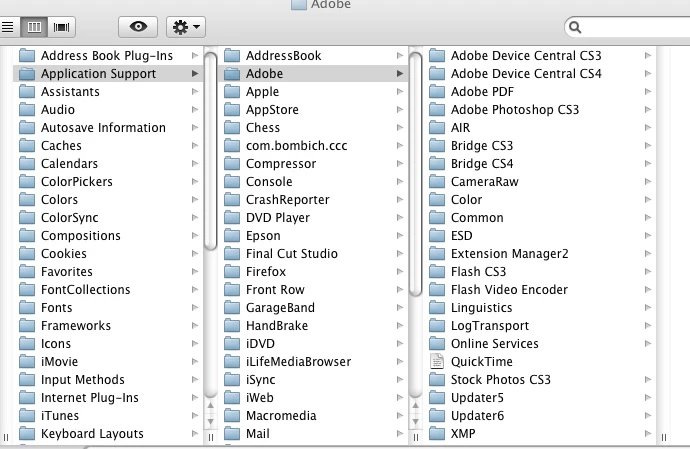
It seems that there is no "Adobe PCD" file in my folders to delete.


Juanfordroad, the screenshot you shared appears to be the Users/<UserName>/Library/Application Support/Adobe/   Please make sure you are browsing to the Root library and not the hidden User Library.  The location of the Adobe PCD folder is in /Libary/Application Support/Adobe/.

2 replies

Participant
March 29, 2024

also i think it depends on how old your pc is,, works better on older computers apparently 

kglad
Community Expert
Community Expert
March 29, 2024

@Tina364060824vlx 


this is an outdated thread.  it's no longer possible to activate cs3 on any device and therefore use beyond the 30 day trial on any one computer (unless reformatted every 30days).

Jeffrey_A_Wright
Community Manager
Community Manager
April 9, 2018

Branching to a new discussion.

Juanfordroad, if you need to reinstall Photoshop CS3 then please use the new installation files, and serial number, available at CS3 .  If you continue to encounter errors with the process then what specific errors are you facing, Juanfordroad?  Are you still installing on Mac OS 10.6?

juanfordroad
Known Participant
April 10, 2018

Thank you for your reply.  I hope you can provided assistance.  Here is what has transpired:

My Mac Pro (mid 2010) which contained the software and hardware was severely damaged in a hurricane last year.  Thanks to my son, I obtained another Mac Pro that was older but functioning.  I transferred the drives and tried to open the software for Photoshop, After Effects CS4 and Final Cut Pro, among others.  All were operational with the exception of Photoshop CS3.  The screen appeared telling me to re register online.  After several attempts of clicking on the re register tab I gave up and decided to uninstall and reinstall the program. After I inserted the CS3 disc and followed the prompts the progress bars advanced slowly.  Then I was asked to 'insert After Effects CS4 and click OK to continue'.  I followed the instructions and when the disc got up to speed clicked OK.  The progress bars barely moved before the next screen told me to insert Photoshop CS3 and press OK.  The progress bars barely moved before the screen asked me to insert After Effects CS4.  This went on several times until I had stopped in frustration.  I then went to the Adobe site for help.  Finding the page on how to install a 'replacement' copy of Photoshop I downloaded the .dmg whose name I cannot remember (I downloaded it in snow leopard and am currently in lion).  After opening the CS3 setup icon I followed the steps to completely uninstall the components.  Then followed the steps to reinstall CS3 which seemed to be advancing the progress bars quite well.  Then the screen returned to 'insert After Effects CS4'.  I did this once and the same situation happened as described earlier.

Adobe should NOT make the process of reinstalling software that is registered and paid for this difficult.

I do hope you have a solution.

juanfordroad
Known Participant
April 17, 2018

You will want to locate your valid After Effects CS4 serial number to reinstall.   The copy that is registered under this e-mail address was returned, and refund issued, on 4-7-2007.

Before that, you do have a license for After Effects 6.5, Juanfordroad.  This predates the Creative Suite release and may be why you returned After Effects CS4 upgrade as it would not qualify for the upgrade pricing.

If you are planning to reinstall After Effects CS4 then please see Find your serial number for information on how to locate your registered serial numbers.  It may be that After Effects CS4 is logged under a different account.  If you would like assistance, then please contact our support team at Contact Customer Care so that any alternate e-mail address or phone numbers that may have been used to register the software, can be found Juanfordroad.


So you are saying I should delete my CS4 program and reinstall it.  My age and memory faculties dimly recall that I did have a different email and password during that period but have no idea what they were.  I also recall that Adobe sent me the wrong format for CS4, Windows instead of Mac.  But again, I can't be certain of those events.  Maybe your digging into my account(s) could confirm this.

I did run the CC cleaner tool at some point during our discussions as well as running the uninstall program.  Does this mean I have to run it again, or download another copy of the cleaner?

Before I undertake this worrisome task, please advise as to which program should be installed first.

Thank you.