Participant
November 27, 2016
Answered

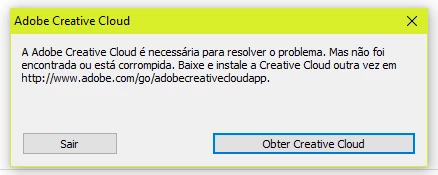
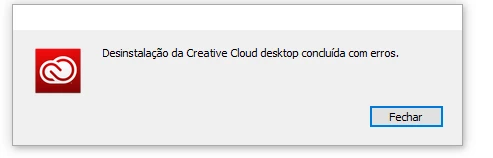
I can not install and uninstall adobe creative cloud

  • November 27, 2016
  • 2 replies
  • 1455 views

I've tried everything but I can not install and uninstall adobe creative cloud.
This topic has been closed for replies.
Correct answer Kevin Stohlmeyer

I just went through this problem in its entirety and the only way to solve it is to set up a chat with Adobe support and let the representative fix it by controlling your machine.  There were numerous obscure files that had to be removed to clean the old Creative Cloud desktop from your machine, after which you just reinstall a fresh copy and then have it re-install all your apps.  i now have seen several complaints about this issue here so, despite the fact  that many (maybe almost all) people don't have this problem a number do, and it isn't easy to work your way through it alone.


Manually deleting CC apps is never a good process. The tech probably ran this tool to cleanup any old CC remnants to give you a clean install of the new software. It's always a good idea to uninstall using the app or this tool.

Use the Creative Cloud Cleaner Tool to solve installation problems

2 replies

Sheena Kaul
Legend
November 29, 2016
kglad
Community Expert
Community Expert
November 27, 2016

i can't read those error messages, so better help might be available if you copied/pasted those error messages so the translator could be used.

uninstall everything cc, https://helpx.adobe.com/creative-cloud/help/uninstall-remove-app.html

then uninstall the cc desktop app, https://helpx.adobe.com/creative-cloud/help/uninstall-creative-cloud-desktop-app.html

clean your computer of cc files per http://www.adobe.com/support/contact/cscleanertool.html

restart your computer (don't skip this)

reinstall the cc desktop app, https://creative.adobe.com/products/creative-cloud using compatibility mode (https://technet.microsoft.com/en-us/library/bb456979.aspx?f=255&MSPPError=-2147217396)

use the desktop app to install your cc programs/trials

Participating Frequently
November 27, 2016

I'm on a Mac and just tried installing the latest update.  The install failed due to claim that another version of CC Desktop seas running.  Couldn't find a running CC app anywhere.  Followed adobe site instructions to uninstall CC Desktop.  Message came back saying that couldn't be done as CC Desktop was 'busy.'

What now?

............Mike

kglad
Community Expert
Community Expert
November 27, 2016

open your activity monitor and terminate cc threads.