


- Home
- Download & Install
- Discussions
- Re: I have some problem for install CS4 Design Sta...
- Re: I have some problem for install CS4 Design Sta...

Copy link to clipboard
Copied
My system is win8.
And I have a disc for install CS4 Design Standard Traditional Chinese version.
Whole process are fine......but it has something wrong at last......
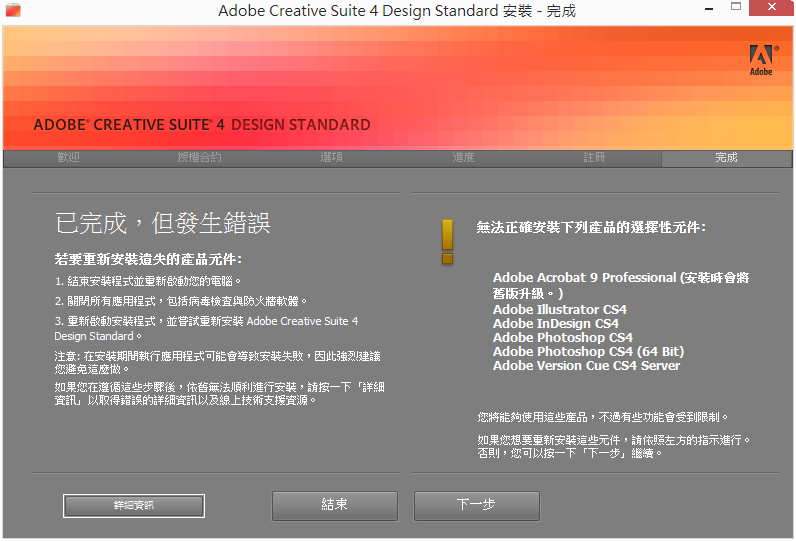
It says: Install is complete,but has something error occur.
And the list of right hand side is "affected products"
In the lower left corner, it's "Information" or "detail" or something like that......
Its screen shot.↓
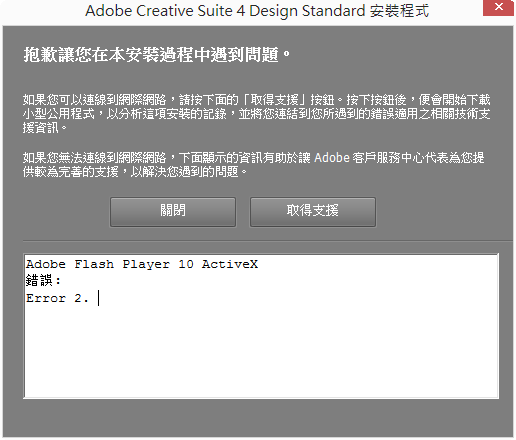
That message says:
"Adobe Flash Player 10 ActiveX
Error:
Error 2."
Can anyone told me what's wrong of my installation ?
Thanks~~


 1 Correct answer


if everything seems to be working, leave it. if you have a problem:
uninstall all the cs4 programs and use the cleaner per, Use the CC Cleaner Tool to solve installation problems | CC, CS3-CS6
uninstall flash player, Uninstall Flash Player | Windows
restart your computer.
install indesign first.
then install photoshop
then install acrobat and illustrator
then install the remaining cs4 programs.

 17
Replies
17
17
Replies
17

Copy link to clipboard
Copied
Copy link to clipboard
Copied
I uninstall my CS4.
And I uninstall flash that suggested by the article.
But it still have same wrong when I install it again......
Is that flash 10 necessary?
Copy link to clipboard
Copied
no, it's not.
it's not even the latest version (14) of flash player, Adobe - Install a different version of Adobe Flash Player
Copy link to clipboard
Copied
So,I can ignore that error, and then install the latest version of flash player directly, right?
And I can ignore that "list of affected products", since it doesn't be affected actually, right?
Copy link to clipboard
Copied
you can ignore errors about installing flash player, but not other errors.
Copy link to clipboard
Copied
So......what should I do next?
Just reinstall that six products, and ignore that error of flash?
Copy link to clipboard
Copied
i can't read the error messages you posted so i can't say if there are other errors.
Copy link to clipboard
Copied
Translation for that words in Traditional Chinese in image 2:
============================================
Sorry for error at the installation process
If you can connect to Internet. Click that "取得支援"(means "to get support") button to connect to Adobe.
That will download a program to analysis your error.
And then,it will take you to the correct page of support for your error.
If you can't connect to Internet. Information under the message can help Customer Service to help you.
=============================================
And that program on Adobe web is dead......
Copy link to clipboard
Copied
uninstall anything from cs4 already installed, clean and then reinstall per Use the CC Cleaner Tool to solve installation problems | CC, CS3-CS6
Copy link to clipboard
Copied
well......that article i have been read......
i remove all things about CS4, run that cleaner, and then restart my computer.
and then, i do what you say in first response, restart computer again, delete some files.
then, install again.
but that error still exist...... : (
so i prefer to know that "install latest ver of flash can repair that error and let that six products go back to normal status?or not?" now......
or that error is not actually occur by flash......
by the way, if i just run the installation to repair that six products, they can work normally?
ps. thanks for that you cost your times to reply me so many times, though it isn't have a answer can solve it.
Copy link to clipboard
Copied
uninstall your flash player, Uninstall Flash Player | Windows
then install your cs4 programs.
test your programs to make sure they work ok.
then untick mcfee and update your flash player, Adobe - Install a different version of Adobe Flash Player
Copy link to clipboard
Copied
============
uninstall your flash player, Uninstall Flash Player | Windows
then install your cs4 programs.
============
i did that......
============
then untick mcfee
============
i don't have mcfee in my computer.
============
test your programs to make sure they work ok.
============
programs can "open", but i don't know they work "ok" or not......maybe some plugin can not work, but i don't know......
Copy link to clipboard
Copied
mcafee is offered when you install flash player from the link in message 11.
so, you were able to install all your programs including indesign? if so, please mark helpful/correct responses (message 11).
Copy link to clipboard
Copied
i don't choose mcfee in that page ever......
and...well......
that error still occur when i install CS4 D. S. in response 10.
but i can open that six programs who be affected after i close installation.
and i'm not sure they work ok,or have some function can not work.
and that situation is same with beginning......
have a error message, but programs can be open.
i don't know that installation process be ok or not.
and i don't know programs work ok or not.
Copy link to clipboard
Copied
if everything seems to be working, leave it. if you have a problem:
uninstall all the cs4 programs and use the cleaner per, Use the CC Cleaner Tool to solve installation problems | CC, CS3-CS6
uninstall flash player, Uninstall Flash Player | Windows
restart your computer.
install indesign first.
then install photoshop
then install acrobat and illustrator
then install the remaining cs4 programs.
Copy link to clipboard
Copied
Oh!! It's work!!
My CS4 work ok now.
That message of error don't occur again.
Thank you, thank you so much!!
Copy link to clipboard
Copied
you're welcome.
enjoy your cs4 programs. you worked hard to install them!


 AdChoices