


Participant
May 17, 2013
質問

Illustrator.exe - Entry Point Not Found

  • May 17, 2013
  • 返信数 3.
  • 16924 ビュー

I have just upgraded to Creative Cloud, previously we had Adobe CS6 Design Premium. Before upgrading I de-installed Adobe CS6 Design Premium from my Windows 8 Professional 64-bit PC, I then ran the Adobe Removal tool went for a reboot.

After the reboot I went with the new install of Creative Cloud Apps using the latest Adobe Application Manager everything downloaded and installed fine however Illustrator in 32 bit version doesnt work, every time I click on the shortcut I get this error saying 'Illustrator.exe - Entry Point Not Found.
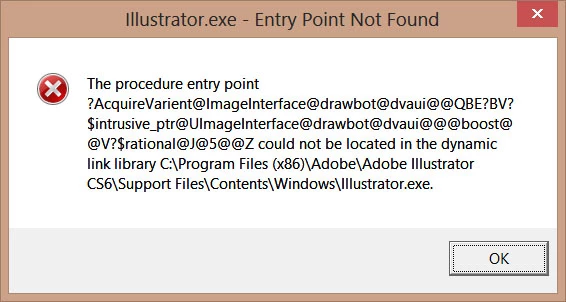
I completely removed Illustrator again and tried a second attempt at installing and keep getting the same error, also Adobe Illustrator CS6 Update (Version 16.2.0) will not install and neither will the Touch App Plugin Update.

Clearly something is weird with the install for 32-bit. The 64-bit version functions fine however I want to try and resolve this issue so that everything works.

Thanks,

Mark

    このトピックへの返信は締め切られました。

    返信数 3

    Participant
    April 20, 2018

    plz help my problem?

    Participant
    November 17, 2016

    I had the same issue but all of these didn't work for me. What did work was to disable UAC and Anti-Virus then uninstall Illustrator from the control panel. After the uninstall, I emptied the temp directory C:\Users\xxxxx\AppData\Local\Temp then I also deleted the Adobe Illustrator directories from the previous install (C:\Program Files\Adobe\Adobe Illustrator CS6 and C:\Program Files\Adobe\Adobe Illustrator CS6 (64 Bit)). I then reinstalled to C:\Program Files\Adobe and let the installer recreate the directories. It is something left over in those directories from the previous install that was causing my issue.

    I hope this helps some.

    Romsinha-9KMEUt
    Adobe Employee
    Adobe Employee
    May 17, 2013

    Hi Mark,

    Please let us know do you have any antivirus installed on your machine. If yes disable it. Turn off firewall and disable UAC. Restart your machine and try to install it again.

    Disable UAC: http://blogs.msdn.com/b/hyperyash/archive/2012/07/18/disabling-user-account-control-in-windows-8.aspx

    nelsonbostock作成者
    Participant
    May 17, 2013

    I have followed your exact procedure disbled anti-virus, disabled Windows Firewall and disabled UAC. De-installed everything then rebooted, made sure anti-virus was disabled along with Firewall then downloaded again and installed and exactly the same problem.

    Romsinha-9KMEUt
    Adobe Employee
    Adobe Employee
    May 17, 2013

    Please follow the mentioned steps:

    1. Uninstall Illustrator from control Panel. Empty temp folder.

    2. Enable hidden Admin: Open Command Prompt as administrator and type--> net user administrator /active:yes

    3. Log Off and log in as administrator

    4. Try to install the application again in root account