
Exit
  • Global community
    • Language:
      • Deutsch
      • English
      • Español
      • Français
      • Português
  • 日本語コミュニティ
  • 한국 커뮤니티
0

InDesign CS 5.5 unter High Sierra installieren: Fehlermeldung

New Here ,
Aug 27, 2018 Aug 27, 2018

Hallo, ich bekomme eine Fehlermeldung beim Öffnen nach dem Download von InDesign CS 5.5 unter MAC OS High Sierra 10.13.6. ( Install kann nicht geöffnet werden... bild.jpgSiehe Bild) Die DownloadDatei hat 1,48 GB. Kennt jemand eine Lösung für dieses Problem?
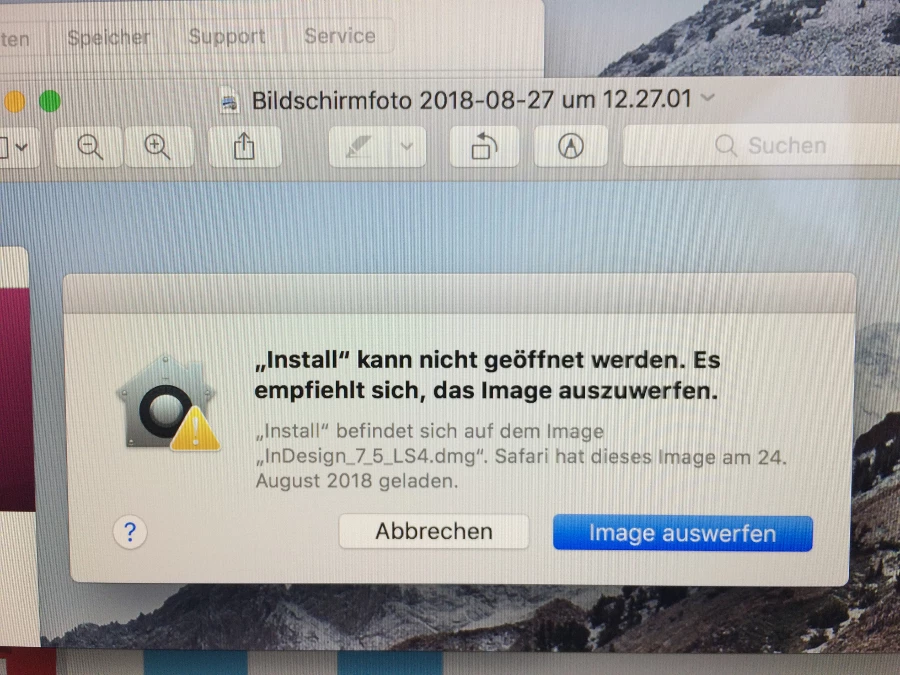
Vielen Dank und herzliche Grüße Jessica

1.5K
Translate
Report
Community guidelines
Be kind and respectful, give credit to the original source of content, and search for duplicates before posting. Learn more
community guidelines
LEGEND ,
Aug 27, 2018 Aug 27, 2018
Translate
Report
Community guidelines
Be kind and respectful, give credit to the original source of content, and search for duplicates before posting. Learn more
community guidelines
New Here ,
Aug 27, 2018 Aug 27, 2018

Hallo Ned, danke für den Link, allerdings kann ich die Install Datei wie gesagt nicht öffnen.

LG Jessica

Translate
Report
Community guidelines
Be kind and respectful, give credit to the original source of content, and search for duplicates before posting. Learn more
community guidelines
Adobe Employee ,
Aug 27, 2018 Aug 27, 2018
LATEST

Jessica, if you are still facing the error it is because you are double clicking or attempting to open the Install.app.  You must open the Install.app package and drag the Install Unix executable to an open Terminal window as discussed in Installing Creative Suite on a new Mac or macOS 10.12 (Sierra) or later .

I am sorry but this workaround is necessary if you wish to use Creative Suite 5.5 on modern versions of macOS.  Please post a screenshot if you continue to face errors implementing the workaround.  Information on how to post a screenshot can be found at FAQ: How do I capture and post a screen shot or video? .

Translate
Report
Community guidelines
Be kind and respectful, give credit to the original source of content, and search for duplicates before posting. Learn more
community guidelines