
GinnyR
Participating Frequently
July 20, 2018
Question

Installation Problem with Photoshop Elements 2018

  • July 20, 2018
  • 3 replies
  • 1936 views

When I try to install PSE 2018 on my HP Windows 10 computer, I get about 75% installed and this error message pops up:
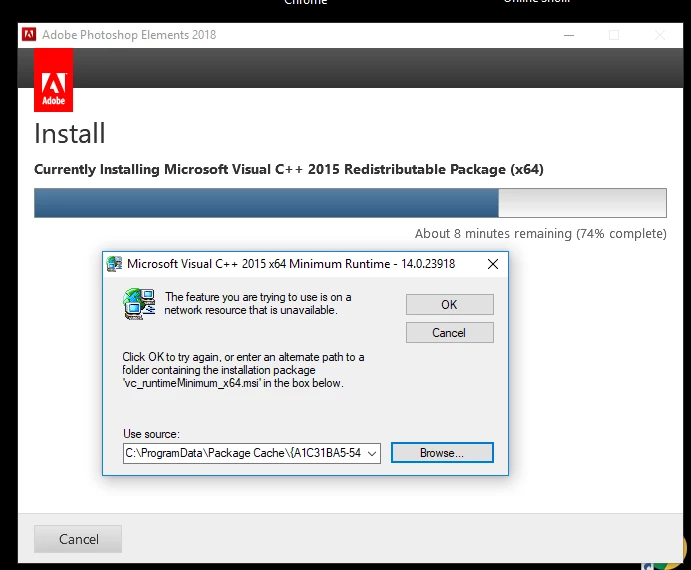
I have tried looking for the "vc_runtimeMinimum_x64.msi file but it appears to be non-existent.  Does anyone know where I can find or download the file?  And once I have the file, which folder should I put it in?  Or, does it make any difference which folder I put it in?  Once I have the file, I figure I will "uninstall" the entire non-working version of PSE and then reinstall it and "browse" to the folder where I put it and instruct this dialog box to use that file.  I hope it works!  P.S. I was considering getting other Adobe products in the future, but after seeing the type of support they offer (or don't offer) I shall reconsider. Thanks for any help you can offer.

This topic has been closed for replies.

3 replies

GinnyR
GinnyRAuthor
Participating Frequently
July 21, 2018

I purchased the program from Amazon as a special "Prime Day" purchase.  The package was unopened and looked new, which was what I ordered (a new one).  It does have the 24 digit serial number on the back.

If I don't get the help I need to install it, I will probably ask for a refund and get Amazon involved, since I notice that Amazon shows on the printed order that I have 30 days to return it.

Govardhan.V
Participating Frequently
July 21, 2018

Please refer below link :

Visual C++ Runtime 2015 Update

Let us know if you need further assistance.

GinnyR
GinnyRAuthor
Participating Frequently
July 21, 2018

The link you gave for "Visual C++ Runtime 2015 Update" says no update is needed for Windows 10.  I have Windows 10 and It is up to date.  Also... the error which I took a screen shot of, and which I show you in the very first post of this thread, is not the error described in the link you have given me. 

Looks like I will have to request a refund from Amazon.  Thanks for the suggestions.  Now I see why so many people want to uninstall Windows 10 and go back to Windows 7 or 8.

GinnyR
GinnyRAuthor
Participating Frequently
July 21, 2018

Someone sent me an email asking about which operating system I am using and what language etc..  My reply.....FYI:  I have  an HP desktop computer running Windows 10.  It is capable of both 32 and 64bit. It has an AMD processor. The program I purchased has both Windows & Mac operating system disks.  I am using the Windows disk. The language is English.  I am American and speak English.

John T Smith
Community Expert
Community Expert
July 20, 2018

Search bar at the top of http://www.microsoft.com/en-us/default.aspx to find and re-install the C runtime, or for ALL Windows help

GinnyR
GinnyRAuthor
Participating Frequently
July 20, 2018

Thanks for trying to help.. but I don't see "vc_runtimeMinimum_x64.msi" on that page.  I already downloaded Microsoft Visual C ++ redistributable and thought maybe I should install that first and then install the vc-runtimeMinumum_x64 (unless it is included in that) and then restart my computer and install Elements.  Can you be more specific about the name of the file that you are recommending I download from the link you gave, because I went thru 20 pages on that link and there was no "vc_runtimeMinimum_x64.msi".... which is the file that Elements installation is looking for.  Thanks.