
Participant
November 4, 2012
Answered

Launching Premier Pro 6 Trial version

  • November 4, 2012
  • 1 reply
  • 1005 views

Hello - I've downloade the trial version of Premier Pro 6 using the Adobe Download Manager and I got the install complete message, it show up in my Add/Remove Programs, I also got an email from Adobe acknowleging my download, but it does not show up in my All Programs - I can't find where to lauch the program.

I also downloaded the trial version of Photoshop 6 to test my Adobe Download Manager and it works fine, no problems at all.

I tried uninstalling and re-running the exe file that I see - but still nothing. What am I missing or what is not working correctly?
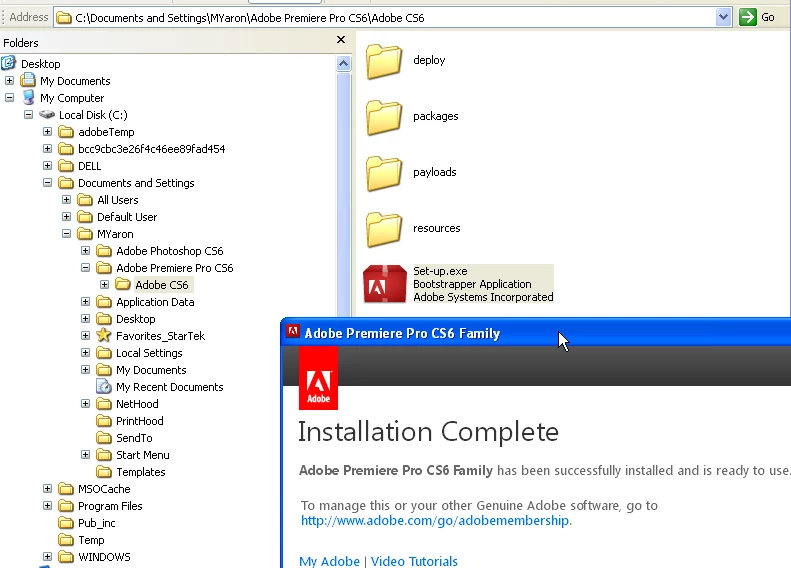
This topic has been closed for replies.
Correct answer Manish-Sharma

From the screen shot shared by you it seems you are working on Windows XP which doesn't meet the minimum system requirement to run Premiere pro CS6.

Check :- http://www.adobe.com/products/premiere/tech-specs.edu.html

1 reply

Manish-SharmaCorrect answer
Inspiring
November 4, 2012

From the screen shot shared by you it seems you are working on Windows XP which doesn't meet the minimum system requirement to run Premiere pro CS6.

Check :- http://www.adobe.com/products/premiere/tech-specs.edu.html

Participant
November 5, 2012

but photoshop 6 works, is it the same requirements?

thank you

-cerah

Inspiring
November 5, 2012

No, Refer to the below link to know the tech specs for the PS CS6.

http://www.adobe.com/products/photoshop/tech-specs.html