Participant
September 22, 2013
Answered

Lightroom 5.2 Installation won't recognize .MSI file

  • September 22, 2013
  • 2 replies
  • 2294 views

I've attempted several times to install the Lightroom 5.2 update, but everytime it starts installing it gives me an error and tells me to locate the folder with the appropriate .msi file for installation. Now, the self-extracting installer shows that it extracted the msi file, but when I locate and click on it the installer tells me it's not the right installation file. Has anyone else come across this as well and, if so, what solutions have you found to get around it?

This topic has been closed for replies.
Correct answer positive_customer16B7

Uninstall is not possible, the following message appears:
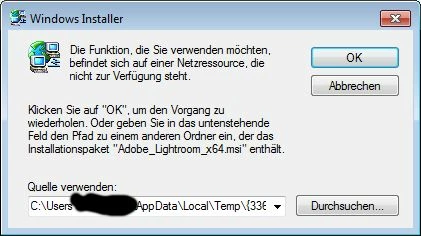
this says that the network resource is not available. I wonder which network resource this would be, as the download had been done to the C drive, no network involved (the same error message on installing and on deinstalling).

When I search for the msi file on disk, only one is found. But when I choose that one, it is not accepted, and installation process aborts.


I finally managed to uninstall the old version of LR and to install the new 5.2 version, respectively, as follows:

- I downloaded fixit from Microsoft's support page http://support.microsoft.com/kb/971187

(the link shows the German translation, but I guess the fixit software by Microsoft will work in different languages, or there must be the equivalent page in English too, I guess)

- I ran the fixit program. Checking Installation did not help. Checking Uninstallation, where I chose Lightroom 5 (previous version) did help, the program was now finally uninstalled.

- I restarted the PC

- I started the downloaded Lightroom file for version 5.2. This time, the installation worked correctly.

Hope that helps for others too.

2 replies

bophil514
Participant
July 21, 2014

Thanks, it solved my problem too

Participant
September 22, 2013

Same problem here. No idea what went wrong.

Participant
September 24, 2013

Same probleme here. New downloads and manual search for msi file on disk does not help, unfortunately.

Romsinha-9KMEUt
Adobe Employee
Adobe Employee
September 24, 2013

Hi,

Please uninstall Lightroom and try installing again.

Win: Go to Control Panel, Uninstall Lightroom, restart your machine and try installing again.

Mac: Go to Applications/Utilities/Adobe Installer and uninstall Lightroom

Install from: https://creative.adobe.com/products/lightroom .

Regards,

Romit Sinha