
Participant
July 2, 2019
Answered

Logo in header in Portfolio website template

  • July 2, 2019
  • 2 replies
  • 9699 views

Hi, I'm wanting to put my png logo in the header / masthead of my Portfolio website. I'm using the template called "Mercedes" and there only seems to be an option for a text heading. I want a separate background image and logo image over the top, is this possible or do I need to use another template?
This topic has been closed for replies.
Correct answer Nancy OShea

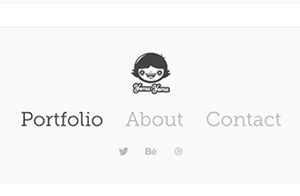
By default, the Mercedes layout has room for a small logo above the navigation bar as shown in the scrrenshot  below.


If you have something radically different in mind, consider using another layout such as Marta or Lukas.

Adobe Portfolio | Layout Themes are the Foundation for Your Website


Also read this article on choosing the right layout.

https://creativepro.com/choosing-an-adobe-portfolio-layout/


And this article on using the Masthead feature.

https://help.myportfolio.com/hc/en-us/articles/218523687-What-is-a-Masthead-how-do-I-use-it-


Finally, for technical help or feature requests:

Contact Portfolio Team


2 replies

Nancy OShea
Community Expert
Nancy OSheaCommunity ExpertCorrect answer
Community Expert
July 5, 2019

By default, the Mercedes layout has room for a small logo above the navigation bar as shown in the scrrenshot  below.


If you have something radically different in mind, consider using another layout such as Marta or Lukas.

Adobe Portfolio | Layout Themes are the Foundation for Your Website


Also read this article on choosing the right layout.

https://creativepro.com/choosing-an-adobe-portfolio-layout/


And this article on using the Masthead feature.

https://help.myportfolio.com/hc/en-us/articles/218523687-What-is-a-Masthead-how-do-I-use-it-


Finally, for technical help or feature requests:

Contact Portfolio Team


Nancy O'Shea— Product User & Community Expert
Ned Murphy
Legend
July 2, 2019

You should find the forum for whichever product this concerns and post your question(s) there.

Here is a link to a page that has links to all Adobe forums...

Forum links page: https://forums.adobe.com/welcome

Abambo
Community Expert
Community Expert
July 5, 2019

https://forums.adobe.com/people/Ned+Murphy  wrote

You should find the forum for whichever product this concerns and post your question(s) there.

Ned,

Adobe Portfolio (READ ONLY)​ has been made read only and support is shifted outside of the fora. So the best a user can do is either using the new support pages https://help.myportfolio.com/hc/en-us or to post here in the CC forum and hoping that one of our friendly ACP colleges has an answer.

ABAMBO | Hard- and Software Engineer | Photographer