
Participant
July 24, 2018
Answered

move all program files to a different drive

  • July 24, 2018
  • 2 replies
  • 830 views

I downloaded Premiere Pro to my SSD C: and am assuming that all the files that are needed for adobe premiere are on that drive. I want them on my storage HDD 😧 however and i don't know how to get them there.

If anyone knows or is experiencing the same thing please let me know.

Thanks!
This topic has been closed for replies.
Correct answer Abambo

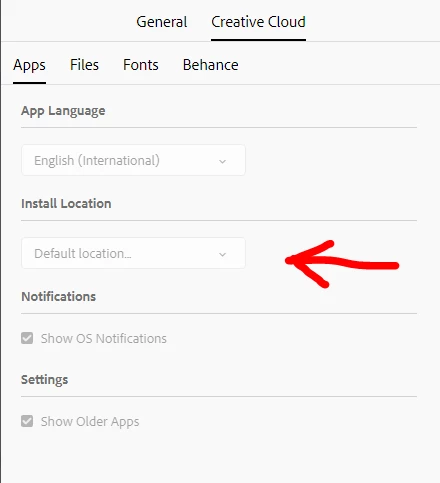
Look here for a different install location:

Try that from your CC app!

2 replies

Participant
January 12, 2021

I have done that now.  How do I move all of my programs to the new location without loosing current settings. If I uninstall and reinstall the program will be where I want it but all of my settings and preferences may be lost.

Abambo
Community Expert
AbamboCommunity ExpertCorrect answer
Community Expert
July 24, 2018

Look here for a different install location:

Try that from your CC app!

ABAMBO | Hard- and Software Engineer | Photographer