
Participant
February 26, 2020
Answered

MSVCP140.dll is missing when loading PS - Newbie - First time installing/using software

  • February 26, 2020
  • 2 replies
  • 8567 views

Hi I'm getting the MSVCP140.dll missing and the advice seemes to be -


Reinstall the files by running the vcredist_x64.exe  files from the following locations. Use Windows Explorer to navigate to the following locations on your computer.

Run the vcredist_x64.exe at the following locations resolve this issue:

\Program Files (x86)\Adobe\Adobe Creative Cloud\CoreSync\customhook\vcredist_x64.exe

\Program Files (x86)\Adobe\Adobe Creative Cloud\CoreSyncV1\customhook\vcredist_x64.exe


I'm really sorry but I have no idea what this means, can someone tell me what to do, I've just subscribed to PS & LB but I'm thinking of cancelling.
This topic has been closed for replies.
Correct answer

Hi

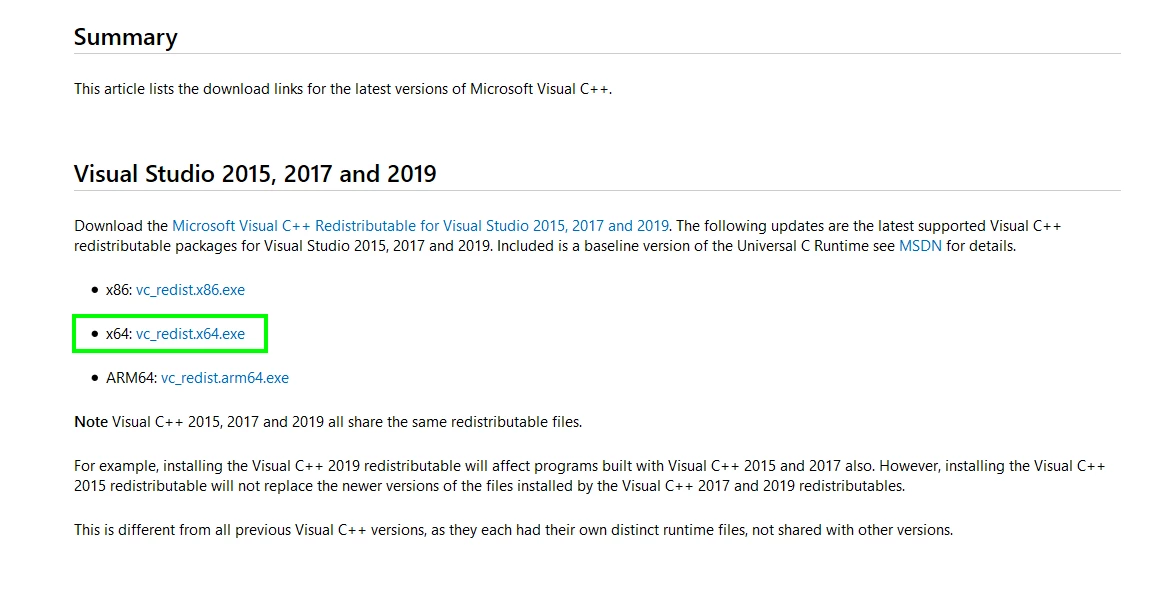
Go to this page and download and install vc_redist.x64.exe

https://support.microsoft.com/en-us/help/2977003/the-latest-supported-visual-c-downloads

2 replies

Participating Frequently
February 26, 2020
Try these fixes
  1. Install the MSVCP140.dll file.
  2. Reinstall the Microsoft Visual C ++ Redistributable package.
  3. Do a clean installation of the program.
Participant
February 26, 2020

Thanks for replying Ruskin, I tried the first reply from Ged and I seem to be up and running 🙂


Correct answer
February 26, 2020

Hi

Go to this page and download and install vc_redist.x64.exe

https://support.microsoft.com/en-us/help/2977003/the-latest-supported-visual-c-downloads

Participant
February 26, 2020

Thanks Ged - That's fixed it 🙂


February 26, 2020

You're welcome 👍