

fotoroeder
Inspiring
February 23, 2017
Answered

Muse quits by itself right after the start process

  • February 23, 2017
  • 1 reply
  • 904 views

Has anybody out there the same experience, that Muse quits right after starting?

I have this issue now the third time. Yesterday I had this, too. It got only solved by uninstall and reinstall via screenshare with ADOBE

Today I had the same issue as well. Via screenshare with an ADOBE worker it got solved again.

I have this issue now the third time, tried to uninstall end reinstall again but this time it fails.

Any suggestions? I use MacOSX 10.10.5.
This topic has been closed for replies.
Correct answer Jeffrey_A_Wright

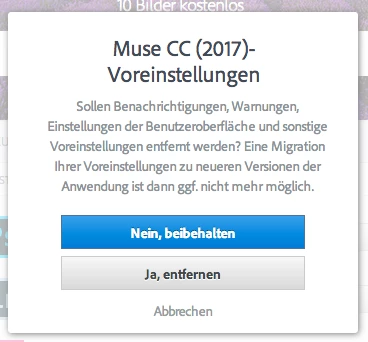
I am also told that any presets or preferences will get lost. Is there a way to safe these before?

I always have to reinstall scripts as well from WebEdgeFonts. If only two scripts, no big thing but frustrating anyway.


Moving this discussion to the Creative Cloud Download & Install forum.

Fotoreader I am sorry but due to the change in install technology, implemented with the release of Muse CC 2017, it is not possible to access the advanced options during the installation.  I would recommend you back up your preferences in case you decide to revert to a previous version.  You can find additional details regarding the installation process at Download and install Creative Cloud apps .

1 reply

fotoroeder
Inspiring
February 23, 2017

If I tell Muse to delete all presets as well when uninstall, it gets a little better, I can open the Musefile, but soon after opening the

Muse-file it quits again and I get an error message from Apple.

ADOBE already had a look at this, at least on the surface of the error message.

So I have a last espresso and wait until tomorrow? Could it be, that the Muse-file also creates this as well?

I`ll give it a try with a completely new file.

Update:

It works with a complete new file. I´m quite not sure if anybody wants to check the muse-file with this issue? It is quite small, with one page

designed and 5 to 7 empty pages.

Otherwise I try to pass this tomorrow directly to ADOBE.

fotoroeder
Inspiring
February 24, 2017

This day,  early in the morning, I must realize the same issue. Is this something only I find? I already checked via "Festplattendienstprogramm", if my machine has a problem but no – everything is fine. Because I didn`t even try to open my file from yesterday it could not be only a problem with the file.

fotoroeder
Inspiring
February 24, 2017

Moving this discussion to the Creative Cloud Download & Install forum.

Fotoreader I am sorry but due to the change in install technology, implemented with the release of Muse CC 2017, it is not possible to access the advanced options during the installation.  I would recommend you back up your preferences in case you decide to revert to a previous version.  You can find additional details regarding the installation process at Download and install Creative Cloud apps .


Quite tricky but that should work (means I found it this way.

Thanks

To back up the preferences: does this happen by saving these folders (Adobe Muse CC Libraries/Lybrary to a different location?