
Participant
January 9, 2020
Answered

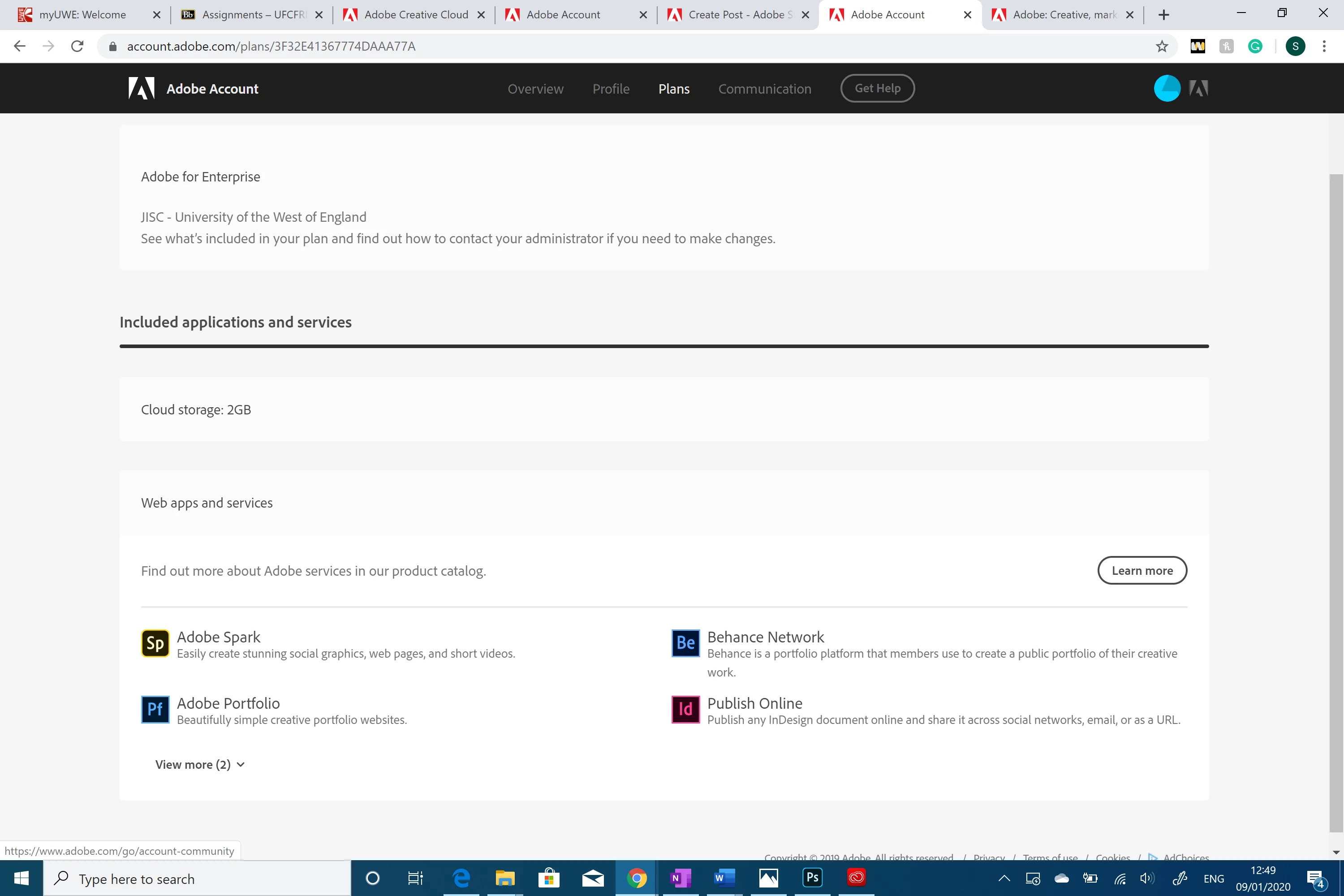
my student plan does't include what i was promised

  • January 9, 2020
  • 6 replies
  • 2915 views

on the website, the plan says it includes all applications, but for some reason, I'm only getting these few applications that I don't even use. the payment has gone through, only for me to realize this is a scam. is there a way for me to get the applications I was promised like photoshop and premiere pro? if not I want it canceled and my money refunded. 

I can't contact any support or help, I called a number that wasn't even working, I just want to be able to reach the support team to solve this or do something about it. 
 

This topic has been closed for replies.
Correct answer Ani*Adobe

Hi there,


Apologies for the confusion. You are subscribed to Creative Cloud Enterprise through your school/college. Please contact the administrator to add or modify access to the other applications.


^Ani

6 replies

Nancy OShea
Community Expert
Community Expert
January 9, 2020

When people hijack a thread, it makes things difficult for everyone. One person has an Enterprise plan through their school.  Another person comes along.  We don't know for sure what the 2nd person has or how they got their subscription -- directly from Adobe or through their school.  If the former, they need to contact Adobe Customer Care.  If the latter, they must go back to their school's IT department.


I hope that makes things a bit clearer.


Nancy O'Shea— Product User & Community Expert
suleimaAuthor
Participant
January 9, 2020

I tried contacting the university as well, they said they cant help. I'm trying to cancel the subscription as I can't change the apps included in the subscription and the apps available are useless. I can't find any "cancel subscription" option. how do fix this? I want to do it before the end of the 14 days so i can get a refund because i'm not using any of the apps available.

Legend
January 9, 2020

Contact Adobe, but they may just send you back to the Uni. However if you have an invoice number, it may help. 

Participant
January 9, 2020

how do you contact adobe ?

Participant
January 9, 2020

I have exactly the same issue

Ani*Adobe
Community Manager
Ani*AdobeCommunity ManagerCorrect answer
Community Manager
January 9, 2020

Hi there,


Apologies for the confusion. You are subscribed to Creative Cloud Enterprise through your school/college. Please contact the administrator to add or modify access to the other applications.


^Ani

Participant
January 9, 2020

hi i have the same problem as her and i contacted my uni and they said to me that they cannot do anything and that i had to contact adobe and of course I cannot find any number or a way to contact adobe personally. can you give further advice please

Abambo
Community Expert
Community Expert
January 9, 2020

No, "they" are wrong. As an admin of a teams contract (the step below the Enterprise contract), I know that "they" are wrong. The Enterprise admin needs to take all actions as you were told by Test_Screen_Name and by Ani_Adobe (an Adobe employee). If "they" don't know how to do what "they" are supposed to do, "they" need to contact support. That is the way Teams and Enterprise contracts work. In no case can you personally contact Adobe for help. And anyway, Adobe cannot help, as the application is managed by the Enterprise administrators.


It's a similar situation to a rented car, where you ask the manufacturer of that car to change or repair the car.


ABAMBO | Hard- and Software Engineer | Photographer
January 9, 2020

Hi

In your taskbar it looks like you have Photoshop opened, when did you sign up for the plan

suleimaAuthor
Participant
January 9, 2020

so far this is just the free trial


Legend
January 9, 2020

According to the sheet, you have your plan through your University, who decide what you can and can't run. Check if that's the same email you used to buy the other plan. Warning: if you bought the plan on a PC where someone else was signed on, you gave the plan as a gift to the other person! If you definitely used the same email to pay for the plan, talk to your University, as they manage this account. Adobe can't help you, nor can we.