June 18, 2013
Answered

New Creative Cloud App unusable: it's blank!

  • June 18, 2013
  • 14 replies
  • 81087 views

This is what I get with the new Creative Cloud App:
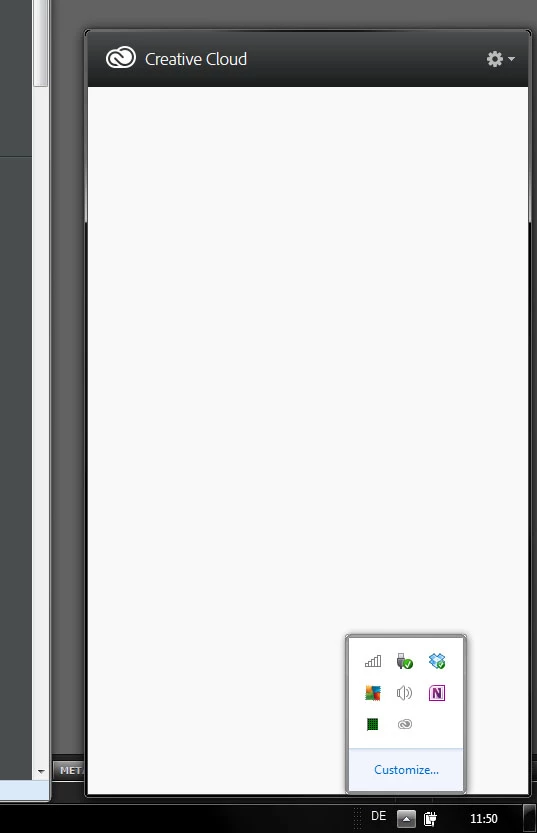
How am I supposed to use it?

This topic has been closed for replies.
Correct answer Manish-Sharma

Hi Andreball,

Can you try quitting the Creative Cloud desktop apps from Task bar and then re-lanching it ?

Also, Are you using any font management software on your machine ?

Can you provide the screen shot for the content in below folder :-

C:\Program files (X86)\Adobe\Adobe Creative Cloud

Thanks,

Manish Sharma

14 replies

Participant
June 2, 2014

Bit late to the party here, but I want to add that removing the OOBE file worked for me.  I suspect a Windows update caused the error (specifically, 8.1 for 64), as that's the most recent event. 

For reference, I've also been getting unusual update notifications for Acrobat Pro OUTSIDE the app, which have all failed, yet now the CC app is working, I see no update for that program.

Thanks Jeff.

Participant
October 11, 2014

Did you drag the OOBE file into the trash and empty it? I tried that (I am on a Mac) and it wouldn't all me to empty it

Please help!

Nikhil R Gupta
Community Manager
Community Manager
October 11, 2014

Hi jnm60,

Go to Applications-->Utilities-->Adobe Installers.

Uninstall Adobe Creative Cloud.

** If it says application is running in the background then open Activity Monitor and close the process of Creative cloud.

Once the creative cloud is uninstalled then follow the below mentioned steps:

Please go to Library

    1. Click on Finder then Click on Go and Go to folder

    2. Type /Library and click on Go

    3. Go to Application Support and Adobe and then delete OOBE folder.

    4. Redo Step 1

    5. Type ~/Library and click on Go

    6. Go to Application Support and Adobe and then delete OOBE folder.

    7. Go to https://creative.adobe.com/products/creative-cloud?promoid=KLYVF

Download Adobe Creative cloud, Install it.

If the above steps do not work. Try enabling root user account and then try to open Adobe Creative cloud.

Enable root user: Enabling and using the "root" user in Mac OS X

Thanks,

Nikhil Gupta

Participating Frequently
February 4, 2014

I have Windows 7 Premium.

I've tried all the following in the previous posts to no avail, except for creating new windows account. New account was the only way for it to work and I did not want that.

I finally figured out the root of all evil. The ampersand in Windows user folder name (not the Windows displayed user name).

If you have ampersand (&) or other non-alphabet characters in windows user folder name (Example: C:\Users\Bob & Mary), then Flash Builder will fail to install (happened to me), Creative Cloud will display white screen, and/or other miscellaneous problems.

I confirmed this to be true and works:

1) I had blank Creative Cloud window as shown in the first post.

2) I renamed the display username and window user folder name by doing the instructions here:

   http://www.ghacks.net/2011/03/28/how-to-change-a-windows-account-name-and-user-profile-folder-name/

   (Example: Change from "Bob & Mary" to "Bob n Mary" - without the quotes)

3) After logging back in my newly renamed account, I opened Creative Cloud and login interface shows up! :-)

Participant
February 6, 2014

Remove all adobe applications and reinstall adobe CC

Participating Frequently
January 17, 2014

I had the same problem.... so I tried the solution of deleting the database file, as per previous posts and that helped!

good luck...

Manish-SharmaCorrect answer
Inspiring
June 18, 2013

Hi Andreball,

Can you try quitting the Creative Cloud desktop apps from Task bar and then re-lanching it ?

Also, Are you using any font management software on your machine ?

Can you provide the screen shot for the content in below folder :-

C:\Program files (X86)\Adobe\Adobe Creative Cloud

Thanks,

Manish Sharma

June 18, 2013

Hey Manish,

previously I have restarted my computer, reinstalled the app and restarted it too and nothing has helped. An hour later now, apparently after my login session on the Adobe webpages has expired, I can see something in the pop up menu - a login form followed by a license agreement.

I think that might be the conflict.

Here the screenshot

Participant
February 21, 2015

which file did you delete