- Home
- Download & Install
- Discussions
- Re: No updates of any apps in my Creative Cloud - ...
- Re: No updates of any apps in my Creative Cloud - ...

Copy link to clipboard
Copied
For some odd reason I never get any updates of any of the apps on my system. I've tried the suggested options in this community including removing the .db file from the library/OOBE folder and uninstalling and re-installing Creative Cloud alltogether but to no avail.
Even though I am several versions behind for Photoshop the updates page within CC keeps showing 'You're up to date!'. Only thing that seems to work is uninstalling and re-installing each app, something I really don't want to do every single time I find out online there's a newer version out..
Any suggestions are greatly appreciated.


 1 Correct answer


I see! Thanks for cooperating patiently. I would recommend you to speak with our support team here: https://adobe.ly/40JaeKn
They have an option to access your screen(with your permission only) if needed and help you with the issue.
Let us know if you have any questions.
^Shivangi

 45
Replies
45
45
Replies
45


Copy link to clipboard
Copied
are you waiting to see if updates work after following:
uninstall every cc app including preferences per https://helpx.adobe.com/creative-cloud/help/uninstall-remove-app.html
then uninstall the cc desktop app, again using the correct uninstaller per https://helpx.adobe.com/creative-cloud/help/uninstall-creative-cloud-desktop-app.html#sa_src=web-mes...
clean your computer of cc files per http://www.adobe.com/support/contact/cscleanertool.html
restart your computer (don't skip this)
reinstall the cc desktop app using the "alternative download links" at the bottom of the page at https://helpx.adobe.com/download-install/kb/creative-cloud-desktop-app-download.html
Copy link to clipboard
Copied
Correct! We'll know as soon as a newer version of either PS or LRC arrives.
Copy link to clipboard
Copied
got it.
poster with different situation, branched.
Copy link to clipboard
Copied
Well, I really am very sorry to have to return to this thread but it seems that the problem persists. Photoshop 26.9 is available but my CC is again not having it. 'No updates available' and it keeps saying 26.8.1 is the latetst. Did the whole sign out - sign in and restart etc. again to no avail. Logged in to the online version (https://www.adobe.com/apps/updates) and even that is showing 'no updates available'.
Oddly enough I DO get upodates for the CC app itself.
Any other ideas?

Copy link to clipboard
Copied
HI there,
Could you please click on the link shared in here to update Photoshop:https://adobe.ly/45cPEUf?
Let us know the outcome.
Thanks
^KS
Copy link to clipboard
Copied
Hi Kanikas,
Thanks for the quick reply. Clicking the 'Update photoshop' on that page simply opens the Photoshop app (26.8.1) on my Mac - even though the page warns me that it will be opening CC. Nothing else happens.

Copy link to clipboard
Copied
Thanks for confirming. Have you tried the steps listed here? https://adobe.ly/3IRR9zu
Let us know.
^Shivangi
Copy link to clipboard
Copied
Repeatedly. And way more than just that, see the steps as suggested by kglad in the previous page of this thread.
Nothing has helped - CC refuses to aknowledge available updates.. 😞
Copy link to clipboard
Copied
in your cc settings, copy and paste into a message here the app install directory setting.
Copy link to clipboard
Copied
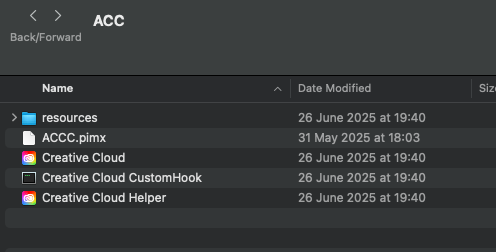
Attached screenshot is all it says within settings. I can confirm that CC is installad at Applications/Utilities/Adobe Creative Cloud/ACC/Creative Cloud.app.
What I noticed though is that the app itself has june modigfied date even tthough CC updated itself just yesterday. Or so it led me to belief at least.
Copy link to clipboard
Copied
do you have a teams, education or enterprise subscription?
Copy link to clipboard
Copied
Copy link to clipboard
Copied
reset the cc desktop app by making sure it's in the foreground, then press:
Win: Ctrl + Alt + R
Mac: Cmd + Opt + R
Copy link to clipboard
Copied
I have done that several times already.. and again just now but no change.
Copy link to clipboard
Copied
then follow @sprinklr-integration-user's suggestion or
repair per https://helpx.adobe.com/download-install/kb/creative-cloud-install-stuck.html
if that fails and you have windows, open your control panel > add/remove programs > cc desktop app > repair
if that fails, uninstall using the correct uninstaller from https://helpx.adobe.com/creative-cloud/help/uninstall-creative-cloud-desktop-app.html#sa_src=web-mes... and then reinstall using*
if that fails, do a clean cc install carefully following each applicable step:
uninstall every cc app including preferences per https://helpx.adobe.com/creative-cloud/help/uninstall-remove-app.html
then uninstall the cc desktop app, again using the correct uninstaller per https://helpx.adobe.com/creative-cloud/help/uninstall-creative-cloud-desktop-app.html#sa_src=web-mes...
clean your computer of cc files per http://www.adobe.com/support/contact/cscleanertool.html
check for, and if available, update your os
if windows is your os, repair all ms visual c++ versions that can be repaired (use google if you don't know how to do this)
if windows is your os update your ms visual c++, if it can be updated (use google if you don't know how to do this)
restart your computer (don't skip this)
reinstall the cc desktop app using the "alternative download links" at the bottom of the page at https://helpx.adobe.com/download-install/kb/creative-cloud-desktop-app-download.html
use the desktop app to install your cc programs/trials>
if that fails, you probably have a corrupt user account. google your os and how to create a new one.
Copy link to clipboard
Copied
I could not find any active cases with the support. Did you speak with our support team recently?
^Shivangi
Copy link to clipboard
Copied
I have not (yet). There is one more thing I am going to try when I get home and that's cleaning up my macs keychain certificates related to Adobe and see if that does anything a all.
Should that fail I'll see if and where I can get in touch with support.
Copy link to clipboard
Copied
Sure!
Let us know how it goes.
^Shivangi
Copy link to clipboard
Copied
Unfortunately, it didn't.. Still no updates available while we know there actually is one. If you could direct me to the right page for the supportteam that would be great. I just found a chatbot so far.
Copy link to clipboard
Copied
who's we? do you have a teams or enterprise subscription?
Copy link to clipboard
Copied
I see! Thanks for cooperating patiently. I would recommend you to speak with our support team here: https://adobe.ly/40JaeKn
They have an option to access your screen(with your permission only) if needed and help you with the issue.
Let us know if you have any questions.
^Shivangi

-
- 1
- 2

Get ready! An upgraded Adobe Community experience is coming in January.
Learn more
 AdChoices