
J722
Participant
April 8, 2017
Answered

Older version Adobe After Effects CC 2017

  • April 8, 2017
  • 3 replies
  • 11801 views

Hi,

I recently had problems with Adobe After Effects CC 2017. So I would like to download the precious version of Adobe After Effects. But the problem is that I cannot find the 'Previous Versions' tab in Adobe Creative Cloud. I have been looking online for ages and I could not find the answer, I hope that you guys can help me.

Greetings.
This topic has been closed for replies.
Correct answer Nancy OShea
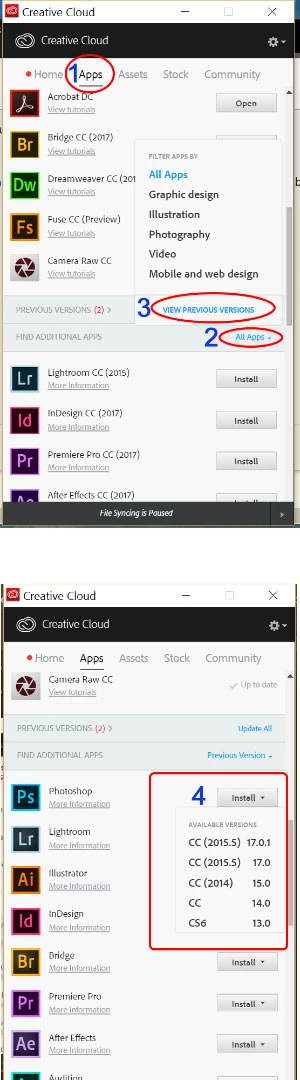
  1. On Creative Cloud Desktop App, click on Apps > Find Additional Apps > All Apps then you should see  Previous Versions
  2. From there, you must click on the Install button to see a drop-list of available versions.
  3. See screenshot below.

3 replies

Sheena Kaul
Legend
April 10, 2017
Nancy OShea
Community Expert
Nancy OSheaCommunity ExpertCorrect answer
Community Expert
April 8, 2017
  1. On Creative Cloud Desktop App, click on Apps > Find Additional Apps > All Apps then you should see  Previous Versions
  2. From there, you must click on the Install button to see a drop-list of available versions.
  3. See screenshot below.

Nancy O'Shea— Product User & Community Expert
Ned Murphy
Legend
April 8, 2017