


- Home
- Download & Install
- Discussions
- Paid Subscription Says Trial Period Expired
- Paid Subscription Says Trial Period Expired

Copy link to clipboard
Copied
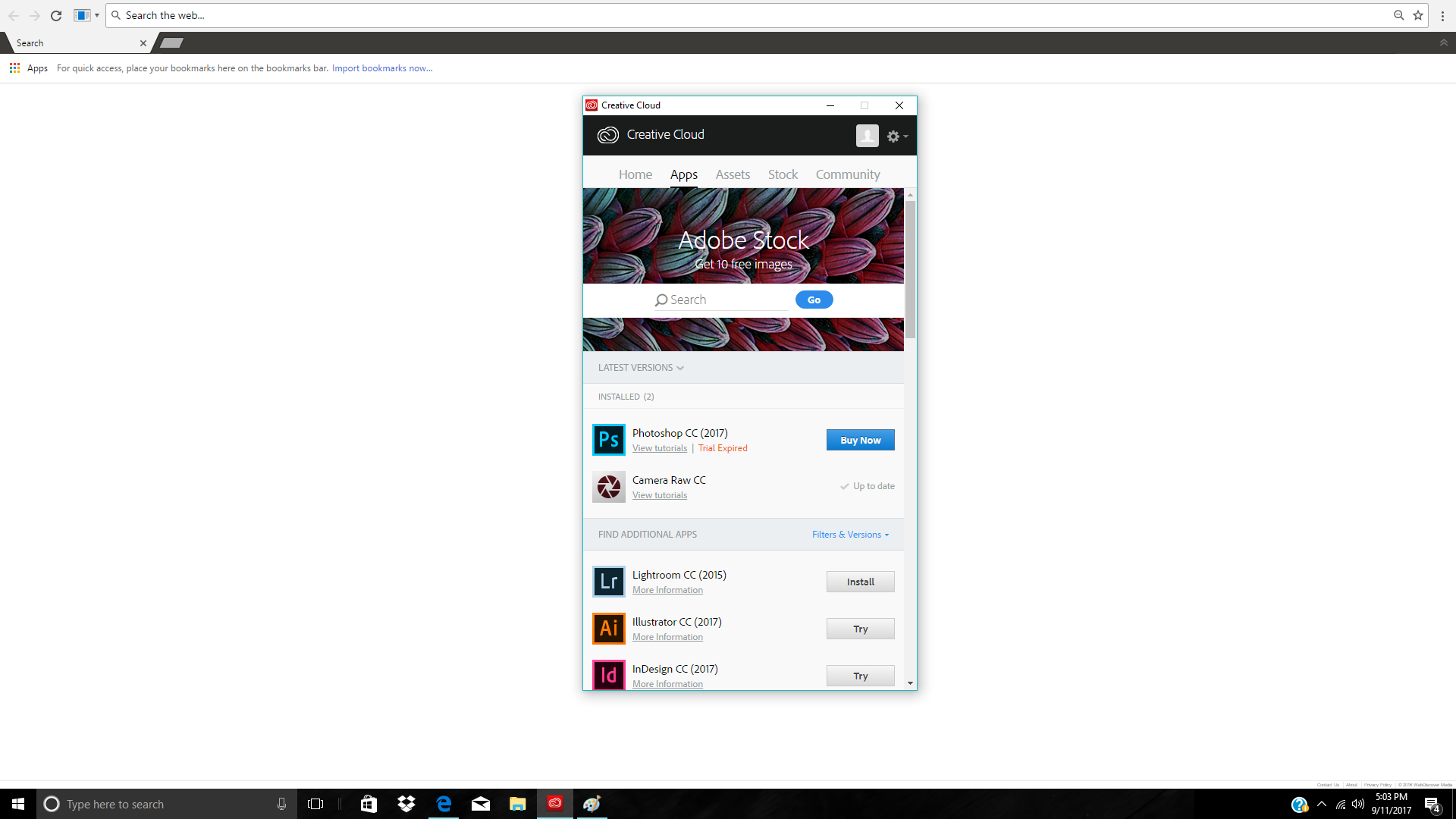
I have tried to contact someone for help. I have the one year subscription for creative cloud. Downloaded photoshop and lightroom. Used for a few months, while using it, it stopped working. Says trial period has expired. Go through and complete every option self helps says to try and nothing works. NOTHING


 1 Correct answer


Tishas51460649 I am sorry you are facing difficulty utilizing your Creative Cloud membership. As Jon indicated in message #4 you need to log in with an e-mail address/Adobe ID associated with an active membership.
The e-mail address you used to post to this public forum does not have a Creative Cloud membership, nor any Adobe software titles registered to it. I would recommend contacting our support team at Contact Customer Care Tishas51460649 to determine which e-mail address has your active me
...
 19
Replies
19
19
Replies
19



Copy link to clipboard
Copied
I know this isn't likely to reduce your frustration level, but I want to avoid giving you advice you've already tried.
What exactly, have you tried so far?
Which OS?
Which version(s) of the programs are you working with?
Copy link to clipboard
Copied
No I appreciate your help, I have tried uninstall, updating payment, the adobe problem fixer and trying to download from both the adobe site directly and through the creative cloud. My account shows the monthly charge was received on Sept 1st. I still cant get photoshop to download and now lightroom is doing the same thing
Copy link to clipboard
Copied
oh sorry Windows 10
Copy link to clipboard
Copied
Did you purchase both of the programs under the same package and Adobe User Id?
Have you tried logging out of the CC Desktop Application all together, waiting a few minutes, and logging back in?
Copy link to clipboard
Copied
Yes on both and I also uninstalled CC a couple of times
Copy link to clipboard
Copied
When you reinstalled, did you use the Adobe Cleaner Tool?
Use the Creative Cloud Cleaner Tool to solve installation problems
That will wipe any trace of the program from your machine before a re-install. It keeps certain files that are often left behind in a normal uninstall from affecting the new installation.
Copy link to clipboard
Copied
Yes that was the adobe problem fixer I couldn't remember the name of. I am desperate though, I can try it again. I have been dealing with trying to get it to work for three days now and also tried to contact someone with CC or adobe and it wont let you get past the forums. Very frustrating so I greatly appreciate your help. I will try it again now.
Copy link to clipboard
Copied
When you go through the Contact Customer Care portal, you need to make sure to click only the Creative Cloud icon when you're having an issue with a CC based service (on the first page after logging in). Clicking on any other icon that might show up when you log in (like Ps or Lr) will only give you the Forum option because, even though they don't say it, those icons are only for Legacy versions of the programs that Adobe no longer supports.
Basically, if you click anything but the CC Logo/Icon after logging into that service portal, it will never give you a chat or phone option.
Copy link to clipboard
Copied
oh wow gotcha, thank you for mentioning that I would have missed it every time. I restarted and ran the cleaner now I am trying download again. Crossing my fingers.
Copy link to clipboard
Copied
Here is a new one, now it is giving me error code P204
Copy link to clipboard
Copied
Do you have any anti-malware/anti-virus running in the background?
Your CC Desktop App may be corrupt too. Did you also log out of and uninstall that, or just Ps and Lr?
Copy link to clipboard
Copied
No the whole enchilada. I also cleaned it afterwards and no, I don't currently have anti virus unfortunately. Brand new computer and only use for photos with creative cloud. No surfing whatsoever
Copy link to clipboard
Copied
OK, and is the error coming up when installing the CC Desktop App, or one of the programs through the App?
Copy link to clipboard
Copied
Tishas51460649 I am sorry you are facing difficulty utilizing your Creative Cloud membership. As Jon indicated in message #4 you need to log in with an e-mail address/Adobe ID associated with an active membership.
The e-mail address you used to post to this public forum does not have a Creative Cloud membership, nor any Adobe software titles registered to it. I would recommend contacting our support team at Contact Customer Care Tishas51460649 to determine which e-mail address has your active membership .
Copy link to clipboard
Copied
I'm not sure what email it is showing, <Removed by Moderator> is the one I was logged into, to get to this forum I believe, but I had so many windows open I am not sure. I am pretty sure I got to this forum through the attempting to contact someone through contact customer care as I just tried again and again your only choice is forum. I also tried renaming the adobe stuff to OOEM which has now allowed me to get past the 204 error code and downloaded the CC again. Once I again try to download photoshop it again now shows trial has expired. Can you not actually speak with someone to resolve the issue or have someone remote in? I am paying for something I can no longer use and I am not program savy enough to figure it out on my own
Copy link to clipboard
Copied

Copy link to clipboard
Copied
Copy link to clipboard
Copied
finally got live chat thank you
Copy link to clipboard
Copied
Thanks for the update Tishas51460649.
For future viewers if you are facing any difficulties with your Creative Cloud membership then please contact our support team directly at Contact Customer Care.


Get ready! An upgraded Adobe Community experience is coming in January.
Learn more
 AdChoices