Participant
March 28, 2021
Answered

photoshop

  • March 28, 2021
  • 3 replies
  • 474 views

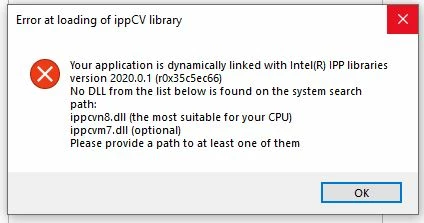
Having installed Creative cloud, I have this problem with photoshop. I know I must download a previous version but I do not understand where I cand find them. Could someone give me a link ?
Thank you !

This topic has been closed for replies.
Correct answer AxelMatt

Please take a look here: Install previous versions of your Creative Cloud apps (adobe.com)


@John T Smith 

This isn't a problem with the C runtime liberaries. The CPU doesn't support the requirements for the SSE4.2 support

3 replies

Legend
March 29, 2021

Be sure you keep the download in a safe place NOT JUST ON YOUR COMPUTER. If your computer disk fails, and Adobe have closed down the download, you will be left with nothing - except a continuing bill for Creative Cloud.

AxelMatt
Community Expert
AxelMattCommunity ExpertCorrect answer
Community Expert
March 28, 2021

Please take a look here: Install previous versions of your Creative Cloud apps (adobe.com)


@John T Smith 

This isn't a problem with the C runtime liberaries. The CPU doesn't support the requirements for the SSE4.2 support

My System: Intel i7-8700K - 64GB RAM - NVidia Geforce RTX 3060 - Windows 11 Pro 25H2 -- LR-Classic 15 - Photoshop 27 - Nik Collection 8 - PureRAW 5 - Topaz Photo
Participant
March 29, 2021
Thank you, it worked !


Garanti
sans virus. www.avast.com

<#DAB4FAD8-2DD7-40BB-A1B8-4E2AA1F9FDF2>
John T Smith
Community Expert
Community Expert
March 28, 2021

That may be a Microsoft problem, so try a Microsoft solution
Go to the Search bar at the top of http://www.microsoft.com/en-us/ to find and re-install the C runtime, or for ALL Windows help
-or direct to https://support.microsoft.com/en-us/help/2977003/the-latest-supported-visual-c-downloads
https://helpx.adobe.com/x-productkb/global/troubleshoot-c-runtime-errors-products.html