Exit
  • Global community
    • Language:
      • Deutsch
      • English
      • Español
      • Français
      • Português
  • 日本語コミュニティ
  • 한국 커뮤니티
0

Problem to install the trial version of Indesign

New Here ,
Apr 10, 2017 Apr 10, 2017

Hello,

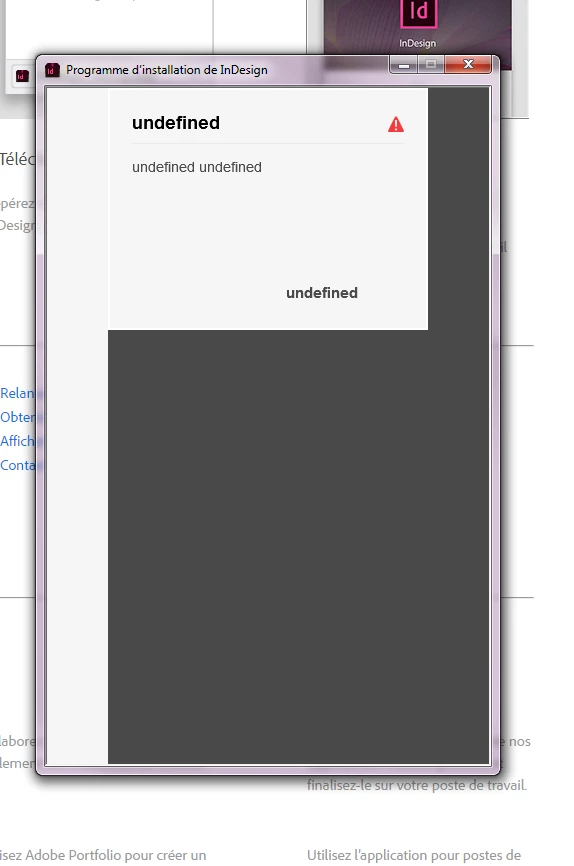
I'm download the trial version of Indesign. When I'm starting installation, I have this screen :

indesign.png

I'm on the Windows 7 PC (64 bits)

Chrome version : 56.0.2924.87

Thanks a lot for your help

TOPICS
Creative Cloud
587
Translate
Report
Community guidelines
Be kind and respectful, give credit to the original source of content, and search for duplicates before posting. Learn more
community guidelines

correct answers 1 Correct answer

Adobe Employee , Apr 12, 2017 Apr 12, 2017

Moving the discussion to Creative Cloud Download & Install​ forum.

Hi virginie1575,

Thanks for sharing the screenshots, it looks like to are unable to download Adobe InDesign CC 2017 from the website on your windows machine. Initially, you encountered "undefined" error and later you see a blank screen after signing in.

I would request you to download Creative Cloud desktop app as Ned suggested using this link: - Download and install Creative Cloud apps.  It seems that you are still using Adobe InDe

...
Translate
LEGEND ,
Apr 10, 2017 Apr 10, 2017
Translate
Report
Community guidelines
Be kind and respectful, give credit to the original source of content, and search for duplicates before posting. Learn more
community guidelines
New Here ,
Apr 10, 2017 Apr 10, 2017

Thanks for your answer Ned Murphy.

After waiting 1 minute, I have this windows :

adobe.JPG

I'm authenticate myself but same after 5 minutes I have always :

adobe2.JPG

...........

Translate
Report
Community guidelines
Be kind and respectful, give credit to the original source of content, and search for duplicates before posting. Learn more
community guidelines
Adobe Employee ,
Apr 12, 2017 Apr 12, 2017
LATEST

Moving the discussion to Creative Cloud Download & Install​ forum.

Hi virginie1575,

Thanks for sharing the screenshots, it looks like to are unable to download Adobe InDesign CC 2017 from the website on your windows machine. Initially, you encountered "undefined" error and later you see a blank screen after signing in.

I would request you to download Creative Cloud desktop app as Ned suggested using this link: - Download and install Creative Cloud apps.  It seems that you are still using Adobe InDesign CC 2017 installer from the web to sign in.

Please update this discussion with the results after install Creative Cloud app.

In case you encounter any error while installing Creative Cloud desktop app, please check the troubleshooting steps mentioned on this link: -Troubleshoot Adobe Creative Cloud download and install issues and for further investigation, you may also use log files and troubleshoot the error code using this link: - Troubleshoot errors using Creative Cloud log files.

Thanks.

Translate
Report
Community guidelines
Be kind and respectful, give credit to the original source of content, and search for duplicates before posting. Learn more
community guidelines