
Participant
October 18, 2013
Answered

Problem with Creative Cloud Desktop app since update to Windows 8.1

  • October 18, 2013
  • 17 replies
  • 40838 views

Hi, I have updated my desktop and laptop to Windows 8.1 over the past day, and have noticed a problem with the Creative Cloud Desktop app.

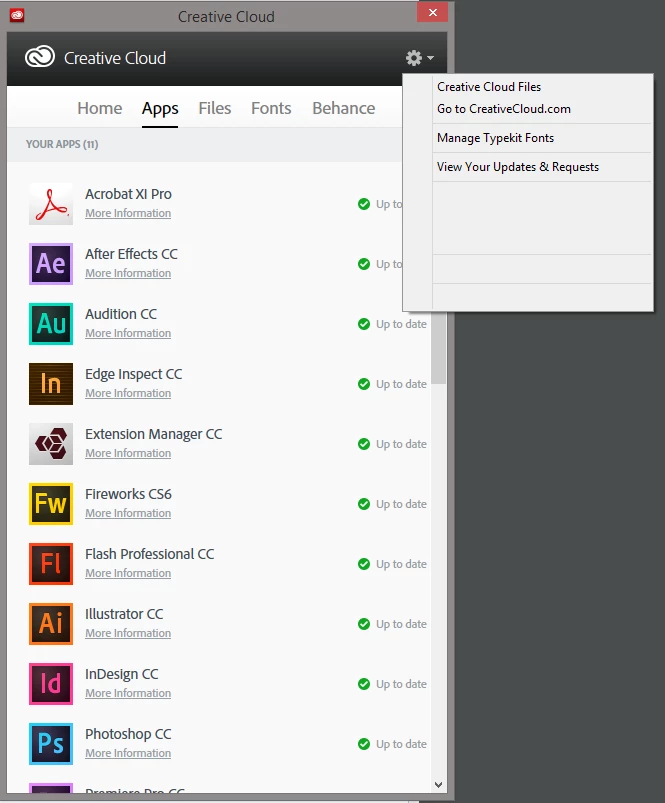
Some menu items when I right-click on either the CC system tray icon, or click on the Settings menu icon in the app interface itself do not show.  I've included a screenshot of the problem.

I have tried uninstalling and reinstalling the desktop app, but this has not worked.  Any ideas?
This topic has been closed for replies.
Correct answer Jeffrey_A_Wright

Interestingly I had a call yesterday from an Adobe support person about this - maybe phoning several people on the forum who have been raising this issue over the last few weeks. I was impressed that he did call - rather late though but appreciated all the same. If only they had publically said that they were looking into it earlier. No dates for a fix etc were needed - just that they were aware of the issue. I think that would have gone some way to controlling some of the anger expressed here and on Twitter.


If you update to the current version of the Creative Cloud desktop application it should allow you to resolve this difficulty.  For more information please see Creative Cloud desktop has missing text in Windows 8.1 - http://helpx.adobe.com/creative-cloud/kb/creative-cloud-desktop-missing-text.html.

17 replies

Participant
October 25, 2013

Same issue here. App menu does not display correctly since 8.1 update as per OP screen grab.

Anyone at Adobe? ....Anyone?

Inspiring
October 25, 2013

One more to add to the list - same problem for me with Win 8.1 Pro 64bit.

Participating Frequently
October 24, 2013

Yip. I have the exact same problem since installing 8.1.

Jonny Shaw
Known Participant
October 23, 2013

At least I am not the only one, was about to capture a screenshot and post - but thanks to the OP for doing so.  Same issue here on Windows 8.1.  This needs fixing Adobe please, on top of the Help bug in Photoshop this is low standards from a top tier developer.

Participant
October 21, 2013

Yep, same issue here, not too clever, hoping it's resolved ASAP.

Participant
October 22, 2013

I raised this initally and sveral months on no answers. I thought it may have been to do with the 8.1 preview relase but isn;t.

Adobe when are you going to sort this out?

Participating Frequently
October 23, 2013

Just to give everyone an update. Not herd back from Adobe Technical support on the 2nd level. (I guess my case wasnt refered to that team, after spending 4+ hours of trying to repair the app the tech couldnt find any way of resolving the issue thought troubleshooting.)

Participating Frequently
October 21, 2013

Also having this issue since installing windows 8.1...

Have tried alternative browsers (Chrome & Firefox) , uninstalling and reinstalling CC and its still broken!

Have tried editing IE settings and it seems even this change isnt helping fix the problem.

Really losing faith with Adobe.

Participating Frequently
October 21, 2013

Just done another search of the forums, this seems to have been an ongoing bug since September (so since the early dev builds of Windows Blue (8.1) .)

Wonderful.

Have contacted Live Chat and my case has been esclated to Level 2 support.

Participant
October 18, 2013

Same problem, CC now looks like this:

Participant
October 20, 2013

I had the same difficulty and discovered, inadvertently, that it appears to be an Internet Explorer problem.  I navigated to the Creative Cloud Download site with Google Chrome and installed it from there, and it works now just fine.