

pentagramwookie
Inspiring
September 29, 2018
Answered

"Adobe Application Manager Utilities" is not optimized for your Mac and needs to be updated.

  • September 29, 2018
  • 18 replies
  • 58232 views

I am getting the error:

"Adobe Application Manager Utilities" is not optimized for your Mac and needs to be updated.

it also says:

This software will not work with future versions of macOS and needs to be updated to improve compatibility. Contact the developer for more information.
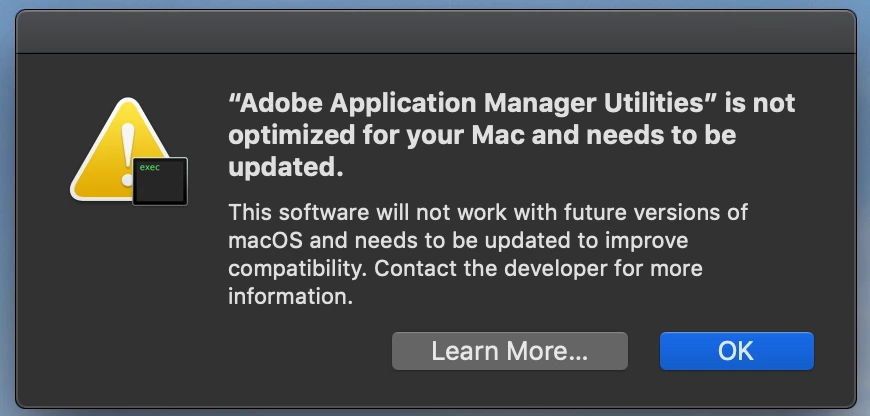
How do I update that?

My Creative Cloud says NO UPDATES.

I'm on a Mac Book Pro 2014 running macOS Mojave 10.14

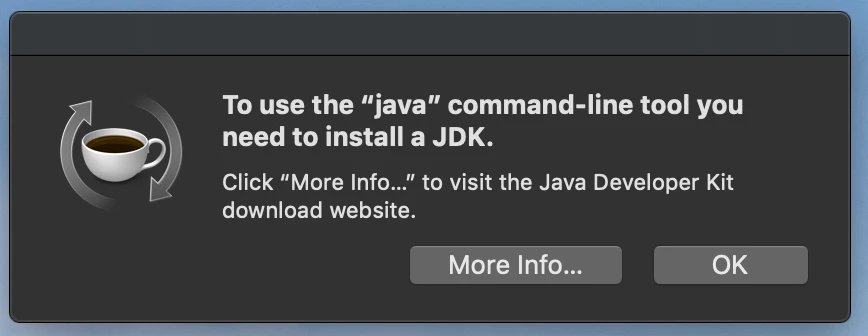
I am also getting this error, not sure it's related:
thank you!

This topic has been closed for replies.
Correct answer Markus Jasker

Gents,

this message just tells you that it will not work in future versions. Everything is fine and this app is working and important for Creative Cloud on Mojave. Just leave it as it is.

And, yes, some apps still need Java and Apple does not provide Java with its macOS. This is an old story. As far as I remember this message was already shown 10.11.x or even earlier with older CC installations. Just install it and you're fine.

18 replies

chased30612208
Participant
July 3, 2019

I have gotten the same error message.  Yesterday all worked fine. I did not elect update AAM today. When I launched LR Classic, only Lightroom 6 appeared and would not open.  I do not have LR 6. I have Classic. How do I solve this problem, get LR Classic to open.

I am running Mac OS Mojave 10.14.

Participant
September 18, 2019

Hi

Just updating as to what the final answer is to this thread seeing that it is now time for all 32bit to out to rest and Adob are still running a lot of 32 bit

Participant
December 30, 2019

Hi All,

New to this forum and I did read the entire thread which is why I signed in and created an account to post here. It has been four months since the last post by @Darryl with no update since. I too am also getting the "Adobe Application Manager Utilities is not optimized for your Mac and needs to be updated." I only have just the one application: Adobe Photoshop Elements 2019 which I bought to help get the red out of some old slides I scanned into my computer. Reading the thread I see recommendations to install Adobe Creative Cloud and this should (in theory) resolve this incompatibility issue. However when I go to do this there are a boat load of apps to choose from and I do not see anything for the application I have.  The only one coming close is for Photoshop but I'm guessing that is not the same as the Photoshop Elements 2019 I have installed? So how do I install Adobe Creative Cloud for my Adobe product? Or I suppose the bigger question is: Is there a Creative Cloud app for my product? TIA!

Legend
April 29, 2019

Apparently AEM isn't really needed in mojave or later, they say. It's there for older systems. Who knows.

Participant
April 29, 2019

My apologies for not reading this thread from beginning to end, so I may simply be repeating something someone else has already said. I know that this may be a question of 'fools rushing in where angels fear to tread', but I double-clicked on Adobe Application Manager in finder. This launched the updater, and after a long wait it has updated AAM. The bad news is that it is still not 64-bit. So it looks like a question of waiting for Adobe to update AAM to 64-bit.

Participating Frequently
February 3, 2019

Let me answer this question directly...it is telling you to contact the software developer (Adobe, in this case) because the AAM app is still a 32-bit app and will need to be redone into a 64-bit app when the next full version of Mac OS is installed. It is Apple's way of getting the users to bug all the software developers to get on the stick and update their apps...they started doing this in High Sierra. It's not something you have to do anything about, since Adobe is obviously aware that they need to update AAM. It's just annoying.

Re the second notice, not related.

Legend
January 27, 2019

That same page also says that if you happen to have Mac OS 10.7 or later, the app’s job is done by the Creative Cloud app. Which is right? I guess some brave souls will beta test Mac OS 10.15 later this year and tell us.

Participating Frequently
January 27, 2019

It says, "If you have a Creative Cloud membership, the Adobe Application Manager will automatically update to the Creative Cloud desktop app, as long as you are running Mac OS 10.7 or later"

This means that once you get a CC membership,  AAM will work as a helper app and will update so that you don't have to open AAM to download or update your apps, it will work through the Creative Cloud app. It's an ambiguous statement, but that's my understanding. Especially since they state (as I posted earlier) that AAM is required on your computer for CC apps you have installed.

Participating Frequently
January 27, 2019

Adobe says: "The Adobe Application Manager is a helper application used to manage the installation of many Adobe products." and "Adobe Application Manager is required on your computer, as long as you have Creative Cloud applications installed.

At this link:

Troubleshoot Adobe Application Manager download and installation issues

Legend
January 20, 2019

The interesting thing is that the best info I've found suggests that Adobe Application Manager is an old update app which gets used when CC finds itself in an older Mac OS. And that, in later systems it lets the Creative Cloud app do the work. Which in turn suggests nobody will find anything fail in Mac OS 10.15. Still, Adobe may well stop uselessly installing it before then.

I love the thought though, that this will be the big problem in Mac OS 10.15. Apple are changing their systems faster and with ever less concern for compatibility. I expect LOTS of issues. But not this one. And these issues are probably something nobody can prepare for, because Apple haven't decided what to break yet.

Legend
December 28, 2018

Adobe Apication Manager isn’t involved with printing. What are your symptoms, please, and exactly what versions of which Adobe apps (please don’t say “latest”)? And what printer?

FortPolkSponsorship
Participant
December 28, 2018

When I send Adobe files (.pdf, .ai, .pds) to the printer, it shows the print jobs and then shows them completed. However, when the file sends to the printer, it pops up and immediately disappears. I would say it's the printer, but I'm able to print other files. I can even print .pdf files from email as long as they're not opened in Acrobat.

Adobe apps are CC2019...if you need more specific than that, you may have to explain how to find that.

FortPolkSponsorship
Participant
December 28, 2018

Same issue. I would't care, except now I can't print from any adobe software. That's kind of a major issue for a marketing department. Has anyone found a solution yet??

Legend
December 2, 2018

There's a new strategy with software, I've heard it called "friction". The idea is to irritate or worry the user. so they contact the software maker, so that the maker of some other software is let off the hook for taking away things that used to work. Thus, Apple's aim is specifically to worry people into contacting Adobe.

Known Participant
December 9, 2018

This seems to randomly pop up on my computer... I had an issue with LR that went never resolved and it only disappeared after some updates. Adobe's solution was to reinstall the entire OS. Adobe sure, seems to be losing its grip...

Abambo
Community Expert
Community Expert
December 9, 2018

Apple is annoying people to constatly upgrade older software, making it not only expensive to run Apple hardware, but also sometimes very difficult. There is, however, good sense in this, because it allows apple to provide up to date hardware.

ABAMBO | Hard- and Software Engineer | Photographer