Participating Frequently
September 5, 2018
Answered

Re: I need to uninstall indesign CS3 on a Mac.

  • September 5, 2018
  • 1 reply
  • 2114 views

Jeff,

I'm trying to do the same thing, but in that folder I get this message:
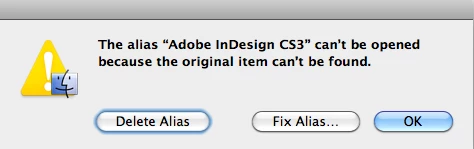
Could my ID uninstall option be found somewhere else on my system? Should I delete the alias, or fix it ... or?

    This topic has been closed for replies.
    Correct answer Jeffrey_A_Wright

    I didn't do the migration, the shop I purchased the used iMac from did. They are an Apple-authorized seller I've used for almost 20 years and I trust them completely. It's a moot point because I don't  have the old hard drive any more.

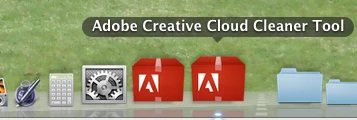
    Re the Creative Cloud Cleaner Tool - it didn't work for me. I've been staring at a spinning beach ball for ages and finally just forced quit out of it. Plus, when I first opened it in the installation window, it's showing two bouncing icons in my dock (see screenshot) ... very odd and I'm sure a sign that all is not well. So ... I'm going to give up for now, and hope I can find another solution. At this point I wish someone else would come along and give Adobe a run for their money. No company should make things this difficult for the people who made them a success.

    I am sorry, Gigi, if the CC Cleaner Tool is not even able to run then your options are extremely limited.  You can try creating a new local administrator account to see if that allows the CC Cleaner application to run.  Information on how to set up a new local administrator account can be found at Install or run Adobe applications in new user account | Mac OS X .

    Have you let the shop that you used know that you are facing problems with the migration, Gigi? 

    If you unable to launch the CC Cleaner tool under the newly created administrator account then I do not have any additional suggestions, Gigi. 

    You can find details regarding the use of the migration assistant at How to move your content to a new Mac - Apple Support if you decide to begin the migration again.  I would also recommend that you provide the URL of this public forum discussion to your computer shop.

    1 reply

    Jeffrey_A_Wright
    Community Manager
    Community Manager
    September 5, 2018

    Coloradogigi, that error occurs because the InDesign CS3 application could not be located when you invoked the alias.  Do you receive a different error when you open the program from the Applications folder?

    What version of Mac OS are you opening InDesign CS3 on, Coloradogigi?  Did anything happen to the computer prior to InDesign CS3 not opening from an alias?

    Participating Frequently
    September 5, 2018

    Sorry - probably should supplied more info.

    I recently replaced my beloved Mac Pro purchased in 2007 (yes, you read that right), with an 2011 iMac. Both running Snow Leopard 10.6.8.

    I have no problems opening InDesign from the app folder (and it lives in my dock). But I'm in the process of getting a new serial number because after I switched machines, I'm getting "trial version" messages when I open my software. So I need to uninstall InDesign and Photoshop CS3. I also have to deal with an old version of Illustrator, but that's another post.'

    That folder has the option to remove Photoshop (see screenshot), but apparently not InDesign. Why?

    Jeffrey_A_Wright
    Community Manager
    Jeffrey_A_WrightCommunity ManagerCorrect answer
    Community Manager
    September 10, 2018

    I didn't do the migration, the shop I purchased the used iMac from did. They are an Apple-authorized seller I've used for almost 20 years and I trust them completely. It's a moot point because I don't  have the old hard drive any more.

    Re the Creative Cloud Cleaner Tool - it didn't work for me. I've been staring at a spinning beach ball for ages and finally just forced quit out of it. Plus, when I first opened it in the installation window, it's showing two bouncing icons in my dock (see screenshot) ... very odd and I'm sure a sign that all is not well. So ... I'm going to give up for now, and hope I can find another solution. At this point I wish someone else would come along and give Adobe a run for their money. No company should make things this difficult for the people who made them a success.


    I am sorry, Gigi, if the CC Cleaner Tool is not even able to run then your options are extremely limited.  You can try creating a new local administrator account to see if that allows the CC Cleaner application to run.  Information on how to set up a new local administrator account can be found at Install or run Adobe applications in new user account | Mac OS X .

    Have you let the shop that you used know that you are facing problems with the migration, Gigi? 

    If you unable to launch the CC Cleaner tool under the newly created administrator account then I do not have any additional suggestions, Gigi. 

    You can find details regarding the use of the migration assistant at How to move your content to a new Mac - Apple Support if you decide to begin the migration again.  I would also recommend that you provide the URL of this public forum discussion to your computer shop.