


- Home
- Download & Install
- Discussions
- Re: Redemption Code "Doesn't seem to be active"
- Re: Redemption Code "Doesn't seem to be active"

Copy link to clipboard
Copied
Please Help -
This was a gift (admittedly from a while ago) and I've tried toady 26/06 to redeem the the Code as I want to use the software.
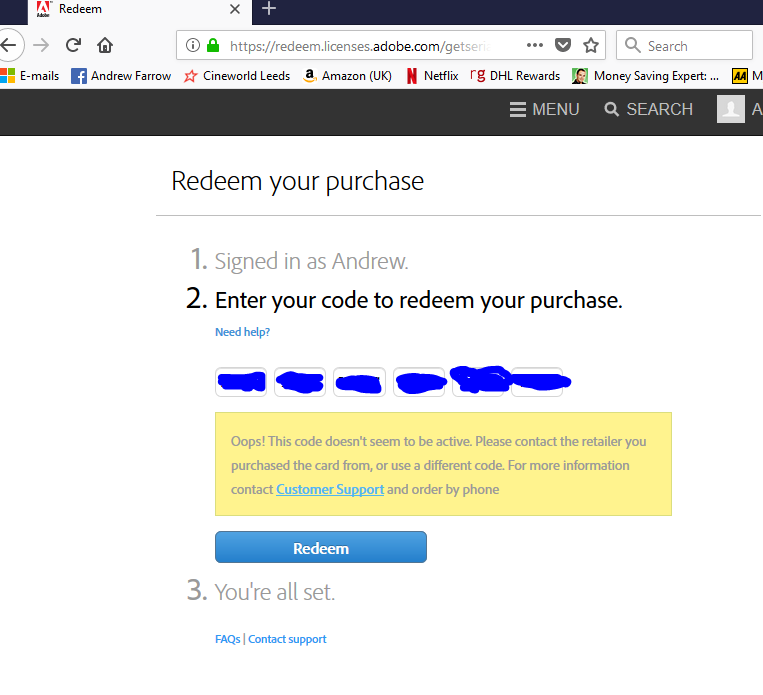
I don;t have the option to go back to the retailer how can I sort this out? -
I can provide a photo of the card and it's packaging to a trusted Adobe representative.


 3 Correct answers


Sure thanks! I have responded back to your PM.
^Ani


contact the vendor.

Alex, Kglad is correct. You will want to contact the redemption code provider if it is invalid. Please see the FAQ section of https://adobe.ly/3UljmBQ for more information. ^JW
 11
Replies
11
11
Replies
11

Copy link to clipboard
Copied
Hi there,
Please private message me the code and I will take a look.
^Ani
Copy link to clipboard
Copied
Thank you Ani,
I have messaged you the details requested.
Copy link to clipboard
Copied
Sure thanks! I have responded back to your PM.
^Ani

Copy link to clipboard
Copied
i'm having the same issue

Copy link to clipboard
Copied
I am also having this issue with an Adobe Photoshope/Premiere Elements bundle. Best Buy showed me the screen indicated that the product was active on their end. Please help.
Copy link to clipboard
Copied
this is an old thread. what do you see when redeeming?
Copy link to clipboard
Copied
Same thing as above. Screenshot attached. Should I have started a new thread? I just figured I'd add to the same one if multiple folks are having the same issue. New to the Adobe threads, so I don't know the protocol here.

Copy link to clipboard
Copied
contact the vendor.
Copy link to clipboard
Copied
Alex, Kglad is correct. You will want to contact the redemption code provider if it is invalid. Please see the FAQ section of https://adobe.ly/3UljmBQ for more information. ^JW
Copy link to clipboard
Copied
I went to Best Buy today to resolve it. Their screen indicates the code is active. Naturally they told me to take it up with the manufacturer. I have a feeling I'll just get knocked around like a ping pong ball between the vendor and adobe and not really get any progress 😕 I'll try again to talk with the Geeks there sometime this week. They told me the code may have been caps sensitive. Whether it is or isn't, capital letters made no difference when I tried again earlier today. Sigh. I guess I'm old but I miss CDs.
Copy link to clipboard
Copied
when you go to best by have them watch you try to activate it.


Get ready! An upgraded Adobe Community experience is coming in January.
Learn more
 AdChoices