
Known Participant
November 28, 2013
Answered

Repeated Registering

  • November 28, 2013
  • 1 reply
  • 1963 views

I just had to register my Photoshop Creative Cloud again. I expect, if past experience is any indication, I will have to re-register each CC application I used in the coming days. I just used it a day ago on this machine with no problem and yet it seems to have forgotten that I have the right to use it. I don't have time for this - especially when the registration process doesn't go well. Adobe needs a more robust method of validating my license.

Sorry for being short with you. I need to get back to work again. No time to explain further but I wanted to post this when it happened so this experience doesn't get lost again.

Just stop asking me to re-register at random times. I've paid my bills, the agreement says I can use it. Leave me alone to work.

Thank you.
This topic has been closed for replies.
Correct answer Rob_Cullen

Fast forward 8 years. Windows 10 now. Windows and everything Adobe is fully updated.


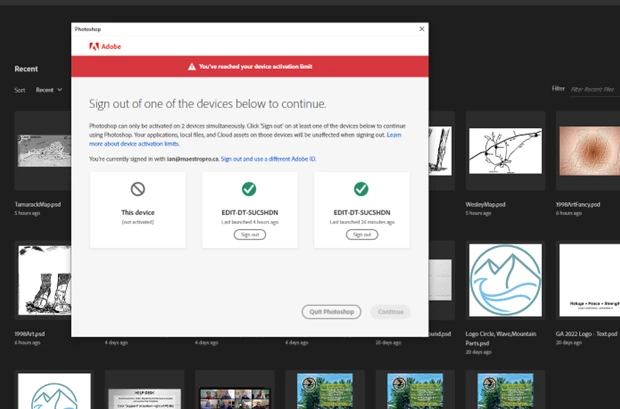
Now it seems like every time I log on to my computer, Adobe wants me to log in to my account before I can use anything. This has happened before and I usually log in once and I'm good. This time I need to re-log in almost every time I restart my computer. The really odd thing is that I need to "log out of one of these devices to continue". Oddly, one of the devices is the same device that I am already loggied into. Two times ago, I logged out of both of my computers before logging in on my desktop. The next time, I had to log in again but I didn't have to log out of any computers. This time, is the weird one. I got the attached notice See below) that told me to log out of one of  my devices... but BOTH devices listed are the device I'm using. I hope you can follow all of that. This is really surreal. Thanks for any help you can offer. 


Sometimes the smallest change to a computer system- eg. change of drive, OS update/upgrade/reinstall,  new video card, etc, will cause Adobe to believe it is a new computer and thus occurs the two devices with the same name.

Easiest is to 'Sign Out' of ALL devices (in the dialog as per your screen-clip), then use the Adobe Creative Cloud Desktop App to 'Sign In'.


1 reply

Jeffrey_A_Wright
Community Manager
Community Manager
November 28, 2013

Imaccready do you use any type of system optimization utilities?  From your description above it appears the licensing files are not being retained on your computer.

I did review your activation history and it does appear your computer is requesting to activate quite often.  So I can verify how many computers are you using the Adobe Creative Cloud on?  Also which operating system are you using?

Finally you may want to try logging in with a newly created local Administrator account to see if you encounter the same difficulties.  This step can be useful to help determine if the file permissions for your current User account have become compromised.

Known Participant
December 2, 2013

Sorry for the slow response. I've been out of town.

I try to run my comnputers without a lot of extras so no to the System Optimization. I'm running it on two computers - my Laptop and my Desktop. Both are running Windows 7.

I will try creating a new administrator account and see if that helps.

Thank you.

Jeffrey_A_Wright
Community Manager
Community Manager
December 31, 2013

I was thinking that I should come here and mark this as the "correct" and "helpful" answer. Alas, I am experiencing the problem again - this time on my laptop.

I want to use Acrobat Pro and first received this message (see image below) followed by a series of screens which, in the end, asked for the Software Key (that 30 or 40 digit number) to register my copy. Since I'm on my laptop, I am away from that number (frustrating).

I used Photoshop to created the screen-grab below - it offered resistance to my using the application also - but I managed to get through without the software key. Now Acrobat works also so I'm not sure what happened there.

I love you guys. I want to keep loving you guys. Please just allow me to use the services I've paid for without getting asked to buy more and without the constant need to register - sign in - prove my worthyness to use - etc.... Put another cookie on my computer - WHATEVER - just do what you need to do to satisfy your insatiable need to prove that I've paid my monthly bill.

Sorry for my rant. I just want to use the software.


Imaccready I am sorry you have been facing difficulties with signing in.  I reviewed both of your recent posts but it is not immediately apparent if you are still experiencing sign in difficulties or not?

You may need to activate another software title such as Photoshop for Acrobat to be licensed properly.