Participating Frequently
December 30, 2013
Answered

Same updates every day!

  • December 30, 2013
  • 1 reply
  • 4795 views

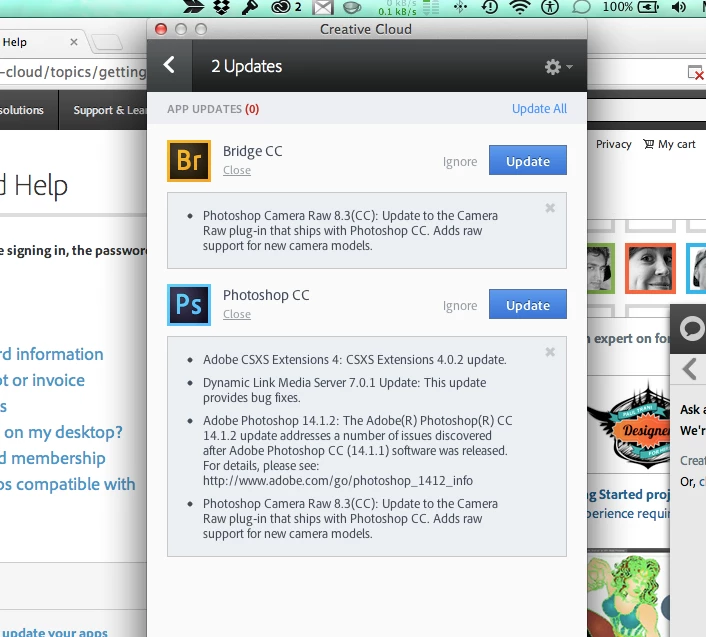
I am asked to update Photoshop and Bridge every day. It has been happening for over a week. At first I just thought - this is ridiculous, why do Adobe need to update these things every day, now I realise that the updates are FAILING.  They updates are the same. 

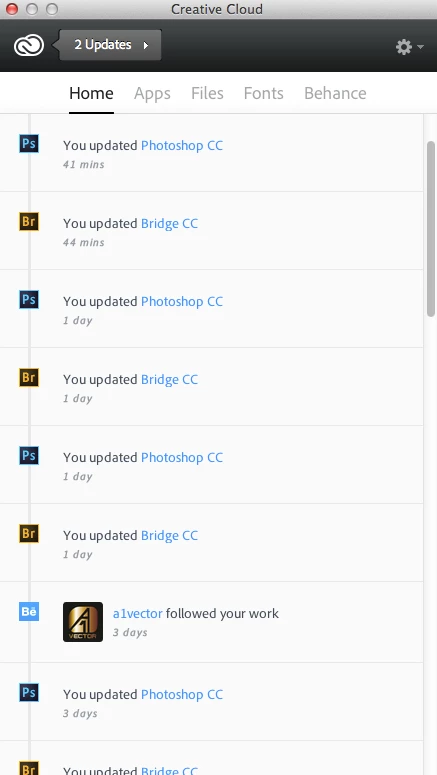
What happens is, I see the updates icon, so I click 'update all'.  CC then apparently completes the updates and all is well, until I reopen CC, then it says '2 updates' again - the same updates.  I can just do this over and over and nothing changes - the apps are never truly updated.

Please help


This topic has been closed for replies.
Correct answer Romsinha-9KMEUt

I have the exact same issue with the Photoshop update in particular.  The Adobe forums seem to be littered with this issue, and so we are not alone.


Please refer the thread: http://forums.adobe.com/message/6005305#6005305 and let us know whether it worked.

Regards,

Romit Sinha

1 reply

Jeffrey_A_Wright
Community Manager
Community Manager
December 30, 2013

Moving this discussion to the Creative Cloud Download & Install forum.

Missdeuxmont please see http://forums.adobe.com/message/5967145#5967145 where this topic has been discussed.

pemo??Author
Participating Frequently
January 6, 2014

Thanks Jeff,

I read through this: http://forums.adobe.com/message/5967145#5967145%235967145

And then (verrrrrry tediously) followed every step in this: http://helpx.adobe.com/x-productkb/global/troubleshoot-unexpected-behavior-user-account.html

Then finally, uninstalled and reinstalled CC.

Nothing worked.  I still have the same 2 updates pending.

How can I progress this to get some one on one assistance?  I am not getting the updates I'm paying for.

Thanks

Jeffrey_A_Wright
Community Manager
Community Manager
April 18, 2014

Hi Jeff,

Turning off all login items fixed the LR problem - it now shows in the list.

But I still have the same old 'same updates every day' problem.  Disabling the login items and deleting the AAM 1.0 folder helps temporarily but if I leave it for a few days, the same updates appear again.

cc bug 19:4:14.jpg


Missdeuxmont what system utilities do you utilize and what version? 

Also as an alternative test you may want to try running in a New user account for several days to see if you observe the same behavior.  This can help you confirm that it is a configuation setting under your original User account that is causing the undesired behavior with updates again becoming available.