
breysena
Inspiring
February 27, 2017
Answered

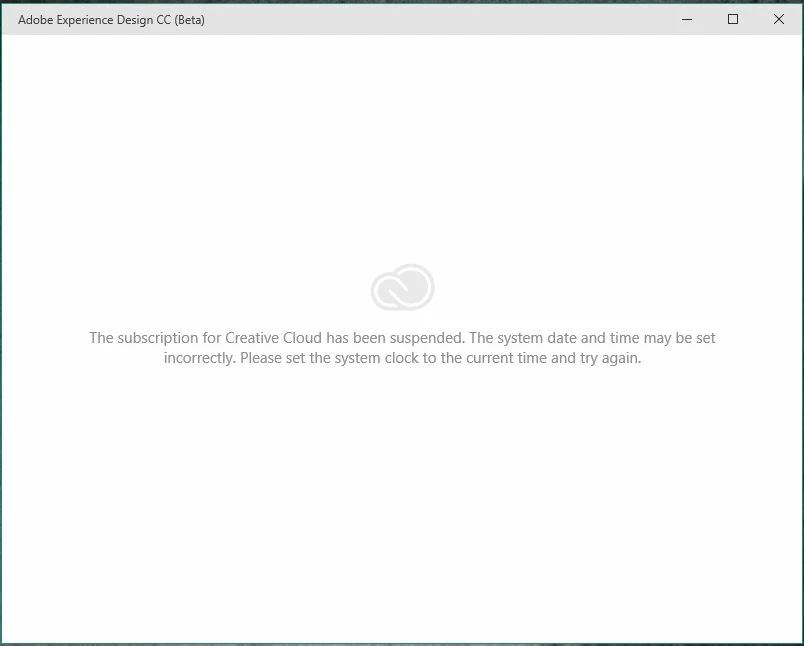
Subscription has been suspended! please help
  • February 27, 2017
  • 9 replies
  • 9543 views

I have some problem after 3 - 4 times open this app. It shows that my system date was incorrect. I fixed the date and time but that wasn't fix the issues. Can you guys help me to solve this? Sorry for bad english. Thanks in advance

Edit :

I forgot to mention, i have reinstalled it for twice but still no result

This topic has been closed for replies.
Correct answer breysena

Just found the way out by myself. Here's the step :

  1. Close Adobe XD
  2. Uncheck the "Launch at Login" settings at the Adobe Creative Cloud App
  3. Close Adobe Creative Cloud App from system tray (the top arrow near the clock and then right click and quit)
  4. Open Adobe XD
  5. After it's showing that you have been suspended, open again Adobe Creative Cloud App
  6. And then Adobe XD will be run correctly

Conclusion : Adobe XD must be opened first before Adobe Creative Cloud to make it run as usual.

I don't know what is this problem from, maybe from my Windows or Adobe itself but It's worked for me, and I hope yours too

9 replies

New Participant
November 11, 2019

HELLO I got suspended because my payment failed for 3 times and now I can not pay any more because I'm suspended. WHAT SHOULD I DO? By the way, logging out and logging in is probably the most stupid answer i have seen here. Like i am suspended in the adobe system, logging in and out does not do anything! PLEASE HELP ME!!!

New Participant
July 3, 2017

The solutions here, work for me .

Thanks a lot.

New Participant
June 1, 2017

Yes, this worked for me too. Thanks!

rodolfocalado
New Participant
May 12, 2017

Thanks!

Alvathoni
Known Participant
April 5, 2017

Thanks for the help, but it doesn't work for me

mohammedf32686237
New Participant
March 26, 2017

thanks for the help it worked for me

Participating Frequently
March 15, 2017

I've just updated my Windows 10 OS and after Windows update all of a sudden I'm facing this same issue with Adobe XD. My OS date and time is right and I've tried reinstalling Adobe CC and Adobe XD without any luck.

breysena
breysenaAuthorCorrect answer
Inspiring
March 15, 2017

Just found the way out by myself. Here's the step :

  1. Close Adobe XD
  2. Uncheck the "Launch at Login" settings at the Adobe Creative Cloud App
  3. Close Adobe Creative Cloud App from system tray (the top arrow near the clock and then right click and quit)
  4. Open Adobe XD
  5. After it's showing that you have been suspended, open again Adobe Creative Cloud App
  6. And then Adobe XD will be run correctly

Conclusion : Adobe XD must be opened first before Adobe Creative Cloud to make it run as usual.

I don't know what is this problem from, maybe from my Windows or Adobe itself but It's worked for me, and I hope yours too

Participating Frequently
March 16, 2017

This workaround worked for me too, thanks for posting back the solution. Hope it would be fixed soon.

lebronleel95310599
New Participant
February 28, 2017

验证采用的是美国时间?

breysena
breysenaAuthor
Inspiring
February 28, 2017

I don't know and I dont want to try all the timezones one by one. It's so complicating

Preran
Community Manager
Community Manager
March 7, 2017

Moved your question to a more appropriate forum " Creative cloud download and install" The experts here are better suited to assist you. ^PK

Colin Holgate
Inspiring
February 27, 2017

Try quitting the Creative Cloud application, and then reopen it. Or, sign out and sign in again. Do either of those things help?

Are you able to open any other CC apps? Have you installed the Xd update from yesterday?

breysena
breysenaAuthor
Inspiring
February 27, 2017

Yes, I already do that sooooo often but still not fixed, so annoying.

Hmm... i just upgrading into windows 10 yesterday only for trying Adobe XD, so no other CC apps installed yet. Maybe untill it's solved.

lebronleel95310599
New Participant
February 28, 2017

我也有同样的问题啊。查了好几天了。