
anastasiac34390185
Participant
November 22, 2018
Answered

trouble installing ADOBE PREMIERE PRO CC

  • November 22, 2018
  • 1 reply
  • 1071 views

I have macOS Mojave, Version 10.14, and I am trying to install Premier Pro CC trial version. My problem is that after I download the installing system it doesn't want to open at all, the Premier pro just jumps on the dashboard for a few seconds and then closes. I've tried to restart the laptop, download from a different browser, I also updated the Creative cloud. I have also tried downloading other apps and the same problem happens again.

Does anyone know how to fix it?
This topic has been closed for replies.
Correct answer Mo Moolla

I used to have old versions, but I uninstall them all


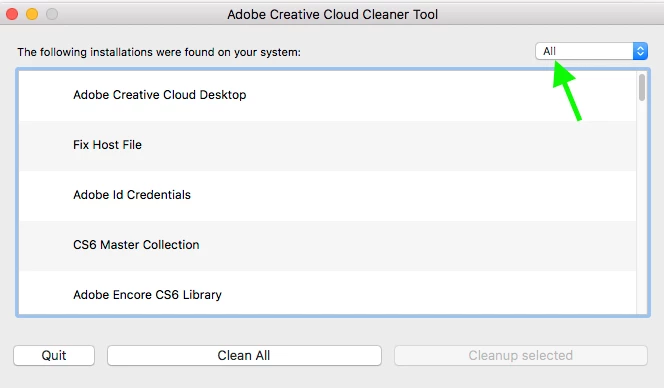
Please use this tool to delete all remnants of old versions and the new one and let it also remove preferences for you.

AdobeCreativeCloudCleanerTool.dmg.

Once everything is uninstalled please reinstall your Adobe app of choice

Click the ALL button to see the dropdown.

Choose ALL to be on the safe side and let it do its work.

If it prompts you to allow it to remove preferences say YES.

Please note this will delete all Adobe apps currently on you Mac

Let me know how it goes

Mo

1 reply

Mo Moolla
Legend
November 22, 2018

Do you have any firewalls enabled?

anastasiac34390185
Participant
November 23, 2018

It's all off.

Mo Moolla
Legend
November 23, 2018

Is this the first version of any Adobe app you are trying to install or do you have older versions