


Exit
  • Global community
    • Language:
      • Deutsch
      • English
      • Español
      • Français
      • Português
  • 日本語コミュニティ
  • 한국 커뮤니티
0

Trying to download previous PS CC version. Why can't I see "previous versions" in CC app?

New Here ,
May 11, 2015 May 11, 2015

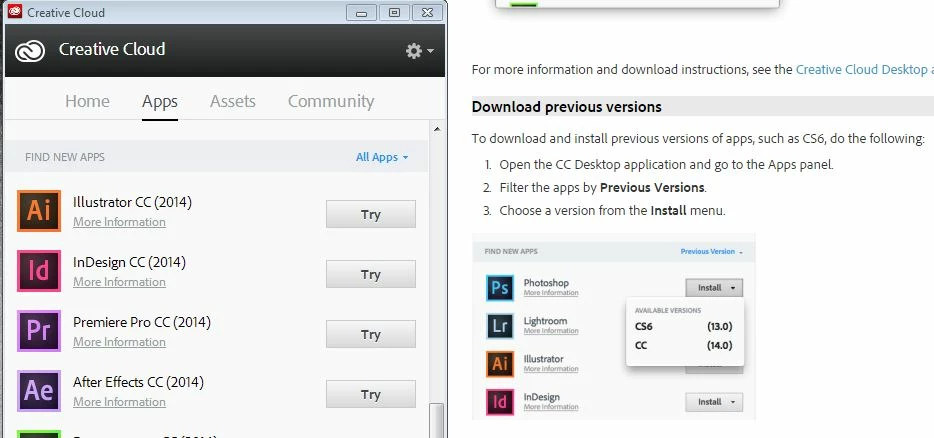
I'd like to download the previous version of Photoshop CC (currently have PS CC 2014). I have tried the help document explaining how to use the desktop CC app and look at the "previous versions". My app does not include previous versions though. I have tried re-installing Creative Cloud and saw the same issue.

Screenshot shows my app on the left which just lists new apps to try and the right is from the help document.
Capture.JPG

TOPICS
Creative Cloud
302
Translate
Report
Community guidelines
Be kind and respectful, give credit to the original source of content, and search for duplicates before posting. Learn more
community guidelines
LEGEND ,
May 11, 2015 May 11, 2015

Previous Version option is not available for Trial Customers.

May I know whether you had purchased subscription ?

Translate
Report
Community guidelines
Be kind and respectful, give credit to the original source of content, and search for duplicates before posting. Learn more
community guidelines
New Here ,
May 22, 2015 May 22, 2015

YES! Subscribed since Nov 2014 on this PC.

Translate
Report
Community guidelines
Be kind and respectful, give credit to the original source of content, and search for duplicates before posting. Learn more
community guidelines
Adobe Employee ,
May 26, 2015 May 26, 2015

Hi Christy,

Please download the latest version of CC desktop app from the help document below:

Creative Cloud for desktop

Regards,

Sheena

Translate
Report
Community guidelines
Be kind and respectful, give credit to the original source of content, and search for duplicates before posting. Learn more
community guidelines
New Here ,
Jun 06, 2015 Jun 06, 2015

I have the latest version currently. If I try to unistall to replace with a newly downloaded copy, the CC Adobe window prevents me from unistalling. It says that since I have other adobe products installed that require CC, it can't be uninstalled. Why would I have to uninstall all Adobe products (and actions BTW), in order to install the CC application?

Translate
Report
Community guidelines
Be kind and respectful, give credit to the original source of content, and search for duplicates before posting. Learn more
community guidelines
Adobe Employee ,
Jun 06, 2015 Jun 06, 2015

Christy,

You may use the Adobe CC cleaner tool to remove the Adobe CC desktop app from your machine.

Use the CC Cleaner Tool to solve installation problems | CC, CS3-CS6

Translate
Report
Community guidelines
Be kind and respectful, give credit to the original source of content, and search for duplicates before posting. Learn more
community guidelines
LEGEND ,
Jun 06, 2015 Jun 06, 2015
LATEST

You may refer below link if you are unable to remove Creative Cloud app using Cleaner tool :

How do you uninstall creative cloud???!!!

Translate
Report
Community guidelines
Be kind and respectful, give credit to the original source of content, and search for duplicates before posting. Learn more
community guidelines