
Participant
November 14, 2017
Answered

Unable to"update payment details"

  • November 14, 2017
  • 2 replies
  • 567 views

After having my subscription suspended, I attempted to reactivate my plan by updating my payment details as instructed.
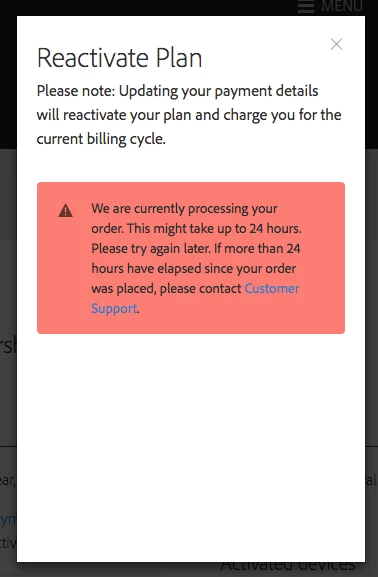
Sadly all I'm getting is this.

This is even more annoying as I thought it had been paid for. When I checked my Paypal account it seems the payment was pending and Adobe itself failed to complete the transaction.

If you would like to get paid, please respond sooner rather than later.

Kevin Greenan.

This topic has been closed for replies.
Correct answer Kanikas

Hi,

I see you have an Adobe account under the same ID as with forums. As I checked the payment details, I noticed that you the payment has not been received by Adobe. You need to get in touch with Paypal for the same. They will be able to provide you correct details.

You may also Contact Customer Care for help and support.

Thanks

Kanika

2 replies

Participant
November 14, 2017

I talked to Paypal and they weren't much help. I contacted Adobe direct via the Chat function and had the issue resolved within the hour.

Basically the transaction had got stuck and they resolved it by cancelling and starting again.

I just resubmitted my card details and the payment was taken, problem solved. So moral of the story is use the chat feature.

Kanikas
Community Manager
Community Manager
November 15, 2017

We're glad your issue resolved.

Enjoy using the services and feel free to get back to us for any other concerns.

Thanks

Kanika

Kanikas
Community Manager
KanikasCommunity ManagerCorrect answer
Community Manager
November 14, 2017

Hi,

I see you have an Adobe account under the same ID as with forums. As I checked the payment details, I noticed that you the payment has not been received by Adobe. You need to get in touch with Paypal for the same. They will be able to provide you correct details.

You may also Contact Customer Care for help and support.

Thanks

Kanika