This topic is closed to new replies. Start a new post to keep the conversation going.
Test Screen NameCorrect answer
Legend
Mar 15, 2020 2:17 PM UTC

Same here.  It is less frequent, but still occasionally happens.


I have no inside knowledge, but what can we find out.


1. The download is from a server in the adobeoodb.com domain. This could be a fake, since it isn't adobe.com, so let's check. https://helpx.adobe.com/uk/enterprise/kb/network-endpoints.html shows the Adobe servers you need to unblock to make things work. adobeoobe.com is in there. So this is a genuine Adobe server.


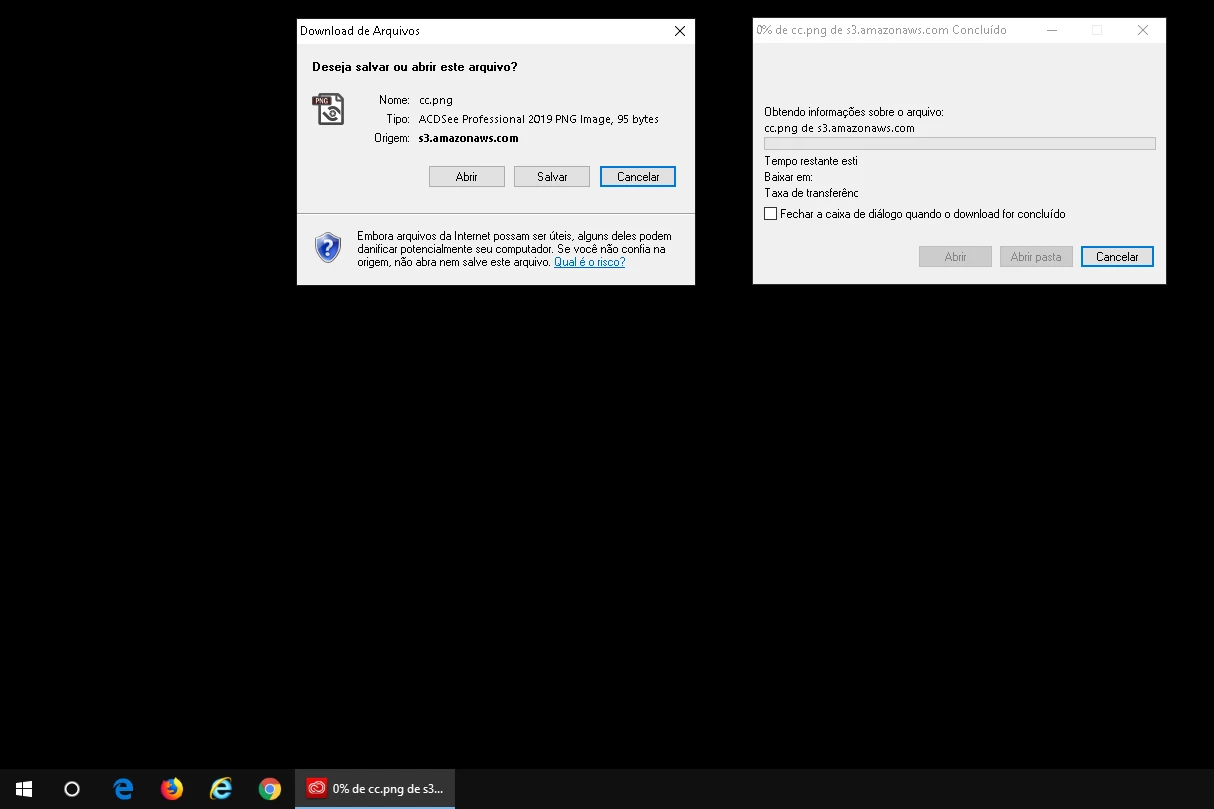
2. The downloads variously say "Infanview PNG file" or "ACSee ... PNG file". This is not saying these apps are in any way involved. This is just what, on your system, Windows calls PNG files. The name comes from the default PNG handler, and you'd get it whenever you download (rather than display) a PNG file. So, all we know is, it's a PNG file and is being downloaded.


That's all so far. So it points at a technical glitch somewhere, but not an attack. As noted above, one pixel images are frequently used as counters, but that clearly isn't what's happening.


29 replies

andreasw5942258
Inspiring
Dec 13, 2022 10:46 AM UTC

I have had the same problems last week. The following helped to fix this in Win 10 for me:
- autostart: deactivate (not delete!) AdobeAAMUpdater-1.0
Please note: after deactivating you have to check manually for updates! - I'll do this once a week


Translate
kglad
Community Expert
Community Expert
Dec 13, 2022 1:18 PM UTC

@andreasw5942258 


thank you for posting that.

Translate
Participating Frequently
Nov 7, 2022 11:04 PM UTC

I have been receiving this as well.  Has it ever been ascertained if this is a virus or something else?

Translate
kglad
Community Expert
Community Expert
Nov 8, 2022 12:41 AM UTC

no one, afaik, has reported malicious behavior.

Translate
Participant
Oct 18, 2022 1:41 PM UTC

yes, i am best interesting of creative cloud.

Translate
kglad
Community Expert
Community Expert
Oct 18, 2022 1:48 PM UTC

@Dheerendra266589523qk9 , do you have a question?

Translate
Participant
Sep 6, 2022 1:09 AM UTC

Still waiting for a solution for this as well...

Translate
authentic_days1549
Participating Frequently
Aug 16, 2022 4:23 PM UTC

Is there a solution to this problem yet? 

Translate
Participant
Nov 8, 2019 6:43 AM UTC

Marcelo did you solve this issue or did Adobe staff just mark this as 'solved' without your input?
I'm having this issue as well. On reboot Adobe CC is attempting to download .png. It is clearly not related to ACDSee Pro unless my is related to 'IrfanView'... Or just maybe Irfan View is my program progam set to open PNG's.

Quite frustrating seeing this marked as solved, David_B, when it clearly wasn't and was just misunderstood by the staff. I pay good money for this suite.

Translate
Participant
Mar 5, 2020 2:21 PM UTC

I'm having the same problem.

Why is this marked as Solved?  It's clearly not.

Translate
Test Screen NameCorrect answer
Legend
Mar 15, 2020 2:17 PM UTC

Same here.  It is less frequent, but still occasionally happens.


I have no inside knowledge, but what can we find out.


1. The download is from a server in the adobeoodb.com domain. This could be a fake, since it isn't adobe.com, so let's check. https://helpx.adobe.com/uk/enterprise/kb/network-endpoints.html shows the Adobe servers you need to unblock to make things work. adobeoobe.com is in there. So this is a genuine Adobe server.


2. The downloads variously say "Infanview PNG file" or "ACSee ... PNG file". This is not saying these apps are in any way involved. This is just what, on your system, Windows calls PNG files. The name comes from the default PNG handler, and you'd get it whenever you download (rather than display) a PNG file. So, all we know is, it's a PNG file and is being downloaded.


That's all so far. So it points at a technical glitch somewhere, but not an attack. As noted above, one pixel images are frequently used as counters, but that clearly isn't what's happening.

Translate
Participant
Sep 19, 2019 12:34 PM UTC

I actually have the same issue and have not found a solution. Since I don't have, nor ever had any ACDSee product, they are unable to help me with Adobe CC trying to download cc.png. Does anyone know how to actually fix this or does someone know what I should tell ACDSee support so they can help me with this Adobe CC issue? I noticed someone posting a link to some automatic registry cleaner software. I am a bit weary of those. Has anyone tried that? Does it work?

Also, I am slightly puzzled why Adobe CC trying to download cc.png would be ACDSee's problem, but I am willing to ask them again if I just know what I should ask of them.

Translate
karianner63266020
Participating Frequently
Nov 7, 2019 11:44 PM UTC

The attempted download of cc.png continues on every reboot of my computer.  ACDSee is nowhere near my computer.  I am anxious about this...help?

Translate
Participant
Mar 16, 2020 9:22 AM UTC

My PC was a new one. Built as a gaming rig, but also installed Adobe CC in case I need to do home office. So no Irfanview or ACDSee installed. Ever. But my wife has an extra account in case she needs home office so it could be she has installed it. I doubt it since she doesn't need either for work and I don't see anything related in HKLM. Anyway, I went through HKLM and HKCU and removed everything I thought not fitting there (do NOT try this at home! Deleting wrong things from the registry may render your entire operating system unusable, possibly even immediately.) and I haven't had this since. So it is something in the registry. Not sure what. I do not recommend my blind fix for anyone. It was a bad way to go about it and I think it was more luck than anything I didn't brick my OS.

Translate
AranankA
Participant
Apr 19, 2019 7:46 AM UTC

I have the same problem. Every time you start the PC before it is switched off (never during a restart!) Exactly these 2 windows. Triggering process: ADOBE CC.

I downloaded the cc.png: 1 kb small, invisible (only one pixel), ideal for bad guys!

Content (read out via Notepad ++):

"‰ PNG

IHDR% ÛVÊ PLTEÿM \ 58 tRNS @ æØf

IDATxœcb 67 | ¨IEND®B`, "

Neither the downlod, nor the open brought an improvement! This is annoying!

P.S .: There is no running on the system !!! ACDSEE! Only ADOBE!

Translate
Participant
Aug 7, 2019 3:50 PM UTC

I don't have any ACDSEE products installed, and FreeDownloadManager which handles my downloads suddenly downloaded this cc.png, from https://connect.ffc.adobeoobe.com/cc.png?t=1565191975033

Contents, (leaving out non-ASCII characters) are identical to those posted by AranankA above. Creative Cloud (4.9.0.504) is running but did not react to this download. No Adobe pages open in any browser.

Translate
Abambo
Community Expert
Community Expert
Aug 7, 2019 8:28 PM UTC

The non Ascii characters are probably simply binary data. Use filealyze and look at the PNG data structure.

Translate
ABAMBO | Hard- and Software Engineer | Photographer
jane-e
Community Expert
Community Expert
Apr 8, 2019 11:13 PM UTC

Hi Marelo

In addition to David’s link, this site may also help with the cc.png file:

What is Cc.png and How to Fix It? Virus or Safe?

Jane

Translate
David__B
Legend
Apr 8, 2019 10:41 PM UTC

Hi Marcelo,

This doesn't look like it is Adobe related it looks like ACDSee Pro. ACDSee Photo Studio Software | Photo Editing, Photo Management, Photo Editor, Digital Photography, Digital Asset Managem…

You should contact them for help.

ACD SYSTEMS | Email Us

Best,

- Dave

Translate
Marcelo Dischinger
Participant
Apr 8, 2019 11:16 PM UTC

ACDSee Pro is just the software configured to open image files. It could be any other. The pop-up message icon is from Creative Cloud (see attached image).

Translate