Exit
  • Global community
    • Language:
      • Deutsch
      • English
      • Español
      • Français
      • Português
  • 日本語コミュニティ
  • 한국 커뮤니티
0

why can't i install cloud creative? my laptop is macbook air(10.10.3)

Community Beginner ,
Apr 29, 2015 Apr 29, 2015

i can't install cloud creative, it always said dowload error...

TOPICS
Creative Cloud
625
Translate
Report
Community guidelines
Be kind and respectful, give credit to the original source of content, and search for duplicates before posting. Learn more
community guidelines

correct answers 1 Correct answer

Community Beginner , May 02, 2015 May 02, 2015

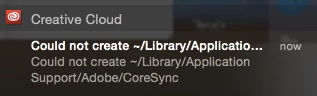
Screen Shot 2015-05-03 at 13.11.00.png

notification shows this...

Translate
LEGEND ,
Apr 29, 2015 Apr 29, 2015

Are you getting error message as  'Download Error'  under Apps tab menu in Creative Cloud application ?

Translate
Report
Community guidelines
Be kind and respectful, give credit to the original source of content, and search for duplicates before posting. Learn more
community guidelines
Community Beginner ,
Apr 29, 2015 Apr 29, 2015

yes!!

what can i do?

thank you

Translate
Report
Community guidelines
Be kind and respectful, give credit to the original source of content, and search for duplicates before posting. Learn more
community guidelines
LEGEND ,
Apr 29, 2015 Apr 29, 2015

Below Download Error message , may I know whether you have the option button as  'Download Creative Cloud"  or  'Reload Applications"  ?

Download Error is of 2 types. let me know the option button name below Download Error message.

I will provide you steps

Translate
Report
Community guidelines
Be kind and respectful, give credit to the original source of content, and search for duplicates before posting. Learn more
community guidelines
Community Beginner ,
Apr 29, 2015 Apr 29, 2015

this one~

'Download Creative Cloud"


thank you

Translate
Report
Community guidelines
Be kind and respectful, give credit to the original source of content, and search for duplicates before posting. Learn more
community guidelines
LEGEND ,
Apr 30, 2015 Apr 30, 2015

To aviod future error . Instead of simply renaming and try , it is better to remove and perform clean installation process.

Quit Creative Cloud Application and close all Adobe applications.

1) Click on the Finder and look for the options listed next to Apple Icon located at the top left corner of the Desktop screen and click on "Go" menu button and select "Utilities" option.

(Applications>Utiliites)

Locate Adobe Creative Cloud and Adobe Application Manager folder under Utilities window and trash both folders.


2) Trash Adobe Creative Cloud from Applications well.

3)

1) Right click on Finder icon and  select "Go-ToFolder " option.

2) You will get a text box, type-in below command and then hit 'Return' key.( Do not miss ~ symbol)


~/library


3)Then navigate to Application Support>Adobe.

Open Adobe folder and trash folders named AAMUpdater and OOBE.

4)

1) Right click on Finder icon and  select "Go-To" Folder option.

2) You will get a text box, type-in below command and then hit 'Return' key.


/library


3)Then navigate to Application Support>Adobe.

Open Adobe folder and trash folders named AAMUpdater ,Adobe Application Manager and OOBE.

5)

Click on the below link and download & run Adobe Cleaner tool :

Select the option "Adobe Application Manager for Mac OS X 10.6" and then click on "Clean up Selected" .


https://helpx.adobe.com/content/help/en/creative-suite/kb/cs5-cleaner-tool-installation-problems/_jc...

6)

1)Please click on Apple menu icon and select System Preferences, and then click Network.

2)Choose the network that is currently connected to internet that can be Ethernet or Airport(Wireless).
3)Then click on Advanced button and click Proxies Tab.
4)Under 'Select a Proxy server to Configure' Uncheck all the proxy check boxes, then uncheck 'Use Passive FTP Mode (PASV)'.
5)Then click on Apply Now button.

7) Click on the below link and download Creative Cloud setup file and use the same to install the Creative Cloud Desktop application.

https://creative.adobe.com/products/creative-cloud

Translate
Report
Community guidelines
Be kind and respectful, give credit to the original source of content, and search for duplicates before posting. Learn more
community guidelines
LEGEND ,
Apr 30, 2015 Apr 30, 2015

Still same ??

Quit Creative Cloud application.

Provide full permissions to both Adobe folders from both ~/library and /library and then launch Creative cloud application again and try try load apps list and check.

You may refer below link :
How to fix download error on Adobe Creative Cloud

Translate
Report
Community guidelines
Be kind and respectful, give credit to the original source of content, and search for duplicates before posting. Learn more
community guidelines
Community Beginner ,
May 02, 2015 May 02, 2015

Screen Shot 2015-05-03 at 13.11.00.png

notification shows this...

Translate
Report
Community guidelines
Be kind and respectful, give credit to the original source of content, and search for duplicates before posting. Learn more
community guidelines
LEGEND ,
May 03, 2015 May 03, 2015
LATEST

Please refer below link :

https://forums.adobe.com/thread/1828087

Make sure that you had provided full permissions to ~/library/Application Support/ Adobe. 

Translate
Report
Community guidelines
Be kind and respectful, give credit to the original source of content, and search for duplicates before posting. Learn more
community guidelines
Adobe Employee ,
Apr 29, 2015 Apr 29, 2015

Hi,

In case of Download error, please refer to the threads below:

Creative Cloud "Download Error" message

Creative Cloud - Download error - stubborn error

Regards,

Sheena

Translate
Report
Community guidelines
Be kind and respectful, give credit to the original source of content, and search for duplicates before posting. Learn more
community guidelines