Participating Frequently
June 13, 2015
Answered

Why isn't photoshop downloading?

  • June 13, 2015
  • 2 replies
  • 16730 views

Hi, I got a subscription for creative cloud a few months ago but I didn't download it at the time. My subscription is still up to date. I have tried to download creative cloud and photoshop. I get a message telling me photoshop is downloading but doesn't download at all. How can I fix this?

This topic has been closed for replies.
Correct answer Govardhan.V

Hi 

Thank you for your advice. I'll contact Adobe in a couple of days. 

Is the root user account different from the admin account? I've altered the permissions in both libraries (hidden and overt) and played around with everything else using the admin account. I also used a VPN to access Adobe through San Franscisco (I live in Australia) but that didn't work either.

I won't have time to play with the computer in the next couple of days because of work.

Elizabeth


Root User account is Super user account with superior privileges.  You can try launching CC app once.

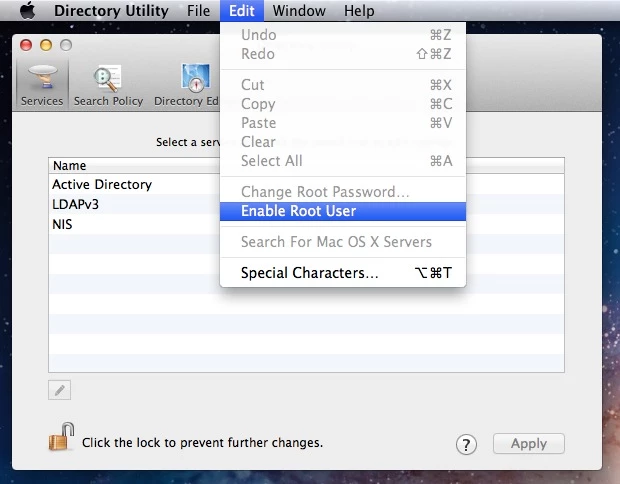
You cannot create Root account , It is an built in user account , you can enable it and disable it as per your choice.

Step for enabling Root user account :


OS X Mavericks: Enable and disable the root user

(Applies for Yosemite as well)
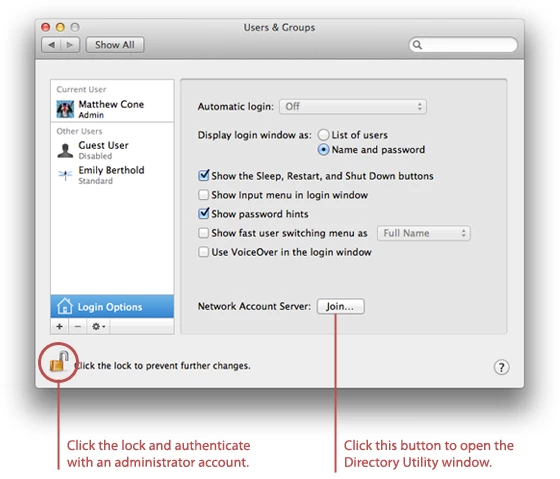
How to log in as root

  1. If you are logged in, choose Log Out from the Apple menu.
  2. If you are logging in from a list of usernames with pictures, click Other.
  3. In the Name field, type: root
  4. In the Password field, type the password you defined when setting up the root user account.

Once you logged in to Root Account try to launch  Creative Cloud app and check.

2 replies

Participant
August 11, 2020

this information is 5 years old.  I'm having the same exact issues loading photoshopped from my CC account.  Do you still recommend these instructions? I don't want to go through all of this only to find out it doesn't work any longer.  I can't believe in 5 years you haven't made this easier to work with.  I miss my legacy software.  HELP!!!

Govardhan.V
Participating Frequently
June 13, 2015

Are you trying to download from Adobe website??

If yes , please install Adobe Creative Cloud application and then you can install Photoshop cc using same,

https://creative.adobe.com/products/creative-cloud

Reference :

https://helpx.adobe.com/creative-cloud/help/download-install-app.html

Anna LizaAuthor
Participating Frequently
June 14, 2015

That's what I have bee trying unsuccessfully to do. I have spent hours installing and uninstalling bits and pieces but all I can get to is the app trying to install and initialise then failing. Not cool.

Govardhan.V
Participating Frequently
June 16, 2015

Hi

Thanks for replying.

OS 10.10.3.

I used an app called Creative Cloud uninstaller and I uninstalled all CC folders in Utilities and Library,

I didn't remove CS4 or old versions of Adobe programs, only those related to Creative Cloud.

I verified my hard drive and repaired permissions.

I am not sure what giving full permissions to Adobe folder means or how to use the Root account.

Regards

Elizabeth


First we will try with providing full permissions , if that does not work, then we will enable root account and check.

Follow below steps :

Quit Adobe Creative Cloud application .


Step 1)

1) Right click on Finder icon and  select "Go-To" Folder option.

2) You will get a text box, please type-in exactly below command and then hit return.

/tmp

3)It will open tmp folder.
4)Delete all contents present inside tmp folder.

Step 2 :

1) Right click on Finder icon and  select "Go-To" Folder option.
2) You will get a text box, type-in below command and then hit 'Return' key.( Do not miss ~ symbol)

~/library

3)Then navigate to Application Support>Adobe

.

Right click on Adobe folder and select "GetInfo" option.

Expand the Sharing & Permissions section.

Click the lock icon in the lower-right corner. Enter your administrator user name and password when prompted, and then click OK.

Please click on '+' symbol , it will open list of user accounts. Add Currently logged in user name and Administrator option,

Then provide "Read & Write" permission to Currently logged in user name and Administrator option,.

Click the Gear icon, and select Apply to Enclosed Item. Close the Get Info dialog box.

Step 3:

1) Right click on Finder icon and  select "Go-To" Folder option.
2) You will get a text box, type-in below command and then hit 'Return' key.

/library

3)Then navigate to Application Support>Adobe

.

Right click on Adobe folder and select "GetInfo" option.

Expand the Sharing & Permissions section.

Click the lock icon in the lower-right corner. Enter your administrator user name and password when prompted, and then click OK.

Please click on '+' symbol , it will open list of user accounts. Add Currently logged in user name and Administrator option,

Then provide "Read & Write" permission to Currently logged in user name and Administrator option,.

Click the Gear icon, and select Apply to Enclosed Item. Close the Get Info dialog box.

Then launch Adobe Creative Cloud application and try to install Photoshop app again .