
Known Participant
October 27, 2017
Beantwortet

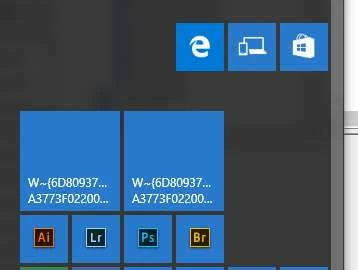
Windows 10 start menu icons messed up for all apps after update

  • October 27, 2017
  • 3 Antworten
  • 7170 Ansichten

Yesterday I updated CC apps, selecting to remove the old ones. Now all of the Adobe icons on the start menu are messed up, i.e. they don't work anymore. Even the little ones in the complete list of apps on the left side fail: They still show 2017, should be 2018. 2018 icons are nowhere.

I can go to the apps directly in the programs folder and run them, but that's a bit of a hassle ...

Pinning these to start doesn't work either, the icons look messed up, and they don't work.

Any way to fix these icons? Thanks
Dieses Thema wurde für Antworten geschlossen.
Beste Antwort von kglad

i think that's still your best bet.

this is the only non-forum info on adobe.com that i could find, Application icons change to Acrobat or Reader icon on Windows

3 Antworten

Lost Hiker
Inspiring
February 4, 2018

This just happened to me.  The icons either turned "white" and when I clicked on "Properties" it said there was some kind of problem.  So, I ended up deleting the shortcut icons on the desktop for Photoshop, Lightroom and Bridge.  Then I did a search using the Cortana "Type here to search" box on the task bar and typed in the name of the app icon.  When the name came up, I right clicked and then clicked on "open file location."  Then I clicked on the file name and clicked again on "send to".  Clicked again on "Desktop".  Icons are all back and everything works.  I had one other unrelated icon that was suffering a similar "white" problem, so I deleted it and went through the same process, and now everything is okay again. 

Known Participant
November 6, 2017

Meanwhile, after yet another restart, it seems fixed. Still I need to manually recreate all icons. And (of course?) the application defaults are also broken. But that is an issue I had for years. Especially Photoshop - it never appears in the suggested application list for images ... But that's a different issue.

Thank you all for your replies.

kglad
Community Expert
Community Expert
November 6, 2017

you're welcome.  (and glad that's sorted, hopefully never to recur.)

kglad
Community Expert
Community Expert
October 27, 2017

google: win 10 repair icons

Known Participant
October 27, 2017

That was of course the first thing I tried. Applied some "fixes", at least the broken icons that I had added myself disappeared. But there is no general issue with the icons. Just with Adobe icons, after yesterdays updates. Meanwhile I found that on my admin account the icons are ok. Just on my work account they are broken. Before the updates everything was fine.

kglad
Community Expert
kgladCommunity ExpertAntwort
Community Expert
October 27, 2017

i think that's still your best bet.

this is the only non-forum info on adobe.com that i could find, Application icons change to Acrobat or Reader icon on Windows