
Participating Frequently
December 25, 2012
Answered

Can't install Updates to Photoshop CS6

  • December 25, 2012
  • 1 reply
  • 55980 views

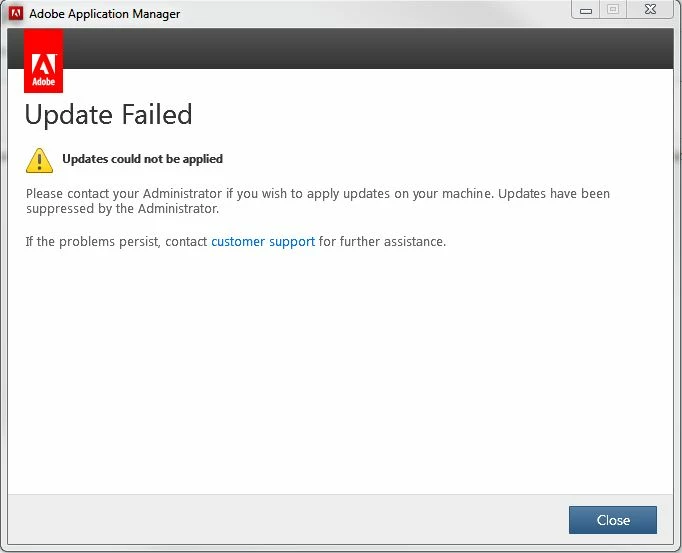
I have tried everything to install updates that I can think of, but still have had no success.  The option to check for updates in Photoshop 6 is grayed out(I am running Windows 7 on a relatively new machine).  I tried downloading the update and installing manually via the AdobePatchInstaller, but it fails also and I get the window which is shown below.  I have tried reinstalling Photoshop CS6.  That doesn't work either.  I have turned off the virus checker(McAfee).  I am the only user on this machine(full administrator privileges) and have no trouble with the Lightroom installations or any other updates from other programs.  It seems to be something with the Adobe Application Manager and CS6.  What could cause the update to be grayed out in the help menu of CS6 ??  It seems someone at Adobe would know.  I would greatly appreciate any help in remedying this as I am getting a new camera and at the least would like to be able to upgrade camera raw, but the updates to CS6 would be nice too.  Any thoughts on other things that I can try .. 
Cordially,

Mike Culver

This topic has been closed for replies.
Correct answer Manish-Sharma

That should solve the problem unless your network is not connenting to the Adobe Update server.

Please read the tech note and follow the instruction, this should help

http://helpx.adobe.com/creative-suite/kb/disable-auto-updates-application-manager.html

Make sure no Adobe application should be  open when following these steps.

1 reply

Inspiring
December 25, 2012

Can you delete the below files from your computer and then check.

C:\Program files\common files\adobe\AAMUpdaterInventory\1.0\AdobeUpdaterAdminPrefs.dat

C:\Users\<username>\AppData\Local\Adobe\AAMUpdater\1.0\AdobeUpdaterPrefs.dat

These are the files which are being created/ used by the Administrators to disable the Auto-update for Adobe Applications.

Note :- The first file is the Adobe Application Manager Preference file which will be re-created, next time when you will update the Adobe Softwares.

Culver99Author
Participating Frequently
December 25, 2012

Hi, Manish-Sharma ..  First thank you for the reply.  I deleted the AdobeUpdaterPrefs.dat file as instructed.  The AdobeAdminPrefs.dat file does not exist on my computer.  I searched the entire C drive and looked in the location you specified.  The update option in the Help menu of CS6 is still grayed out so the problem still exists.  I have actually thought about deleting all of my Adobe apps and starting from scratch, but that is extreme.  I use lightroom 4, an old version of audition, premiere elements, flash, reader,... think that's it.  Lightroom updates fine by it's method.  Photoshop and Lightroom are the applications I use most and, as mentioned, I am getting a new camera.  I can't even update Camera Raw.  Any help or advice you can give me would definitely be appreciated.  Thanks again for the response.

Cordially,

Mike Culver

Manish-SharmaCorrect answer
Inspiring
December 25, 2012

That should solve the problem unless your network is not connenting to the Adobe Update server.

Please read the tech note and follow the instruction, this should help

http://helpx.adobe.com/creative-suite/kb/disable-auto-updates-application-manager.html

Make sure no Adobe application should be  open when following these steps.