
Participant
Nov 27, 2015 7:22 PM UTC
Answered

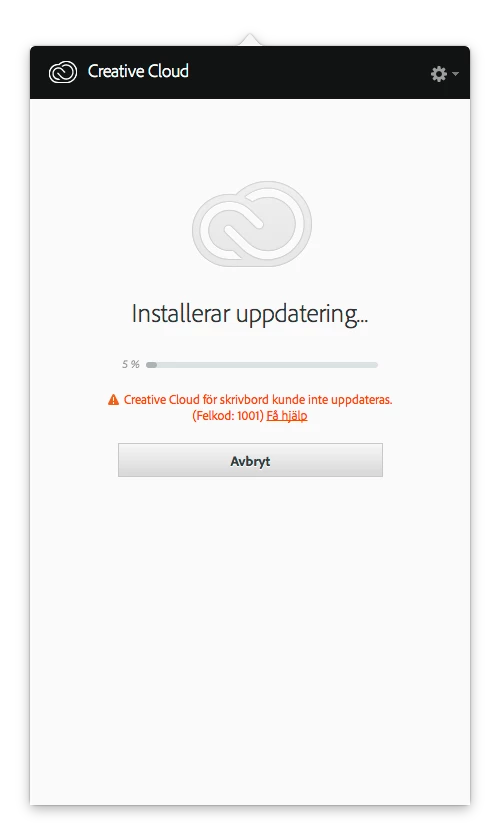
CC update crash! Error code: 1001

My CC Desktop Manager crashes when contacting the Cloud for update since a few days back. Running OS X 10.10.5 (swedish version) on a MacPro. Been in contact with Adobe Support yesterday and got very good help and the problem was solved. That is, util now. The same problem is back. I already spent hours searching answers, but nothing seems to work. Anyone with at "Magic" solution? Perhaps I shall just reformat the entire drive and start from scratch?
This topic is closed to new replies. Start a new post to keep the conversation going.
MakrotulpaCorrect answer
Participant
Dec 3, 2015 8:57 AM UTC

Just spent an hour with a support rep who managed to get it working by

1) creating a new user account

2) downloading a specific version of of the Creative Cloud installer (the one from my Creative Cloud account still have the error code 43 but one from a different adobe website seemed to work).

Unfortunately I didn't get where the specific version was from - not sure if support can help with that.

29 replies

Participating Frequently
Oct 12, 2016 2:26 PM UTC

October 12, 2016. I just experienced the same issue. Based on a few of the prior responses, I closed all apps on my 2013 IMac Desktop running the latest version of Yosemite and restarted the machine. It appeared to be in the middle of a CC update and it said having problems with some files. I cancelled, restarted and it went through smoothly. I have not had this problem on my 2 year old 13 in MacBook Air  also running Yosemite

Translate
Participant
Jun 12, 2016 3:27 AM UTC

I also get this every few months. There must truly be a better way to for this app to manage itself and it's updates. Adobe, whatever strategy you have employed with this app is persistently not working and it is time to come up with a new strategy. Stop hacking at the existing and change tack. Find a new way. Please.

Translate
bclee337
Inspiring
Feb 28, 2016 7:19 PM UTC

Can someone please post a link to the specific version of the installer you need to download under a different account?  I think I've followed all the directions here but I'm still stuck.

  1. Updater stuck at 5% with Error Code : 1001
  2. Download and run uninstaller
  3. Change permissions on both Application Support/Abobe folders and all contents
  4. Follow the link to download the installer, set up a new account, download.
  5. Now I get Error Code: 43 when I try to run the installer.
Translate
Sheena Kaul
Legend
Feb 29, 2016 12:06 PM UTC

Hi,

Please see Error downloading, installing, or updating Adobe Creative Cloud apps for the details on the errors you are facing.

You may download the latest version of Adobe creative cloud from the link below:

Download Adobe Creative Cloud apps | Free Adobe Creative Cloud trial

Regards,

Sheena

Translate
Known Participant
Feb 29, 2016 4:15 PM UTC

Thank you Sheena.

I have reviewed the solutions on the site you suggest, and I have the following comment for Adobe:

Instead of forcing home users, (who may or may not have a sophisticated understanding of how all of this works), to go to all these lengths--even to install a system upgrade they may not want, or to spend valuable time on the telephone with a technician--why doesn't Adobe fix this download problem? It's not as if they provide Creative Cloud for free. The problem with this particular upgrade has been going on for some time now. I have been waiting in hopes that Adobe would fix it, but apparently that's not going to happen.

Translate
MakrotulpaCorrect answer
Participant
Dec 3, 2015 8:57 AM UTC

Just spent an hour with a support rep who managed to get it working by

1) creating a new user account

2) downloading a specific version of of the Creative Cloud installer (the one from my Creative Cloud account still have the error code 43 but one from a different adobe website seemed to work).

Unfortunately I didn't get where the specific version was from - not sure if support can help with that.

Translate
bobb84012647
Participant
Feb 14, 2016 5:49 PM UTC

I experienced the same problem updating, receiving Error Code: 1001. After reading all of the suggestions I was still reluctant to create a new account and download a new version - that does not sound logical to me. So instead I just restarted my Mac (OSX Yosemite 10.10.5). Upon restart, the Creative Cloud loaded and indicated that updates were available for Photoshop and Lightroom. I chose Update All, and the updates were installed without incident. Both Photoshop and Lightroom load perfectly and indicate they are up to date (release 2015.1.2). Much easier than the support rep's suggestions, and at least worth a try before spending time on the phone.

Translate
Participant
Feb 22, 2016 2:29 AM UTC

Your suggestion of restarting computer has worked for me so far.  Thanks.  kept crashing at 0%, restarted and was already to 9% when fully booted.

Translate
Sheena Kaul
Legend
Nov 28, 2015 10:28 AM UTC

Hi,

Please try the steps below:


Regards,

Sheena

Translate
hejraAuthor
Participant
Nov 28, 2015 11:19 AM UTC

Hi Sheena,

Thank You for Your answer. Unfortunately that only works untill the next CC update, when the error-message will reappear.

I already have a case that is marked ”solved”, because last time I was in contact with Adobe Support, it worked. We tried all type of solutions, and one worked. That was to create a new AdminUser and reinstall CC there. However, like I said, it worked only until CC wanted to install an update.

The issue seems to still bee there, and that is the update procedure.

I´m very sorry but this is a dealbreaker for me. Since I work with Lr and Ps professionally, I need them to putting food on the table. For now I´m forced to evaluate other software solutions on the market.

Vänliga hälsningar / Best regards

Janne Hejra

Translate
Sheena Kaul
Legend
Nov 28, 2015 2:52 PM UTC

It can happen because of the permissions over the Adobe folders or the network firewall/proxy.

Translate