
Kristafee
Participant
December 5, 2017
Answered

CS3 licensing has stopped working

  • December 5, 2017
  • 1 reply
  • 646 views

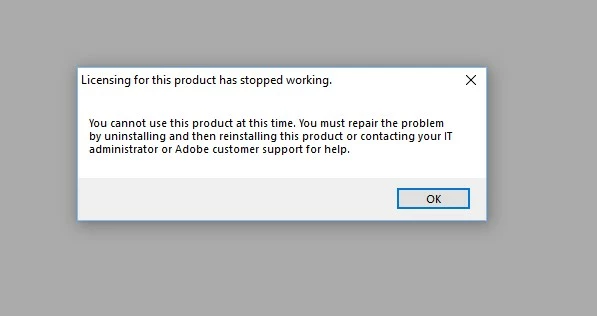
Hi there, I did delete the cache file and when i went back in I got this error message saying I couldn't use adobe at this time.  Any thoughts?  This was after following all the instructions to uninstall, got the new key, reinstalled, restarted and still had the activation errors.  Like so many others, I only use this to make certificates for my students.  There's no way I can afford the latest and greatest just to make a few promotion certificates. 😕😕  Thank you guys for all the help you offer.
    This topic has been closed for replies.
    Correct answer Jeffrey_A_Wright

    Branching to a new discussion.

    Kristafee did you only delete the cache.db file as discussed in Resolve "temporary activation expired" error for CS3 and Acrobat 8 or were additional files removed?

    To resolve the current error please see Error: "Licensing has stopped working" | Windows .  If you continue to encounter errors then please update this discussion with the list of Adobe software currently installed on the computer?  Do these software titles also encounter an error that, "Licensing for this product has stopped working," when you open the applications?

    1 reply

    Jeffrey_A_Wright
    Community Manager
    Jeffrey_A_WrightCommunity ManagerCorrect answer
    Community Manager
    December 5, 2017

    Branching to a new discussion.

    Kristafee did you only delete the cache.db file as discussed in Resolve "temporary activation expired" error for CS3 and Acrobat 8 or were additional files removed?

    To resolve the current error please see Error: "Licensing has stopped working" | Windows .  If you continue to encounter errors then please update this discussion with the list of Adobe software currently installed on the computer?  Do these software titles also encounter an error that, "Licensing for this product has stopped working," when you open the applications?